
Knowledge Base
v4.8.5
Search this version
Why is MetaDefender Kiosk not recognizing floppy drives?
Copy Markdown
Open in ChatGPT
Open in Claude
Check Your Version:
This article applies to all MetaDefender Kiosk releases after version 4.7.0, deployed on both Windows and Linux systems.
MetaDefender Kiosk supports uploading to and from floppy drives, however, floppy drive access is disabled by default.
To configure your MetaDefender Kiosk to recognize floppy drives, please do the following:
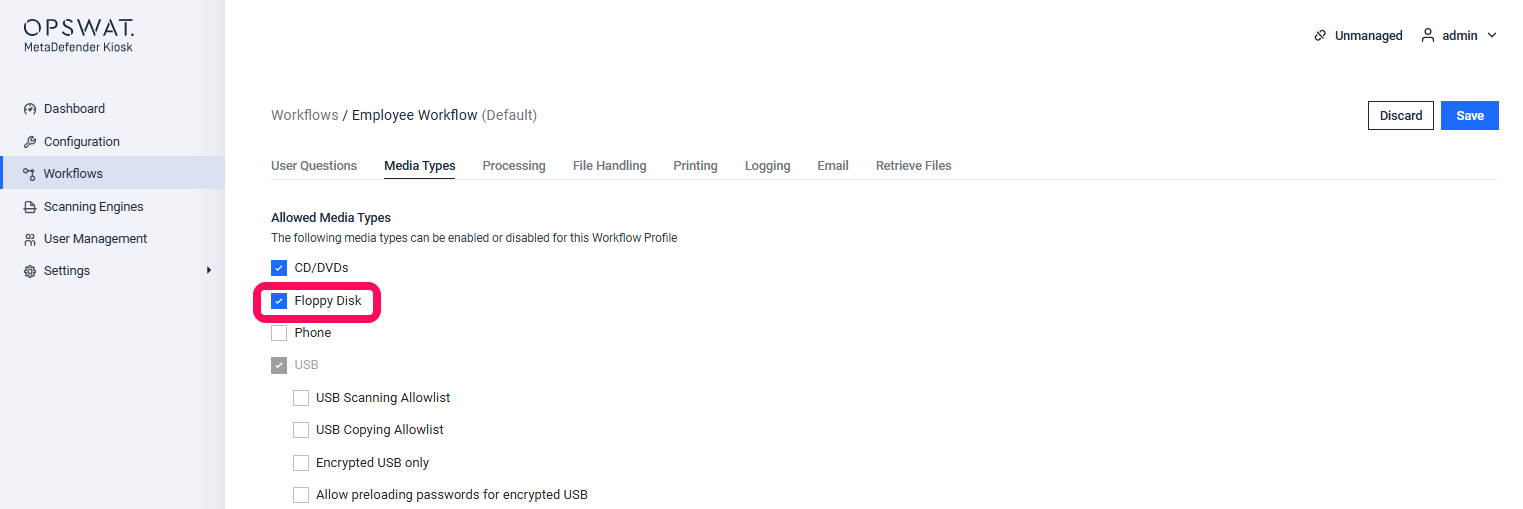
Go to your MetaDefender Kiosk Management Console>Workflows>MediaTypes
Now, select the Floppy checkbox, as illustrated below, then click Apply to save your settings.
Support:
If you have followed the instructions above but Your Floppy Drive Is Still Not Being Recognized By MetaDefender Kiosk, please follow these instructions on How To Create a Support Package, before creating a support case or chatting with our support engineer.
Last updated on
Was this page helpful?
Next to read:
Does a CVE affect MetaDefender Kiosk?null
Discard Changes
Do you want to discard your current changes and overwrite with the template?
Archive Synced Block
Message
Create new Template
What is this template's title?
Delete Template
Message
Knowledge Base
Knowledge Base
Configuration & Setup
Error & Troubleshooting
Page
Code Steps
Category
Label
Link
Separator
Title
Message
Page icon
No icon. This page keeps the plain index row.
orSVG or PNG, square, at least 32×32.
Create new category
What is the title of your new category?
Edit page index title
What is the title of the page index?
Edit category
What is the new title of your category?
Edit link
What is the new title and URL of your link?