
This article applies to MetaDefender Kiosk version 4.8.0 and later.
Overview
Starting from version 4.8.0, MetaDefender Kiosk introduces a configuration option that allows administrators to disable the Welcome Screen.
This helps streamline the user experience by skipping the initial screen and taking users directly to the media detection prompt.
Why Disable the Welcome Screen?
Disabling the Welcome Screen can be useful in environments where:
Users are already familiar with the workflow
Faster interaction is required (e.g., high-traffic kiosks)
The initial instructions are not necessary
How to Disable the Welcome Screen
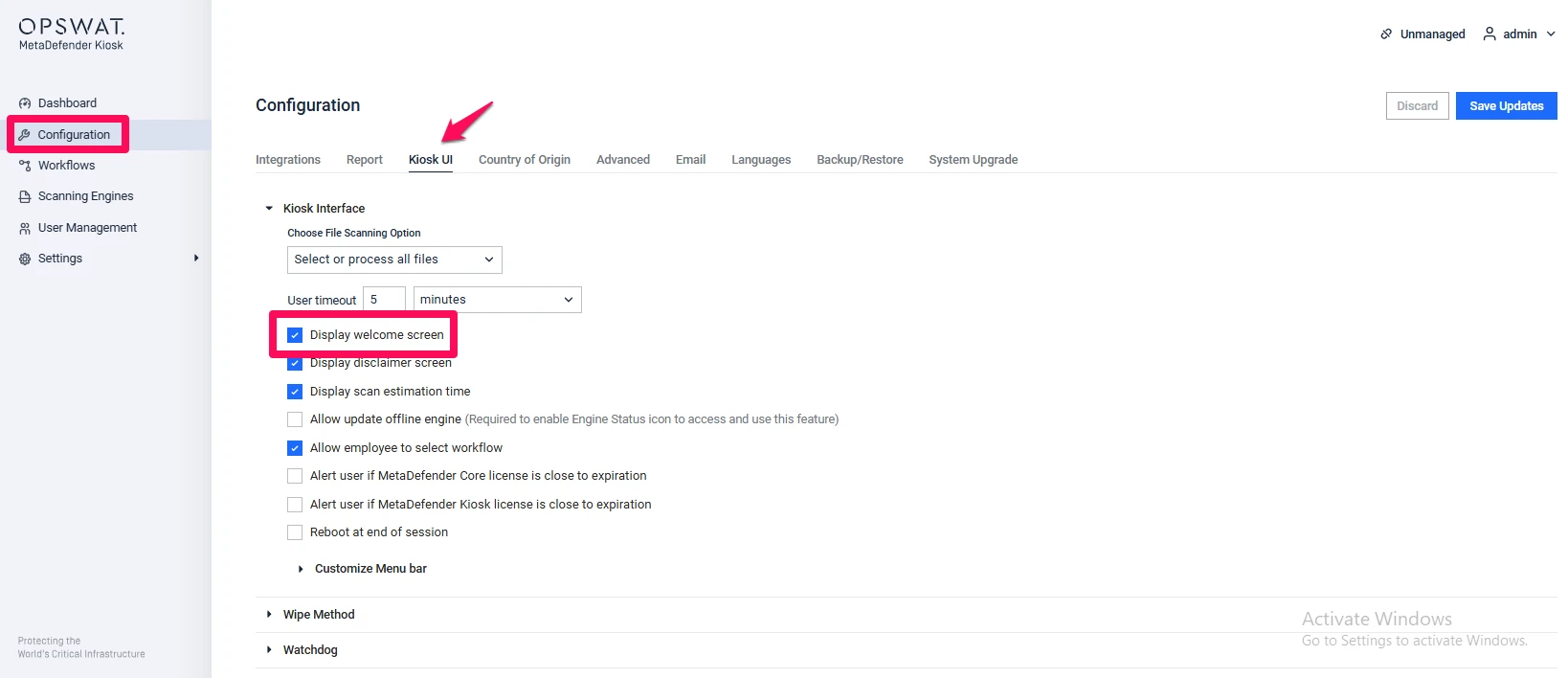
Go to the Configuration tab (left sidebar)
Navigate to the Kiosk UI tab
Locate the Kiosk Interface section
Untick the option for displaying the Welcome Screen
Behavior After Disabling
What you see next depends on a couple of other settings:
If Bypass Authentication or Simplified Workflow is turned on, the Kiosk always goes straight to the media detection prompt — the Welcome Screen setting has no effect in that case.
Otherwise, once the Welcome Screen is disabled:
If the disclaimer screen is enabled, users see the disclaimer screen next.
If the disclaimer screen is disabled, users go straight to the user-type selection screen — or, if only one user type (Guest or Employee) is configured, straight into that workflow.
Disabling the Welcome Screen does not change how license expiration or session timeouts are handled: an expired license is still detected and shown immediately, and a configured session-timeout popup still appears on schedule, on whichever screen the user lands on.
If Further Assistance is required, please proceed to create a support case or chat with our support engineer.