
Is there a maximum number of entries allowed under “Substring Match” or “Regular Expression Match” in the USB Scanning Allowlist?
This article applies to MetaDefender Kiosk of all versions.
Administrators configuring the USB Scanning Allowlist in the Kiosk Management UI (Management UI > Workflow > Media Types > USB > USB Scanning Allowlist) may need to know whether there is a limit to the number of entries that can be added under Substring Match or Regular Expression Match.
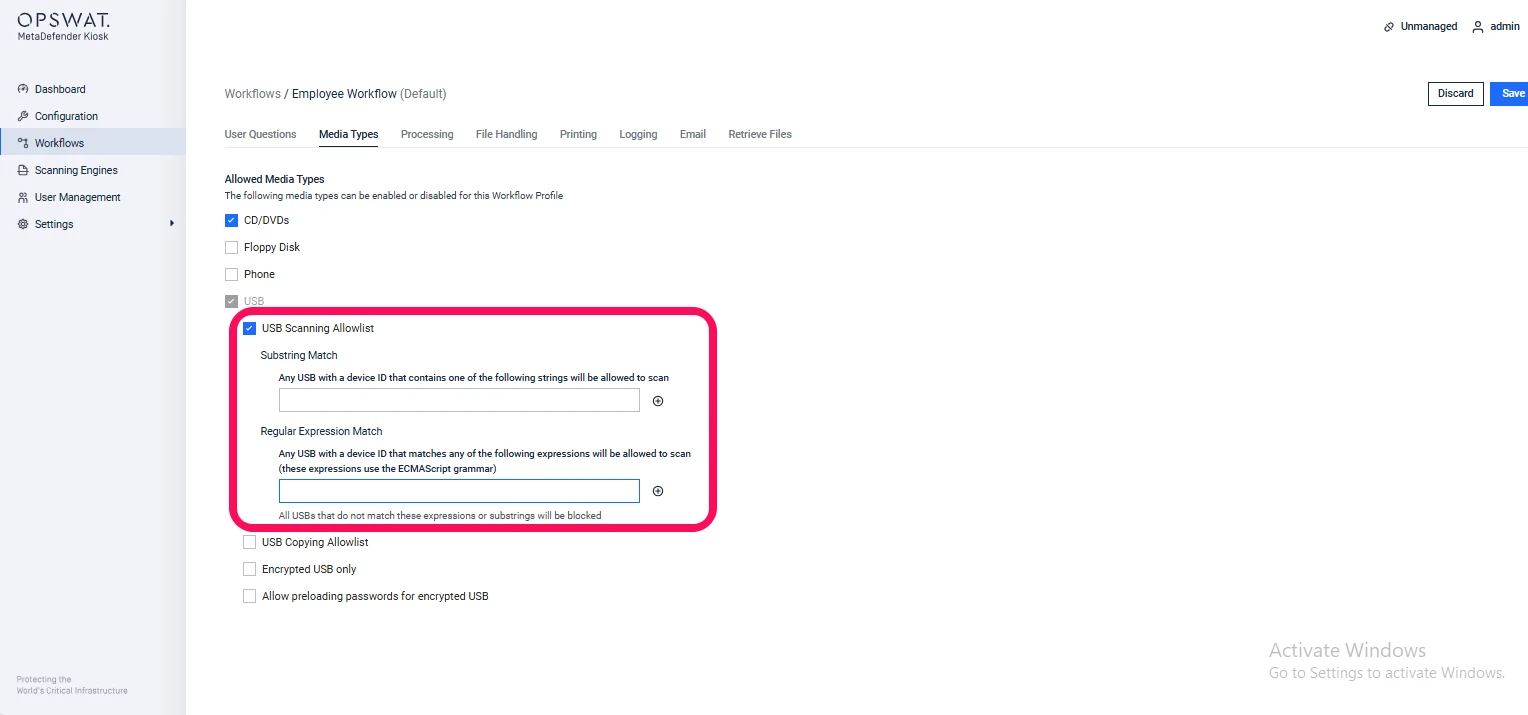
There is no specified upper limit for the number of entries in either the Substring Match or Regular Expression Match sections. This means you can add as many entries as required to cover all the USB devices you want to allow or block.
Example Use Cases:
Allowlisting multiple USB devices from the same vendor or product line using substring patterns.
Using regular expressions to pre-register devices with different firmware versions or serial number formats.
Maintaining a comprehensive allowlist for an environment with many different USB devices while ensuring the kiosk only accepts authorized devices.
Recommendations:
Even though there is no technical limit, it is recommended to organize and document entries to avoid confusion and simplify future maintenance.
For environments with a large number of devices, consider grouping similar devices using substring or regex patterns rather than listing each device individually.
Periodically review the allowlist to remove outdated or unused entries, keeping the configuration clean and manageable.
If Further Assistance is required, please proceed to create a support case or chat with our support engineer.