
Version | 4.8.5 |
|---|---|
Release date | 31 August 2026 |
Scope | This release introduces advanced device threat attack detection, giving Kiosk visibility into hardware- and firmware-level USB attacks that traditional file scanning can't see. It also adds dedicated integration workflows for connected OPSWAT hardware, expands scanning flexibility with multi-device sessions and pre-upgrade health checks, and strengthens credential security through BeyondTrust Password Safe integration and centrally managed autologon/RDP passwords. The release further improves network diagnostics, scan reporting accuracy, encrypted USB and language support, alongside a range of reliability and MFT connectivity fixes. |
Kiosk 4.8.5.9455 | |
Release date | 18 Sept 2026 |
Enhancement | |
Enforce OPSWAT USB hub to use USB 2.0 mode | On OPSWAT Kiosk devices, administrators can now configure the OPSWAT USB hub to use USB 2.0 mode from Configuration > Advanced > Encrypted USB, allowing hardware-encrypted USB drives to be detected reliably. When this option is not enabled, Kiosk can automatically detect when a hardware-encrypted USB drive fails to mount and switch to USB 2.0 mode. |
Kiosk 4.8.5.9349 | |
Release date | 8 Sept 2026 |
Bug Fixes | |
Partially sanitized archives silently dropped when Only Copy Remediated Files is enabled | Fixed an issue where an archive that MetaDefender Core could only partially sanitize was treated as if it had not been sanitized at all, so it was silently dropped instead of copied when a workflow's File Handling settings for Blocked Files used Copy to Secondary Location with Only Copy Remediated Files enabled. |
Kiosk 4.8.5.9268 | |
Release date | 31 August 2026 |
New Features | |
Advanced Device Threat Attack Detection | Kiosk can now detect hardware- and firmware-level device attacks that traditional file scanning cannot see — including BadUSB-style device impersonation, keystroke-injection tools (e.g. Rubber Ducky), rogue network-adapter emulation, autorun-based threats, and USB Killer power-surge attacks (USB Killer detection only available on forthcoming hardware models Kiosk Tower 6 and Kiosk Desktop 5). These attacks bypass antivirus entirely because they exploit the USB hardware itself rather than a file, making them one of the hardest classes of physical-access threats to catch. This gives administrators a critical new detection layer, extending Kiosk's protection beyond file-based scanning to the device layer itself. 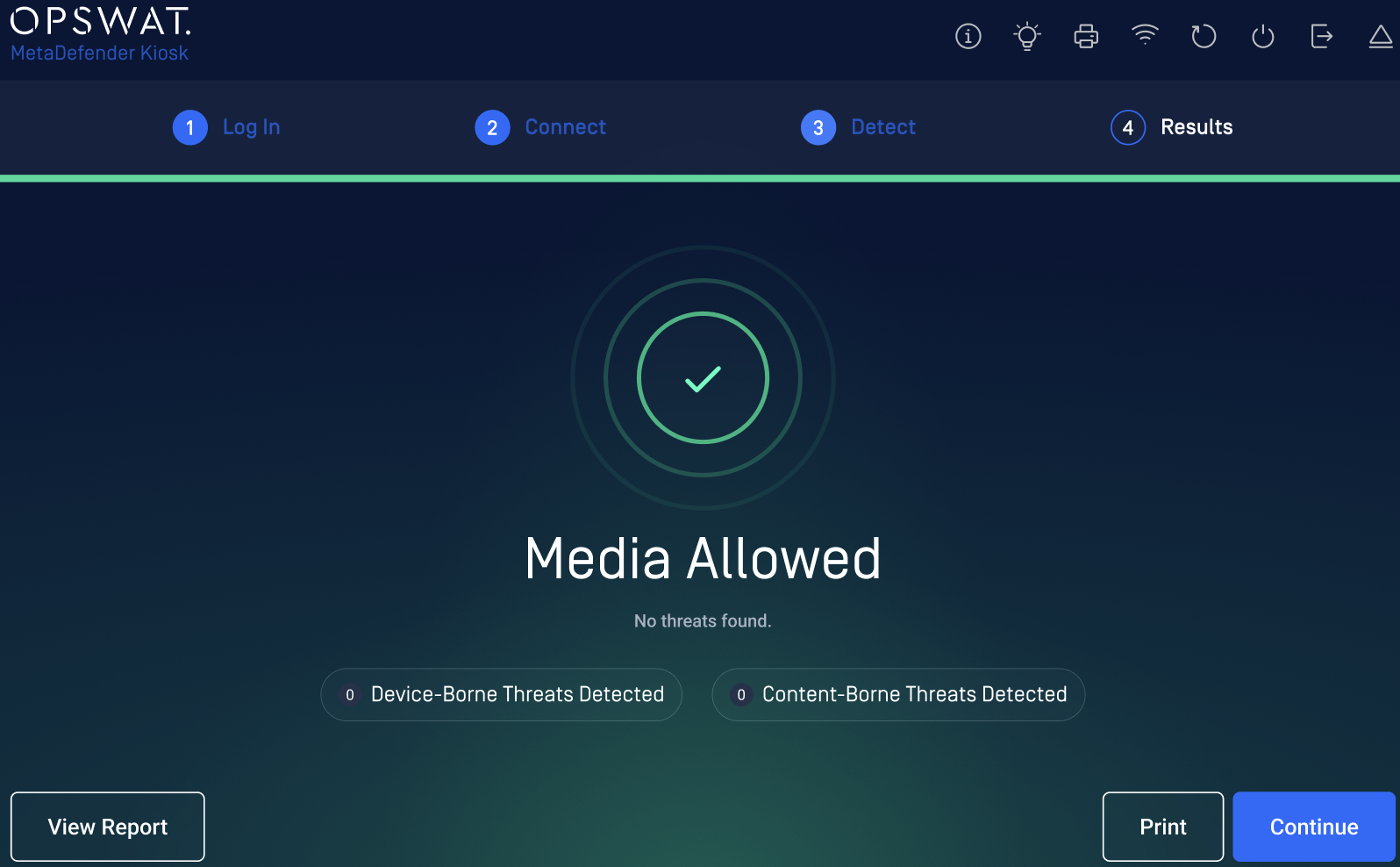 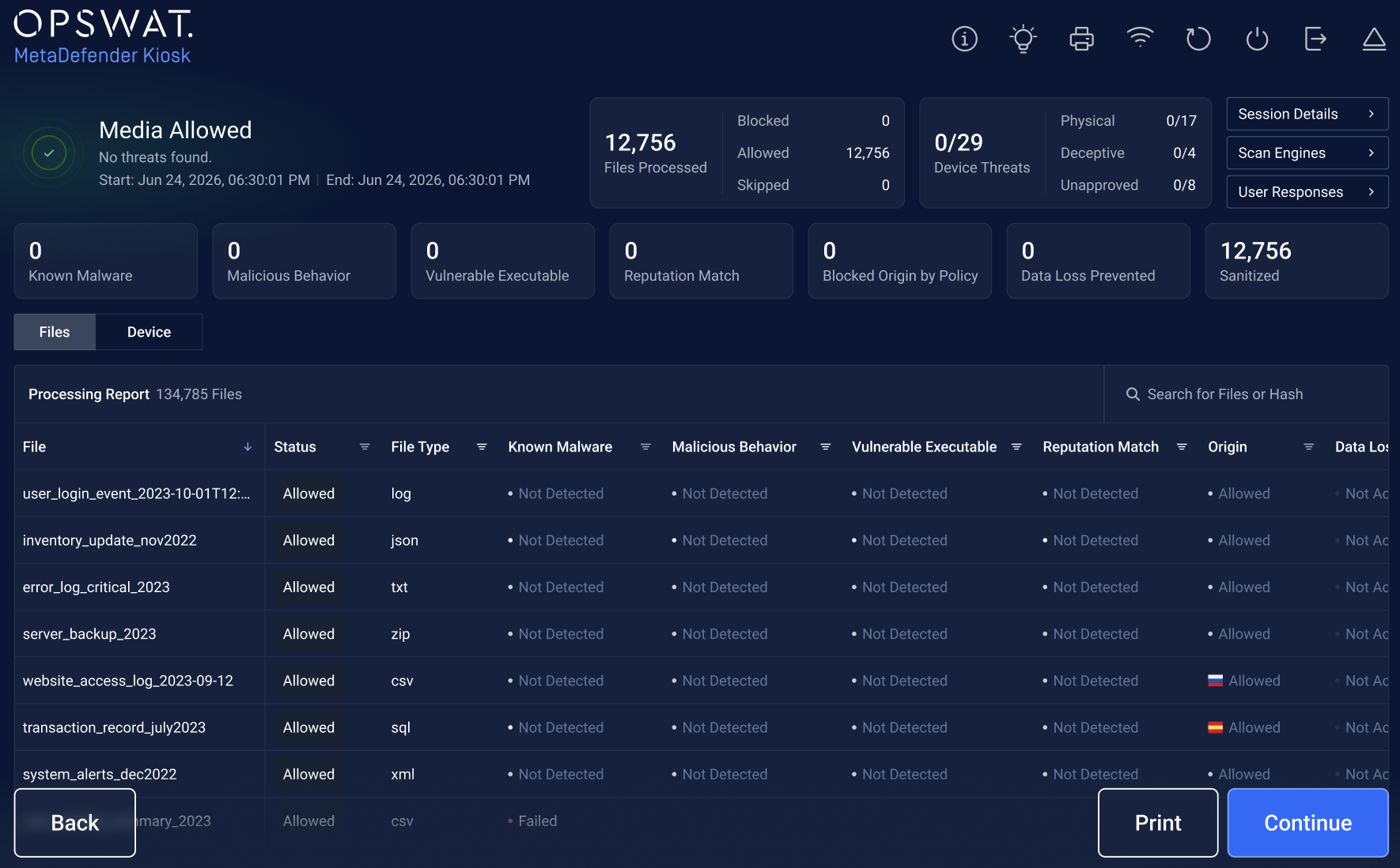 |
Dedicated Integration Workflow for Connected OPSWAT Products (IFW, MD Drive) | Kiosk now supports a dedicated, product-specific workflow for connected OPSWAT hardware such as the Industrial Firewall (IFW) and MD Drive. When a supported device is connected, Kiosk authenticates the user and launches the product's own configuration screen, exchanging configuration, reports, and file transfers with Central Management (CM10) through a workflow designed to extend to future product integrations. 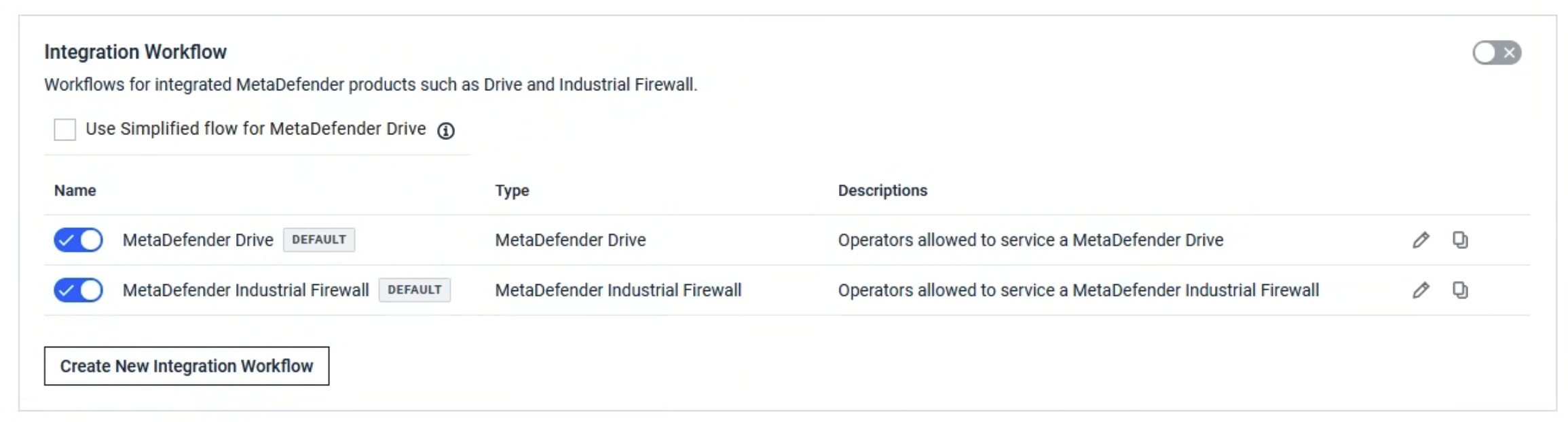 |
Pre-Upgrade Health Check for Hardened-Image Upgrades | The Kiosk Console can now run an on-demand pre-upgrade check that validates conditions such as Core/CM connectivity, active scan sessions, available disk space, and BitLocker status before an upgrade proceeds, and shows an expected-downtime notice when the upgrade starts — helping administrators catch problems before they cause a failed or disruptive upgrade. 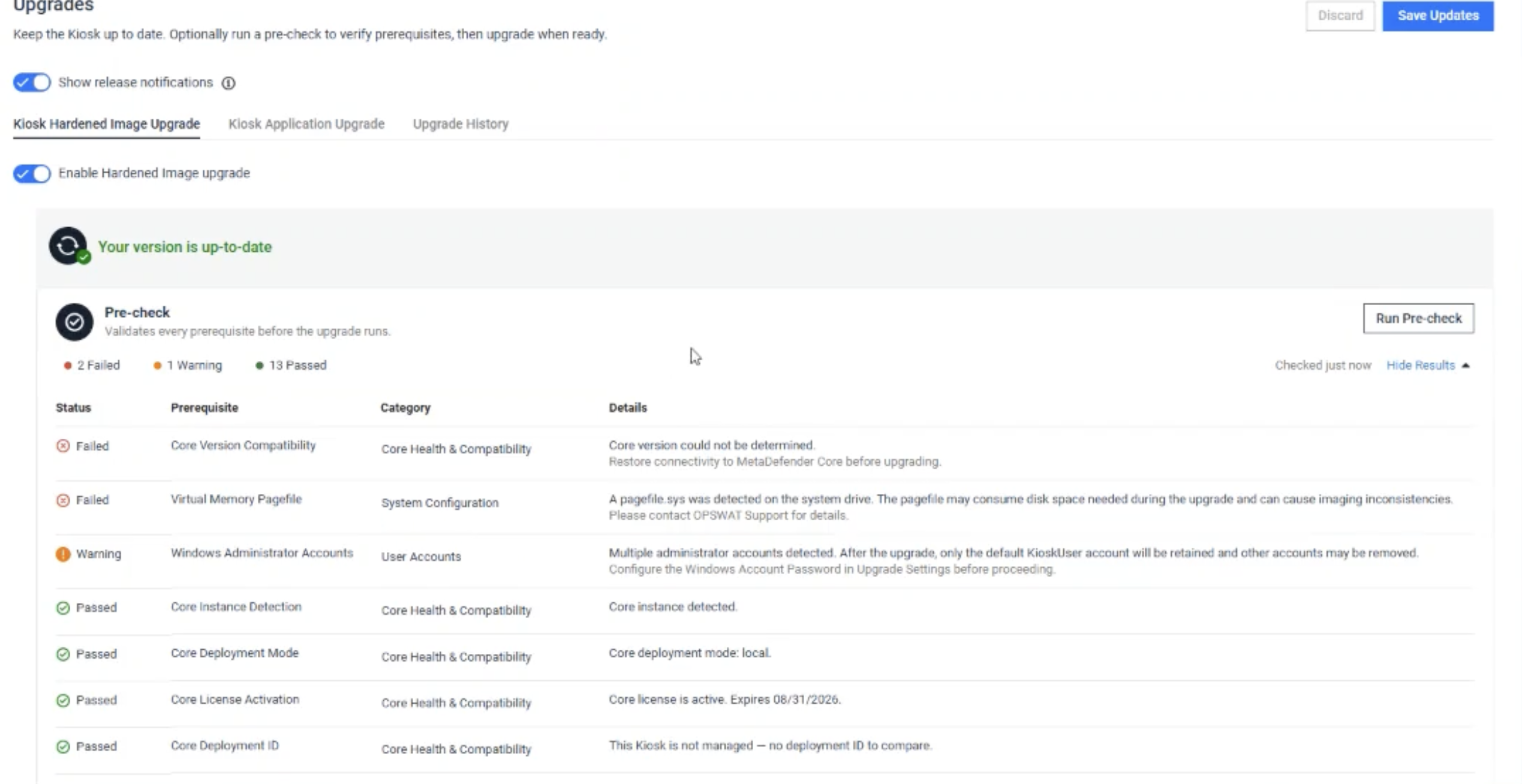 |
BeyondTrust Password Safe Integration for Console Login and Exit Password | Administrators can now back Kiosk Console login and the Kiosk UI exit password with BeyondTrust Password Safe-managed Active Directory credentials, so the account password is fetched and rotated automatically instead of being stored statically. 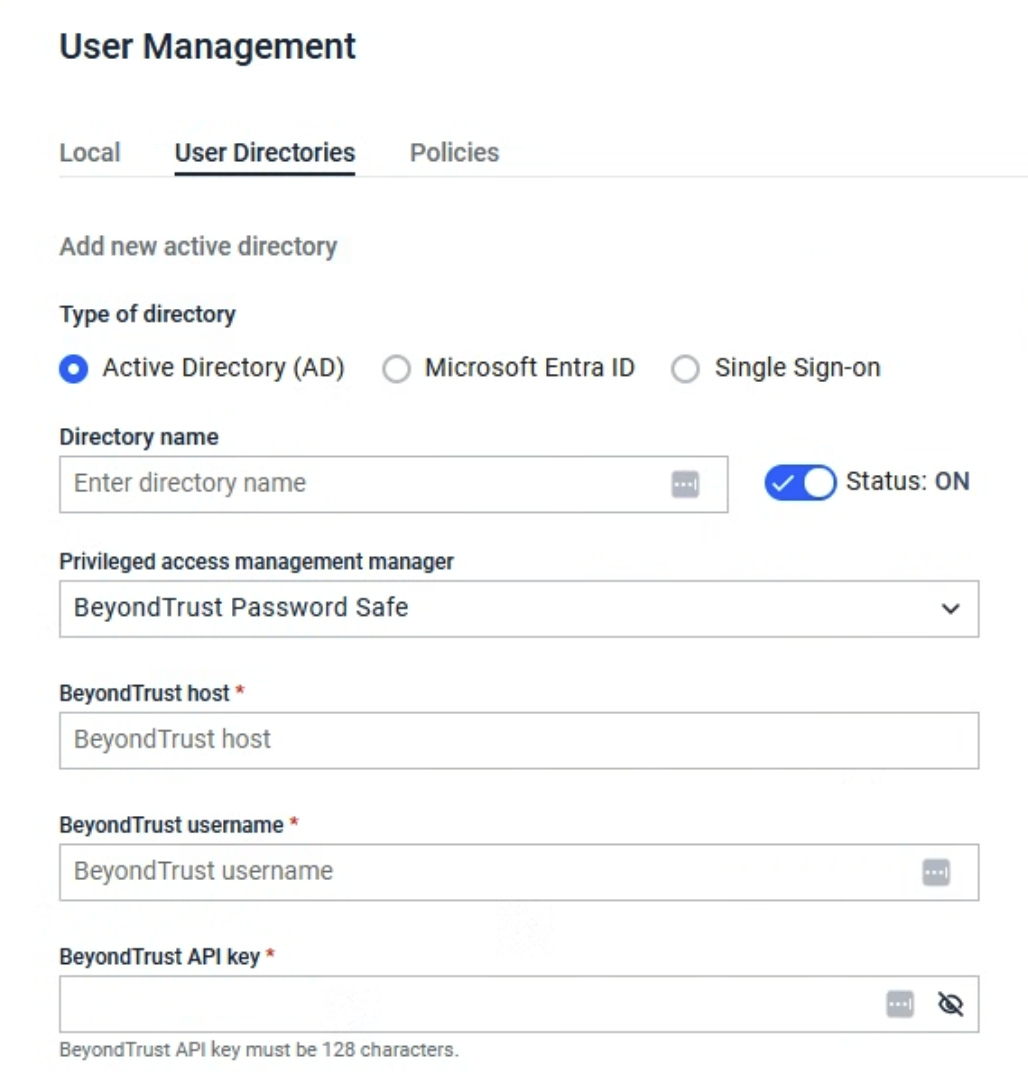 |
Network and System Diagnostics Tool | A new Diagnostics tab in the Kiosk Console lets administrators run a comprehensive set of checks covering connectivity (Core, MFT, My OPSWAT, AD, SSO, SMTP, Syslog), network configuration, Kiosk services, system resources, licensing, scanning engines, certificates, and hardware/BIOS, with packet capture and one-click remediation actions such as restarting services or clearing temporary files. 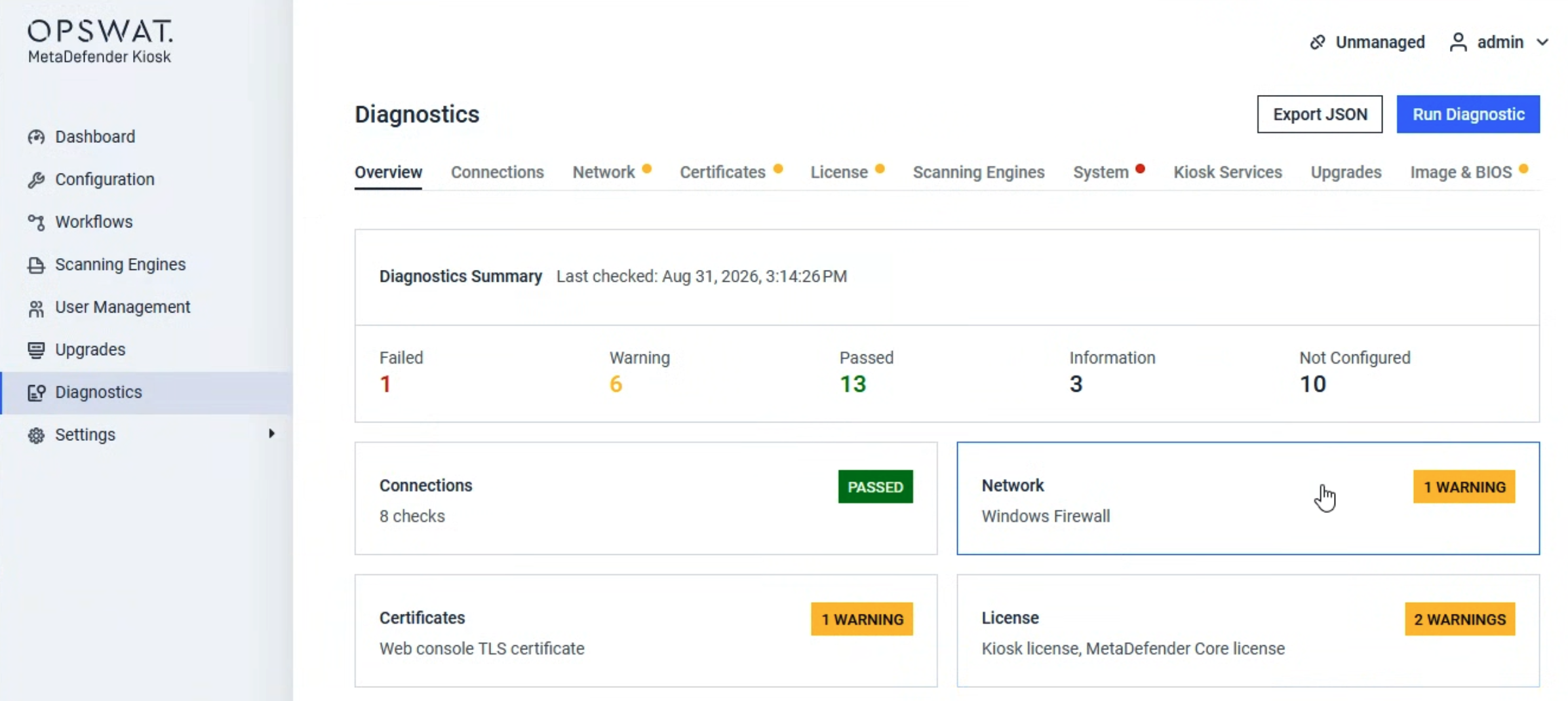 |
Enhancement | |
Exclude Individual Policy Settings from Central Management Sync | Administrators can now exclude specific settings — HTTPS/certificate, Proxy, Processing workflow manifest, and Retrieve Files workflow manifest — from Central Management (CM10) group policy sync on a per-instance basis, so an instance can keep its own individual certificate or configuration instead of being overwritten by the group's shared value. |
More Accurate Scan Time Estimates (AI-Based ETA) | The remaining-time estimate shown during a scan is now produced by an AI-based prediction model that accounts for file size, type, media, and hardware characteristics, in place of the previous static calculation — giving a more accurate, stage-aware estimate that continues to refine as the scan progresses. |
Scan Multiple Devices in One Session | Administrators can enable a multi-media session mode so that, after completing a scan, a user can choose "Scan another device" and continue directly to the next device without re-authenticating or re-answering pre-scan questions. The authenticated identity and answers carry over automatically, while each device still produces its own independent scan report. |
Automatic Deep Network Diagnostics on Connection Failure | When Kiosk detects a network connection failure, it can automatically capture a deep network diagnostic report to help identify the cause, without waiting for an administrator to run one manually. Administrators can turn this on or off from Settings > Network > Advanced. 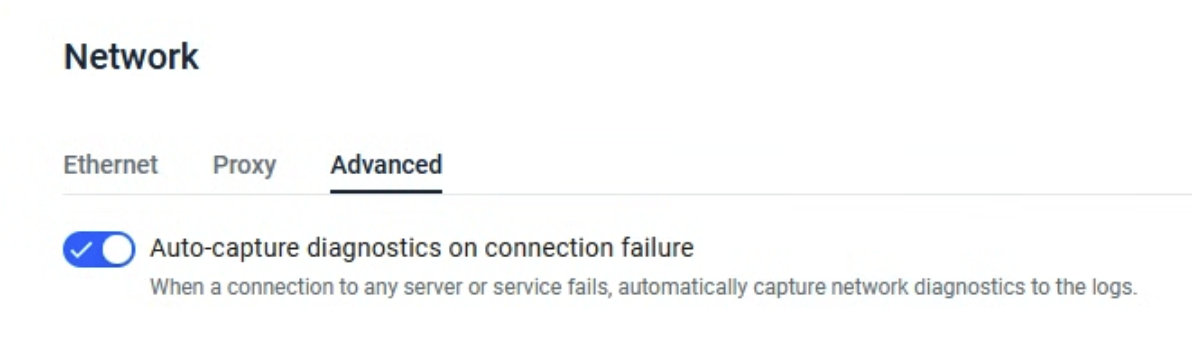 |
Manage Kiosk Autologon/RDP Password from Central Management (CM10) | Administrators can now set and rotate the Windows autologon password used by Hardened-Image Kiosk devices — the same account used for RDP access — centrally from a My OPSWAT Central Management (CM10) policy or at the individual device level, instead of only locally on each Kiosk. |
Partition Details in Secondary Scan Reports | The secondary scan report for multi-partition disk images, including VHD/VHDX, VMDK, TIB, Clonezilla, and LVM, now shows a partition summary, the count of scanned and unscanned partitions, and includes the partition name in each file's path. |
Italian and Traditional Chinese Language Support | The Kiosk interface now supports Italian and Traditional Chinese, including a QWERTY on-screen keyboard layout for Italian, extending localization for Italian- and Traditional-Chinese-speaking deployments. |
Intermittent License Validation and Remote Deployment Deactivation | Online Kiosk instances periodically re-validate their license so status changes are detected without waiting for a restart, and a Deployment ID disabled in My OPSWAT can remotely deactivate the corresponding Kiosk instance. |
Expanded Encrypted USB Device Support (WD My Passport) | Kiosk now supports WD My Passport utility-enabled encrypted hard devices secured, allowing it to be detected, unlocked, and scanned the same way as other supported encrypted USB devices. |
Bug Fixes | |
RFID/passwordless kiosk login could lock the user's Active Directory account | Fixed an issue where an RFID or other passwordless kiosk login automatically attempted a Managed File Transfer (MFT) username/password login on every session, even though no password exists for that identity. The repeated failed attempts could accumulate against MFT's brute-force protection and lock the user's Active Directory account after a few ordinary kiosk visits. Kiosk now skips the automatic login attempt when no password is available for the session. |
Intermittent file upload failures from RFID/passwordless kiosk sessions to MFT | Fixed an issue where Kiosk sent an ambiguous Active Directory account name as the sender identity for Managed File Transfer (MFT) group-transfer uploads from RFID or other passwordless kiosk sessions, which MFT could sometimes match to more than one account and reject with an intermittent "on/off" failure. Kiosk now sends the same resolved unique identity used by other login types. |
Kiosk fails to detect VIASAT Eclypt encrypted drive on K3 devices | Fixed an issue where Kiosk could not detect or display the partitions of a VIASAT Eclypt hardware-encrypted USB drive on K3 (Kiosk 3000) hardware, preventing the device from being unlocked and scanned. |
Windows Event log fills with Kiosk errors referencing omsPACENTER.exe | Fixed an issue where a mismatched 32-bit dependency bundled with the 64-bit Post Action Center helper caused it to fail to launch, so Kiosk's watchdog repeatedly logged relaunch errors to the Windows Event Log roughly every 10 seconds and the post-action-script feature was silently disabled. |
Copy/upload to MFT server failed with no error reason shown | Fixed an issue where a failed file transfer to a Managed File Transfer (MFT) server showed only a generic "Failed to Copy/Move to MFT" message with no explanation, because a logging defect discarded the actual reason returned by MFT. Kiosk now surfaces the underlying reason, including guidance to contact the MFT administrator when the transfer is rejected due to MFT's own upload configuration. |
Known Issues | |
Encrypted Drive Unlock Failure for Standard (Non-Admin) Windows Users (WD My Passport) | When running MetaDefender Kiosk under a standard (non-admin) Windows user session, unlocking utility-enabled WD My Passport encrypted drives fails even when entering the correct password. Operating the Kiosk within an administrative Windows user session is currently required to successfully unlock and access these encrypted drives |
Kiosk fails to detect VIASAT Eclypt encrypted drive on K3 devices | When a VIASAT Eclypt hardware-encrypted USB drive is connected to a K3 (Kiosk 3000) unit, Kiosk fails to detect the device during new-drive detection, so its partitions never become visible and the encrypted data partition cannot be unlocked or scanned. |
MetaDefender KIOSK Documentation
The users can consult this web page or, alternatively, they can download the manual in pdf format from the link below:
MetaDefender KIOSK manual (SHA256: 9BB644060CE8A8FE92645EAD93B20D6BA6E3D81239DAAD0EA322147C6AC6C780).
OPSWAT MetaDefender AGD Documentation_v1.6 (SHA256: 78A69F89D3C0D0FCA8A4B8D30B2C92E55D80CC559583F23AC61158F67CE04988).