
Check Your Version:
This article applies to MetaDefender Core versions 5.17.1 and later deployed on Windows and Linux systems.
Overview
Max Expansion Factor is an archive processing setting in MetaDefender Core that helps prevent "archive bomb" (also known as "zip bomb") attacks, where a small, heavily compressed file expands into an extremely large amount of data during extraction.
Why this setting exists
An attacker can craft an archive that is only a few kilobytes in size but expands to gigabytes, or even terabytes, of data when extracted. Attempting to extract and scan a file like this can exhaust CPU, memory, and disk resources on the scanning host, which can disrupt processing for other files in the queue.
The other archive handling limits, Max nesting level, Max number of files extracted, and Max total size of extracted files, reduce this risk but don't fully close the gap. A crafted archive can still expand well beyond a safe size before those limits are reached. Max Expansion Factor closes that gap by looking at the relationship between an archive's original size and its extracted size, rather than at absolute counts or sizes alone.
How it works
Max Expansion Factor compares the size of the original, compressed archive to the size the archive engine reports it will extract to. If the ratio of extracted size to original size exceeds the configured factor, MetaDefender Core stops extraction and blocks the file instead of continuing to unpack it.
For example:
A zip bomb can be as small as 6 KB, but expand to 60 GB when fully extracted.
With a Max Expansion Factor of 1,000, MetaDefender Core blocks the file after about 6 MB of extraction (6 KB × 1,000) - well before it reaches its full size.
Resulting scan verdict
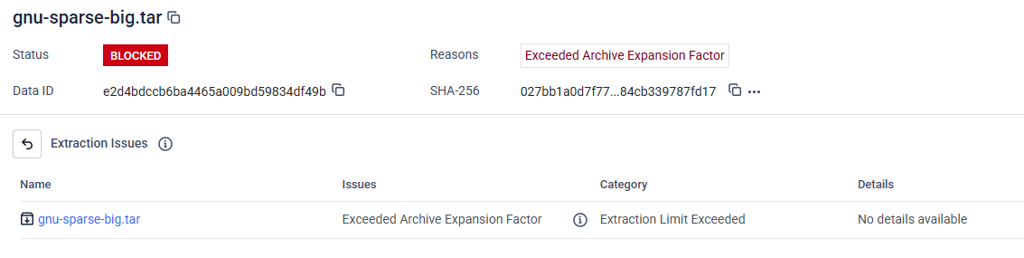
When an archive exceeds the configured factor, MetaDefender Core returns the verdict Exceeded Archive Expansion Factor, and the file is blocked from further processing.
Where to find this setting
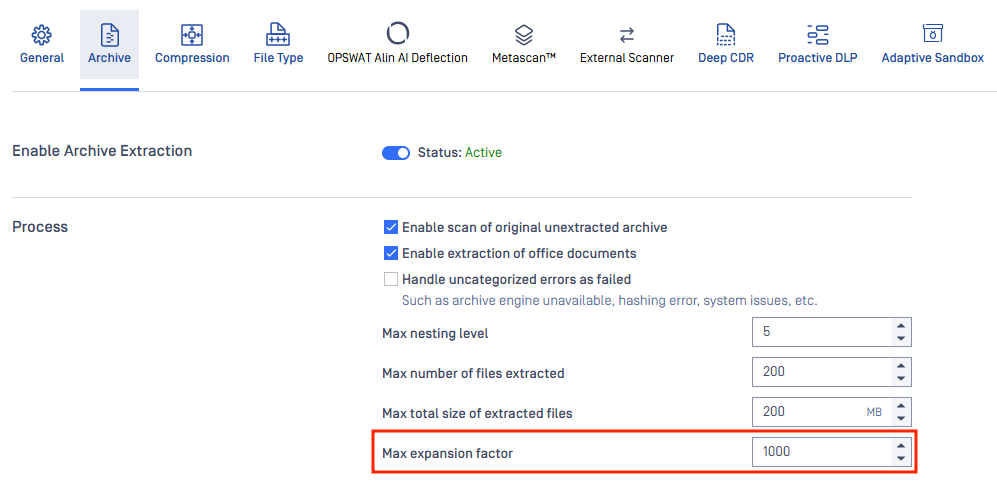
Max Expansion Factor is configured per workflow, alongside the other archive handling limits:
Workflow > Archive > Process
Max nesting level
Max number of files extracted
Max total size of extracted files
Max expansion factor
Archive analysis timeout
Default value
By default, Max Expansion Factor is set to 1,000 (1,000:1 expansion ratio). This default is high so that existing deployments aren't affected unless the setting is explicitly tightened.
Choosing a value for your environment
There is no single value that fits every deployment, because different file types compress differently. Highly compressible content, such as disk images, database backups, virtual machine images, and plain text logs, can legitimately reach high expansion ratios without being malicious.
To choose an appropriate value:
Identify a representative sample of the largest or most compressible archives you expect to process legitimately.
Scan those archives with MetaDefender Core and note the expansion ratio at which they pass.
Set Max Expansion Factor above that ratio, with some margin for variation, so legitimate files aren't blocked.
e.g. if your largest legitimate archive hits a 4500:1 ratio, set it to 5000:1, not right at the edge.
Review Processing History periodically for the Exceeded Archive Expansion Factor verdict, and adjust the setting if legitimate files are being blocked unexpectedly.
Environments with stricter security requirements can lower this value below the default of 1,000:1 to reduce maximum resource exposure. Tightening the value increases the risk of blocking legitimate, highly compressible files, so we recommend validating against real archive samples before deploying a lower value to production.
Related articles
Support:
If Further Assistance is required, please proceed to log a support case or chat with our support engineer.