
This article applies to the MetaDefender Core using Shared Database mode.
In Shared Database mode, multiple MetaDefender Core instances connect to and operate against the same database. Restarting the PostgreSQL service or the database server will interrupt all connected MD Core instances and may impact the stability of the shared environment.
If you need to restart the PostgreSQL service or the database server, follow the steps below to minimize disruption and reduce the impact on the connected MD Core instances.
Step 1: Block new incoming scan requests to MetaDefender Core.
This prevents new scan requests from being submitted to MetaDefender Core while allowing all in-progress scan tasks to complete normally. You can verify and configure this using the options below:
Block inbound traffic to TCP port 8008 on the MetaDefender Core instance.
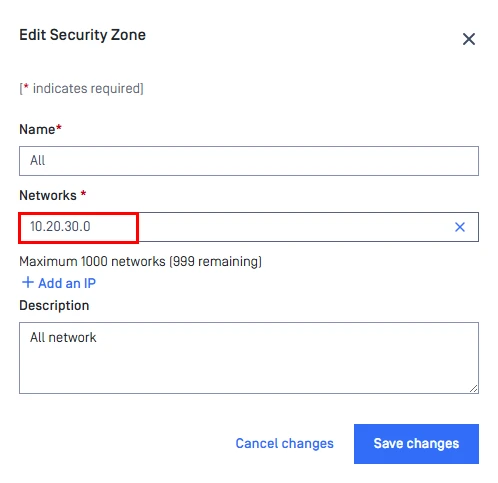
Modify the MD Core Security Zones configuration to use an unreachable network range (for example, 10.20.30.0) to effectively block incoming connections. Workflow Management> Security Zones > Edit
Assign the newly created user agent to the workflows Workflow > General > Restrictions > Limit to specified user agents >
Step 2: Ensure that there are no active processing entries across all MetaDefender Core instances.
Step 3: Restart the Postgres Service or Database Server.
Step 4: Verify that all MetaDefender Core instances have successfully reconnected to the database and that the web UI is accessible.
Step 5: Revert the changes implemented in Step 1 to restore normal operations.
If Further Assistance is required, please proceed to log a support case or chat with our support engineer.