
Title
Page icon
Create new category
Edit page index title
Edit category
Edit link
Why Is the Time Range on MetaDefender Core’s Executive Report Different from the Time Range Selected Before Exporting?
This article applies to all MetaDefender Core versions.
Users may notice a time difference between the selected time range in the MetaDefender Core UI and the time displayed in the exported Executive Report (PDF). This behavior is caused by a difference between the local time zone of the user’s browser and the system time zone of the MetaDefender Core server.
The MetaDefender Core UI displays time based on the local system time zone of the web browser used to access MetaDefender Core.
For example, if your browser’s system time is UTC +07:00, and you select a time range from 12:00 AM to 12:00 AM (one day), the UI will display data accordingly.
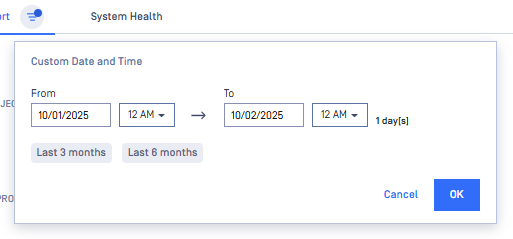
When exporting the report to PDF, MetaDefender Core applies the server’s system time zone.
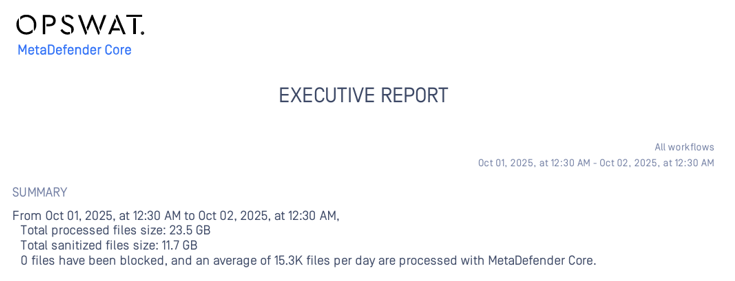
For example, if the Core server time zone is UTC +07:30, the exported report will show 12:30 AM instead of 12:00 AM, resulting in a 30-minute difference.
If Further Assistance is required, please proceed to log a support case or chatting with our support engineer.