
How Is Quarantined File Encryption Handled in MetaDefender Core?
This article applies to all MetaDefender V5 releases deployed on Windows or Linux systems.
Overview
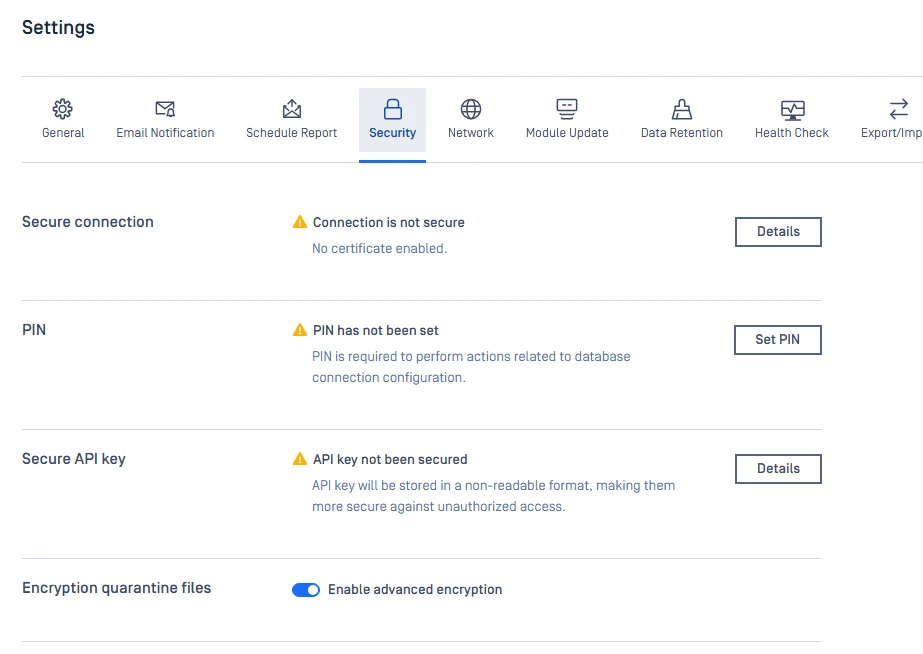
When "Quarantine blocked files" is enabled, MetaDefender stores blocked or malicious files in encrypted form. Files are saved without their original filename or extension.
Two encryption modes are available: Standard Encryption (default, toggle off) and Advanced Encryption (optional, toggle on).
The configuration can be set in Settings > Security > Encrypt Quarantined Files.
Standard Encryption (Default)
Standard encryption is always applied when quarantine is enabled.
Uses XOR encryption with a per-installation salt
Ensures quarantined files are never stored in plaintext
Provides basic protection against unauthorized access
No configuration required
Advanced Encryption (Optional)
Stronger encryption can be enabled via: Settings > Security > Enable advanced encryption
Uses AES-256-GCM encryption instead of XOR
Provides enhanced confidentiality and integrity protection
Applies only when manually enabled
If Further Assistance is required, please proceed to create a support case or chat with our support engineer.