
How to Block/Allow Custom Extensions using RegEx?
This article applies to all MetaDefender Core V4 and V5 releases deployed on Windows or Linux systems.
MetaDefender Core allows blocklisting and allowlisting based on both the FileType and Filename.
However, for custom extensions, it may be possible these are not listed within the FileType category, in which case you can create a rule using RegEx to achieve the desired result.
For example, for a .dat extension, which is not a standard one, but rather depends on the software that generates it, you will not find it under FileType. You can then use the filename option and create a rule as in the example below:
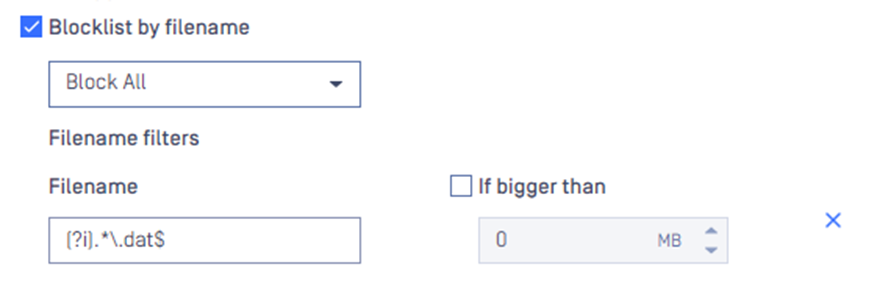
This is a case-insensitive pattern that will block all the files ending in .dat .
Metacharacter | Matches |
|---|---|
(?i) | Flag that enables case-insensitive matching |
. | Matches any single character |
Matches zero or more occurrences of the previous pattern | |
\ | Escape character to remove the special meanings of metacharacters. In the case above it is used to match a literal dot |
$ | Ensures the pattern matches the end of the string |
If Further Assistance is required, please proceed to log a support case or chat with our support engineer.