
How can I increase parallel count and Max queue size?
This article applies to all MetaDefender Core V5 releases deployed on Windows systems.
If you're running a high-performance environment with 32 to 48 CPU cores and need faster file processing speeds, MetaDefender Core allows you to scale performance through two key configurations: queue size and parallel scan count. This article outlines both approaches.
When Should You Scale Up?
You should consider increasing the queue size and parallel processing count only if:
You have a high number of CPU cores (32–48).
Fast processing of large volumes of files is critical to your workflow.
You're experiencing bottlenecks due to a full scan queue or limited parallelism.
Approach A: Increasing Maximum Queue Size
When the MetaDefender Core scan queue is full, incoming scan requests are denied until space becomes available. To avoid this and support a higher load, you can increase the maximum queue size from the MetaDefender Core UI or by using the REST API.
The option can be found under the Settings > General tab.
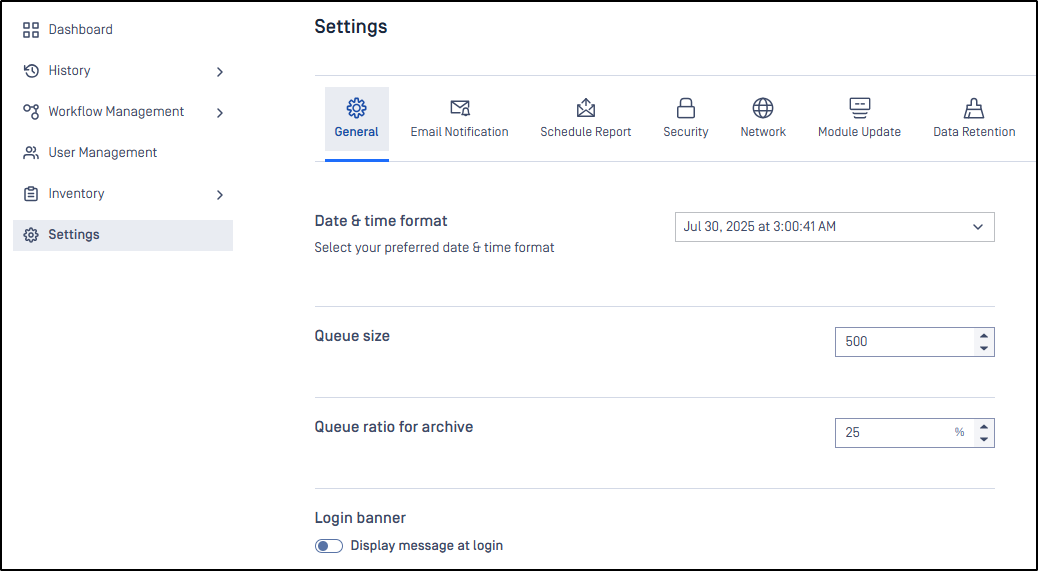
If you want to configure the queue using the APIs, use the following request to update the queue size:
PUT /admin/config/scan
Request Body:
{ "max_queue_per_agent": 500 }
An API key is required to authenticate this request. Make sure to retrieve the key from your MetaDefender Core deployment.
For a more detailed guide, refer to the article: How can I configure the maximum queue size in MetaDefender Core v5?
Approach B: Increasing Parallel Scan Count per Engine
Another method to maximize CPU utilization is by increasing the number of parallel scans per engine. This is especially effective with engines that support multi-threaded scanning.
Configuration Key
To configure this setting, use the parallelcount key in your MetaDefender Core configuration.
This setting controls how many scan threads run simultaneously per engine.
Proper tuning can significantly boost performance in multi-core environments.
For details on modifying this setting, see: MetaDefender Configuration Documentation
If you have any issues Increasing the Scaling Up Performance on MetaDefender Core, please follow these instructions on How to Create Support Package With Bundle Tools?, before creating a support case or chatting with our support engineer.