
This article applies to the upgrade from MetaDefender Storage Security 3.6.1 to 4.1.0 on Linux systems. Later versions no longer fail on an unknown module name: a value in ENABLED_MODULES that has no matching compose file is skipped silently. Replacing onedrive with graph is still recommended, because onedrive no longer enables anything.
Issue
During an upgrade from MetaDefender Storage Security version 3.6.1 to 4.1.0, you may encounter the following error:
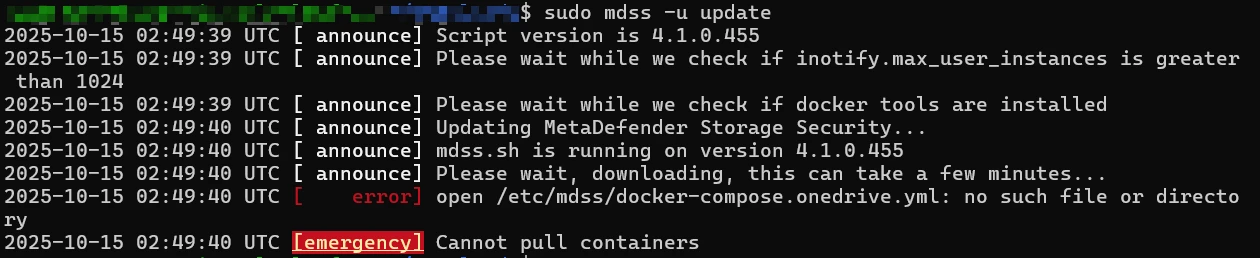
[error] stat /etc/mdss/docker-compose.onedrive.yml: no such file or directory [emergency] Cannot pull containers
This error occurs when the ENABLED_MODULES variable in the configuration file /etc/mdss/customer.env includes the value onedrive, which is no longer valid in version 4.1.0.
Cause
In version 4.1.0, the onedrive module was renamed to graph, and the /etc/mdss/docker-compose.onedrive.yml file was replaced by /etc/mdss/docker-compose.graph.yml.
The upgrade process expects the updated module name, and referencing onedrive in customer.env causes it to look for a non-existent configuration file (docker-compose.onedrive.yml), resulting in the error.
Resolution
To fix the issue:
Open the file
/etc/mdss/customer.env.Locate the line that starts with
ENABLED_MODULES=.

If
onedriveis listed, replace it withgraph.

Example:
Before: ENABLED_MODULES=smb,box,onedrive,sftp,nfs,mft,ftp
After: ENABLED_MODULES=smb,box,graph,sftp,nfs,mft,ftp
Save the file and re-run the upgrade command:
sudo mdss -u update
If Further Assistance is required, please proceed to log a support case or chatting with our support engineer.