
Check your version:
This article applies to all MetaDefender Managed File Transfer releases deployed on Windows systems.
Answer: Yes, SMB signing can be enabled without impacting the core functionality of the Managed File Transfer (MFT) system.
Functionality: Enabling SMB signing does not affect MFT operations. Signing occurs at the protocol layer and is transparent to MFT logic, so all file transfer workflows continue to function normally.
Performance: Some minor performance impact is expected. The CPU must verify each signed packet, which can reduce throughput by approximately 10–15% and slightly increase latency.
Configuration Guidelines:
Ensure alignment between client and server settings.
If the server requires SMB signing, the client must not have it disabled.
The recommended configuration for both client and server is Enabled (Negotiate) to prevent connection failures.
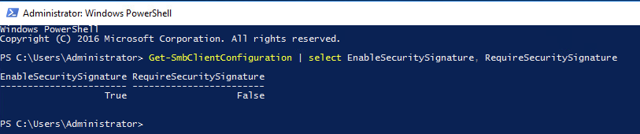
Check SMB Client settings

Check SMB Server settings
Summary: SMB signing enhances security with minimal functional impact. Proper alignment of client and server settings ensures smooth MFT operations.
Support:
If you have questions, concerns or issues regarding MetaDefender Managed File Transfer, please open a Support Case with the OPSWAT team via phone, online chat or form, or feel free to ask the community on our OPSWAT Expert Forum.