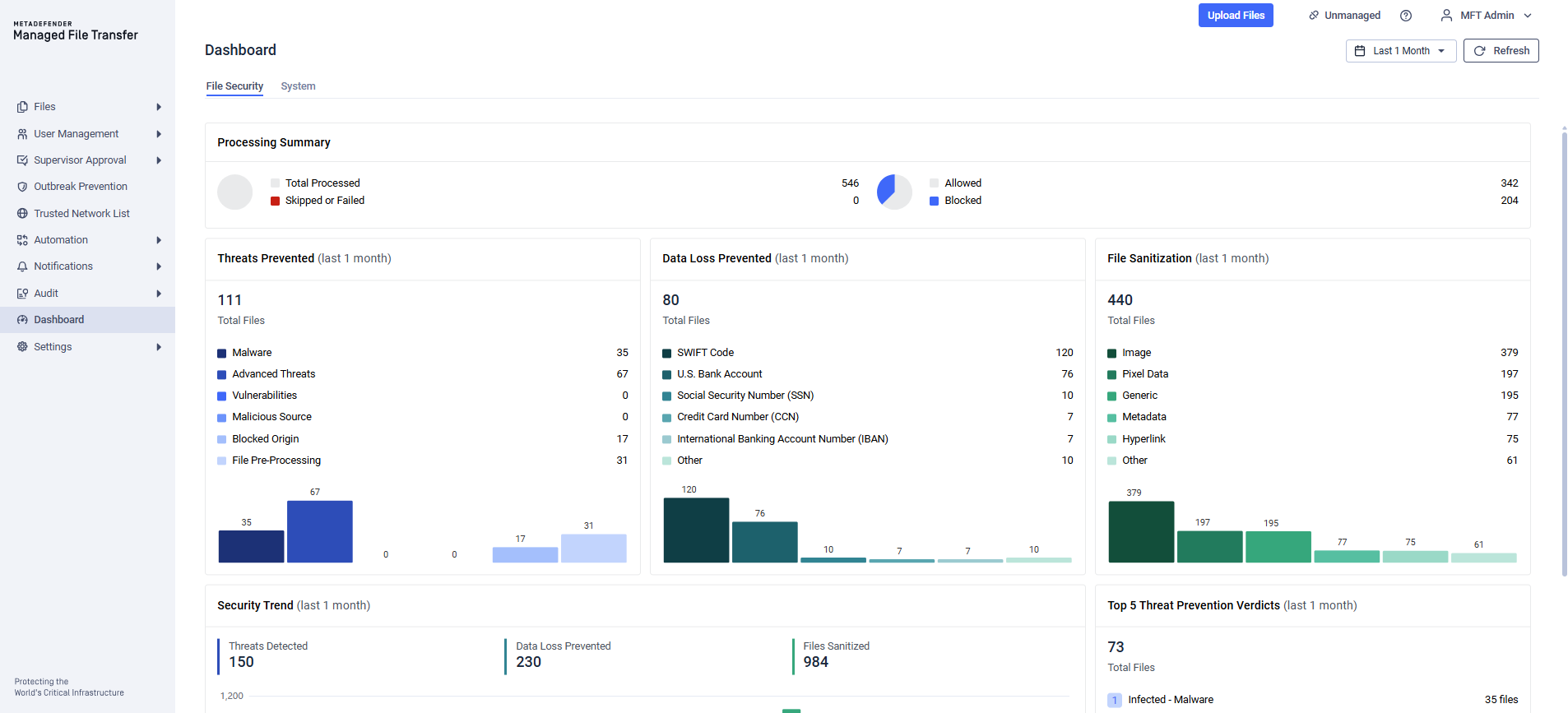
File Security Dashboard provides a centralized, time-based overview of file scanning activity and security outcomes in MetaDefender Managed File Transfer™ . It helps administrators track throughput, identify threats, and understand how effective their prevention and sanitation policies are over a selected time range.
It includes the following widgets:
Processing Summary
Threats Prevented
Data Loss Prevented
File Sanitization
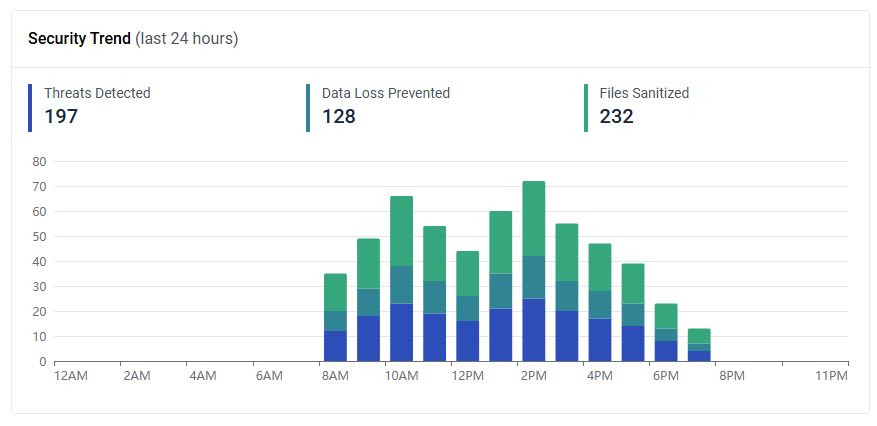
Security Trend
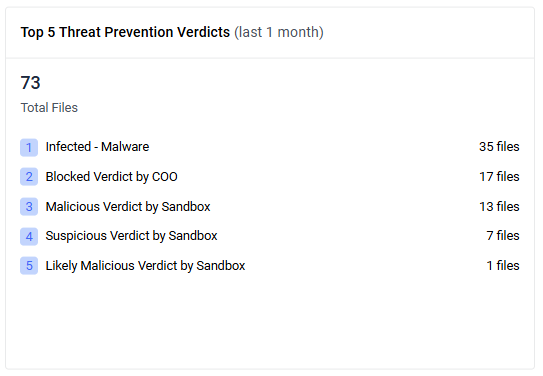
Top 5 Threat Prevention Verdicts
Top 5 Malware Detection Engines
Blocked Origins
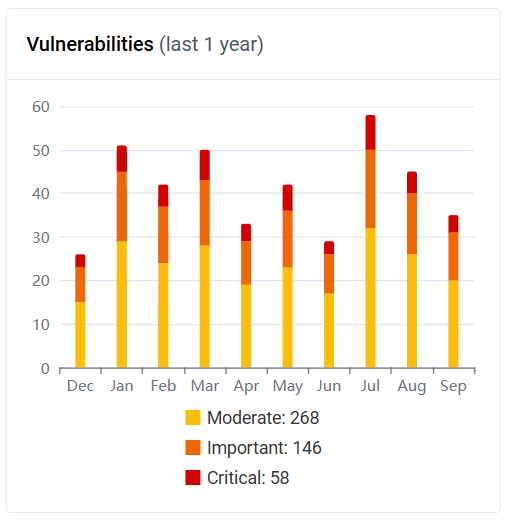
Vulnerabilities
Use this dashboard to validate security policies, spot anomalies, and follow trends in near real time.
How the dashboard updates
The dashboard data collector refreshes the database in every minute.
After a file is scanned, its impact on the metrics appears within up to 1 minute.
Widgets count files with at least one event in a given category during the selected time range.
A single file may contribute to multiple categories.
Rescan behavior
If a file was Blocked, then changed to Allowed after a rescan, the Blocked count will remain the same (it will not decrease), and the Allowed count will increase when the rescan changes the verdict.
Rescanning a file multiple times does not change counts unless the scan result differs from the file’s first recorded scan result (e.g., verdict changes from Blocked to Allowed or vice versa).
Deleting a scanned file
Deleting a file does not reduce any counters. The dashboard reflects historical activity.
Data for the File Security Dashboard Widgets is collected only from version MetaDefender® MFT 3.11.0 and onward. If your system was upgraded from an earlier version, the dashboard will be populated with currently available data.
The scan result of the archive file itself (such as a .zip file) is included in the dashboard widgets. However, the scan results of the files inside the archive are not included.
Processing Summary
The Processing Summary widget presents two pie charts for the selected time range:
Total Processed vs. Skipped/Failed:
Total Processed: The total number of files that entered the scanning pipeline and produced a terminal outcome (Allowed/Blocked/Failed or Skipped).
Skipped or Failed: Files that did not complete scanning due to errors (e.g. scanner unavailability, timeouts, processing failures or network issue).
Allowed vs. Blocked:
Blocked: Files that were prevented due to detected threats, policy violations, or risk assessments by MetaDefender Core™.
Allowed: Files that passed policy checks and scanning rules and were permitted for use or transfer by MetaDefender Core™.
All numbers are cumulative. They increase over time but never decrease, meaning if a file was Allowed, but got Blocked after a Zero-Day Exploit has been found during a rescan, it will contribute both to the Blocked and Allowed counter.
Threats Prevented
The Threats Prevented widget provides a consolidated view of security events detected and blocked across MetaDefender Core™ technologies for the selected time range. It contains the total files count where threats were actively prevented and category breakdown with per-category file counts.
Categories:
Malware: Files which has been marked as infected by Metascan (e.g., AV verdicts, multi-engine findings).
Advanced Threats: Files identified with suspicious or malicious behavior in MetaDefender Sandbox™ analysis.
Vulnerabilities: Files containing known vulnerabilities or risky components detected via package and dependency analysis.
Malicious Source: Files which has been marked as Malicious by InSight Threat Intelligence.
Blocked Origin: Files restricted due to Country of Origin policies and compliance rules.
File Pre-Processing: Files prevented during pre-processing due to type mismatches, malformed content, or disallowed archive characteristics.
Data Loss Prevented
The Data Loss Prevented widget summarizes detections reported by the MetaDefender Core™ DLP engine for the selected time range. It highlights how often sensitive data patterns were identified and prevented from exposure, helping administrators assess policy coverage and tuning needs.
Total Files: Number of files with at least one DLP hit during processing.
Top detections: The five most frequent DLP hit types with their counts, plus an “Other” category aggregating remaining detections.
File Sanitization
The File Sanitization widget summarizes sanitization outcomes reported by the MetaDefender Core™ Deep CDR engine for the selected time range. It provides visibility into how frequently potentially risky content was neutralized, helping administrators evaluate sanitization coverage and tune policies.
Total Files: Number of files with at least one Deep CDR sanitization action during processing.
Top sanitization categories: The five most frequent sanitization categories with their counts, plus an “Other” category aggregating remaining actions.
Increments indicate files that underwent sanitization to remove active content or potential threats.
Sanitized files may still be Allowed or Blocked depending on policy and post-sanitization checks.
If sanitization status changes compared to the file’s first scan result, the count may increase on the rescan event.
Security Trend
Displays, for the chosen period, the number of affected files as stacked bars by category: Threats Detected, Data Loss Prevented, and Files Sanitized.
Top 5 Threat Prevention Verdicts
Shows the top five threat prevention verdicts generated by MetaDefender Core™ for the selected time range, along with the total files. Each entry includes the verdict and the count of affected files.
Top 5 Malware Detection Engines
Shows the five MetaDefender Core™ anti-malware engines with the highest number of malware detections for the selected time range. Each entry lists the engine name and the detection count.
Blocked Origins
Displays a doughnut chart breakdown of files blocked by MetaDefender Core™ Country of Origin for the selected time range. The chart shows the top five countries by blocked file percentage and aggregates all remaining countries under Other.
Vulnerabilities
Displays, for the selected time range, file-based vulnerability assessment results from MetaDefender Core™ as a stacked bar chart by severity (Moderate, Important, and Critical).