
This article applies to all MetaDefender Core releases deployed on Hyper-V.
Issue:
After rebooting a MetaDefender Core virtual machine hosted on Hyper-V, the Deployment ID may change unexpectedly. This behavior is typically caused by the VM’s network adapters being configured with dynamic MAC addresses.
In Hyper-V environments, dynamic MAC addresses can be reassigned during a reboot, resulting in a different MAC address.
Since MetaDefender Core generates its Deployment ID based on hardware identifiers such as the MAC address, any change to the MAC address will lead to a new Deployment ID being created.
How to Check MAC Address Settings in Hyper-V
To verify whether your VM is using dynamic or static MAC addresses:
Open Hyper-V Manager on the host machine.
Right-click the virtual machine in question and select Settings.
In the left pane, expand the VM name and select Network Adapter.
Click on Advanced Features.
Check the MAC Address setting — if it is set to Dynamic, it may change after a reboot.
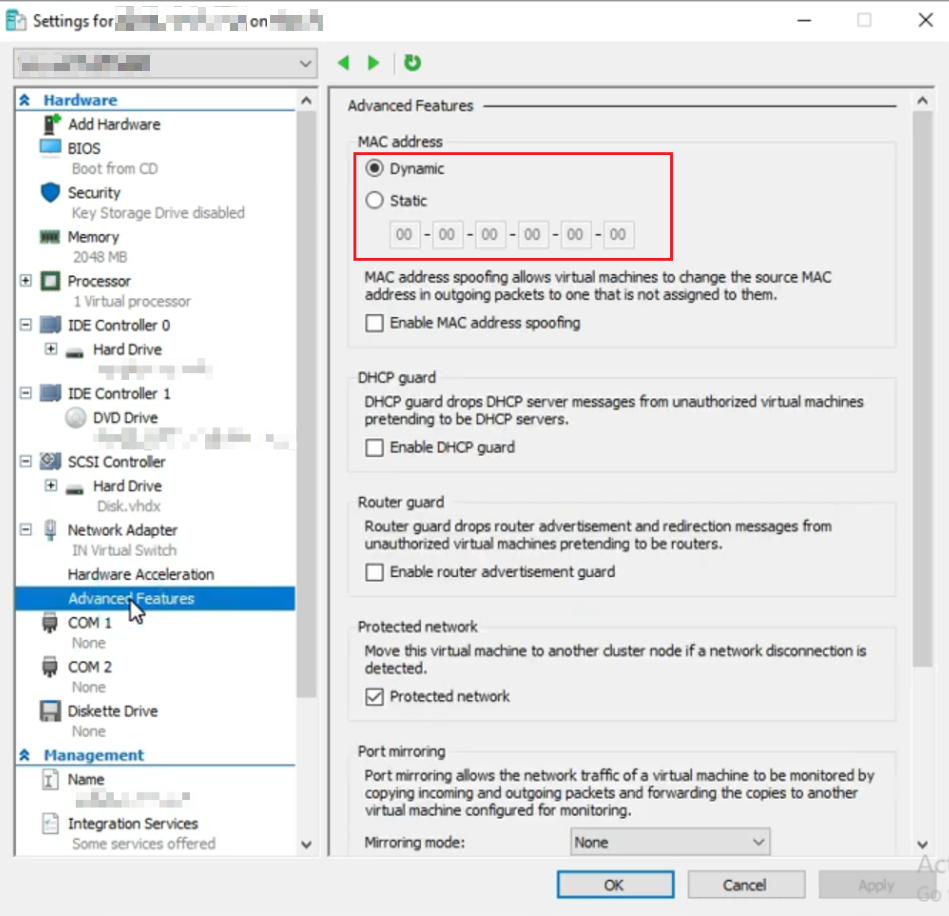
If your VM has multiple network adapters, repeat the steps for each one.
Recommended Solution
To prevent the Deployment ID from changing after a reboot, configure the MAC address of each network adapter to Static. This ensures that the MAC address remains consistent across reboots, maintaining the same Deployment ID.
If Further Assistance is required, please proceed to log a support case or chatting with our support engineer.