
Check your version:
This article applies to MetaDefender Core and is applicable to all MetaDefender Core V5 releases deployed on Windows and Linux systems.
Yes, TXF (Tax Exchange Format) files are supported by OPSWAT MetaDefender Core.
Support for scanning TXF files was introduced starting with File Type Module version 7.8.0. If your system is running an earlier version of the File Type Module, TXF files may not be properly recognized or scanned.
Resolution / Steps
To ensure TXF files are supported:
Verify your current File Type Module version in MetaDefender Core.
Update your modules to the latest available version.
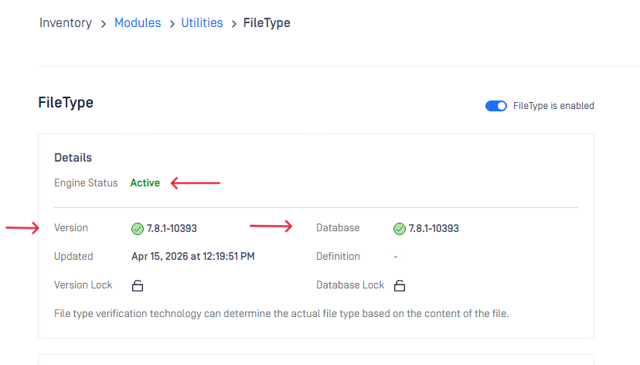
Confirm that the File Type Module is at version 7.8.0 or later.
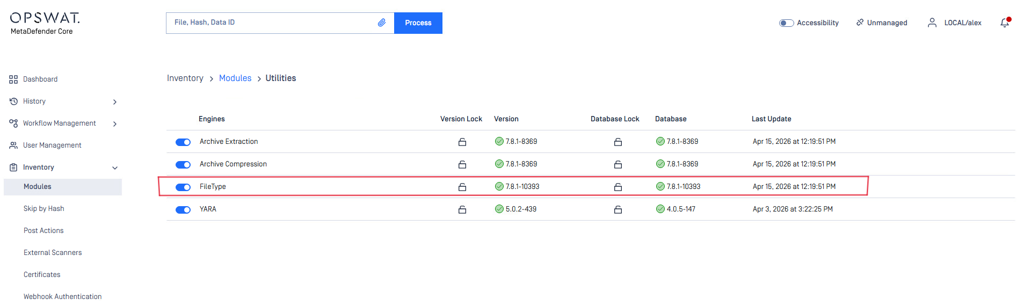
In order to check the File Type Module status and version, in your MetaDefender Core web UI, navigate to: Inventory > Modules > Utilities > File Type. Make sure the engine is enabled - Engine status: Active, and there is a green checkmark next to Version and Database.
Keeping your modules up to date is essential to ensure full file type coverage and optimal detection capabilities.
Additional notes:
No additional configuration is required once the appropriate module version is installed.
Regular module updates are recommended to maintain support for newly added file formats and improvements.
Support:
If you have questions, concerns or issues regarding MetaDefender Core, please open a Support Case with the OPSWAT team via phone, online chat or form, or feel free to ask the community on our OPSWAT Expert Forum.