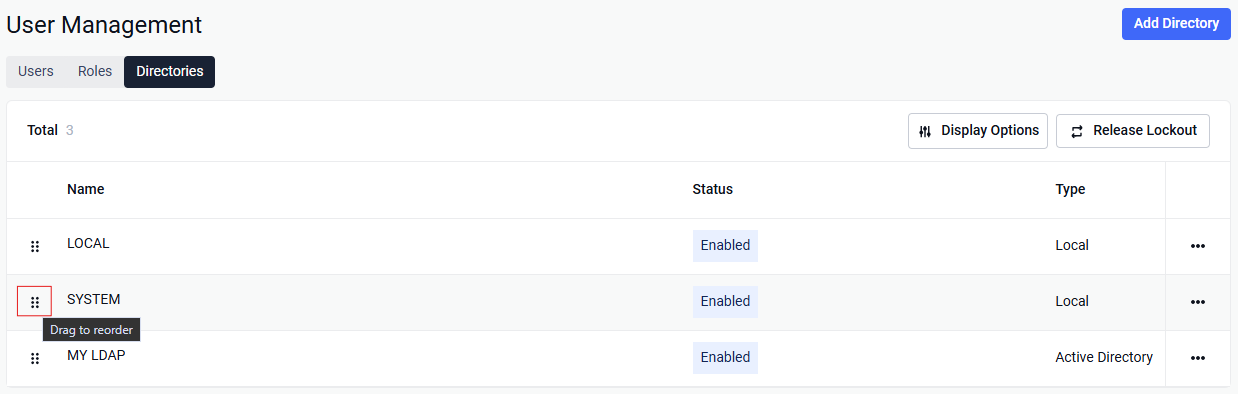
MetaDefender Core can authenticate users against more than one user directory (for example, Local, LDAP, or Active Directory). Each directory has a priority order. That order controls which directory is used when a user signs in.
Plain username (no directory prefix)
If the user enters only a username (for example, jsmith), MetaDefender Core uses the highest-priority directory — the first directory in the configured order.
Username with directory name
If the user enters DIRECTORY/USERNAME (for example, CORP-LDAP/jsmith), Core looks up that directory. If more than one directory could match, Core tries them in priority order and uses the first one where authentication succeeds.
Why order matters
Default login: Users who sign in without a directory prefix are checked against the top-priority directory only.
Multiple LDAP/AD directories: Priority decides which directory is tried first when several could apply.
Same username in different directories: Use
DIRECTORY/USERNAMEso Core knows which directory to use.
Managing directory order
In the Management Console, user directories are listed in priority order (highest first). Administrators can change that order to control which directory is used for plain-username logins.
Tip for administrators: Put the directory most users should use (for example, your main Active Directory) at the top. Use DIRECTORY/USERNAME when users must sign in through a specific directory.