Overview
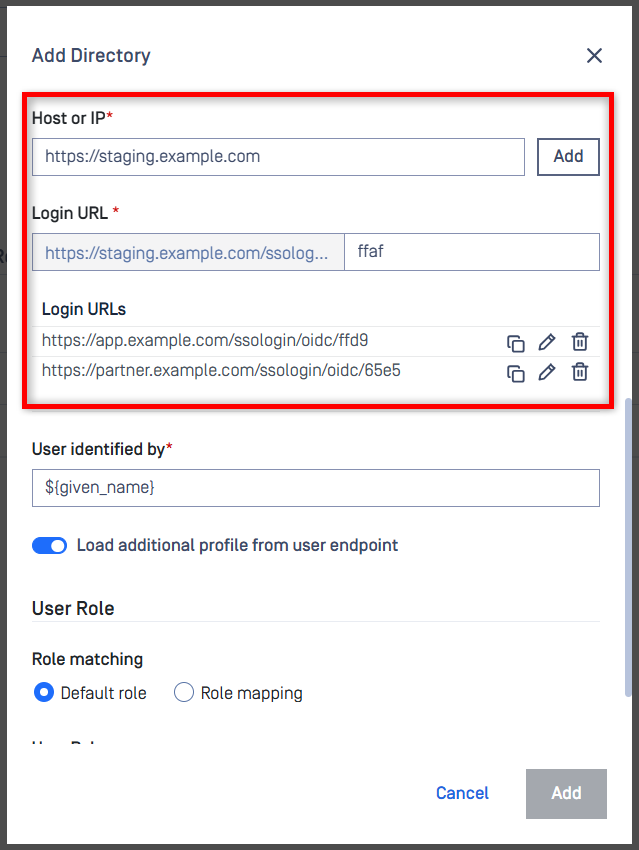
MD Core now supports multiple login/redirect URLs as part of the SSO authentication flow. This enhancement allows deployments spanning multiple domains or client applications to dynamically route users to the correct redirect endpoint during login.
Key benefits
Supports multi-domain SSO scenarios.
Enables multiple client application redirects.
Improves authentication flexibility without custom logic.
The URLs must be registered on both MD Core and the Identity Provider.
Unregistered redirect URLs are rejected for security reasons.
Configuration Steps
Sign in to the MD Core dashboard using an administrator account.
Go to
User Management>Directories.Click
Add Directory, or choose an existing SSO directory to modify.If you are adding a new directory, select OIDC or SAML as
Directory Typeand fill in the required configuration fields.Under the
Host or IPsection, enter your login URL and clickAdd.In your Identity Provider configuration panel, add the same login URL as the redirect/callback URL.
Repeat steps 5–6 for any additional login URLs you need to support.