High Availability
v3.11.3
Search this version
High Availability
High Availability
Title
Message
Create new category
What is the title of your new category?
Edit page index title
What is the title of the page index?
Edit category
What is the new title of your category?
Edit link
What is the new title and URL of your link?
Support Page
Summarize Page
Copy Markdown
Open in ChatGPT
Open in Claude
The Support page allows you to generate a diagnostic support package for troubleshooting.
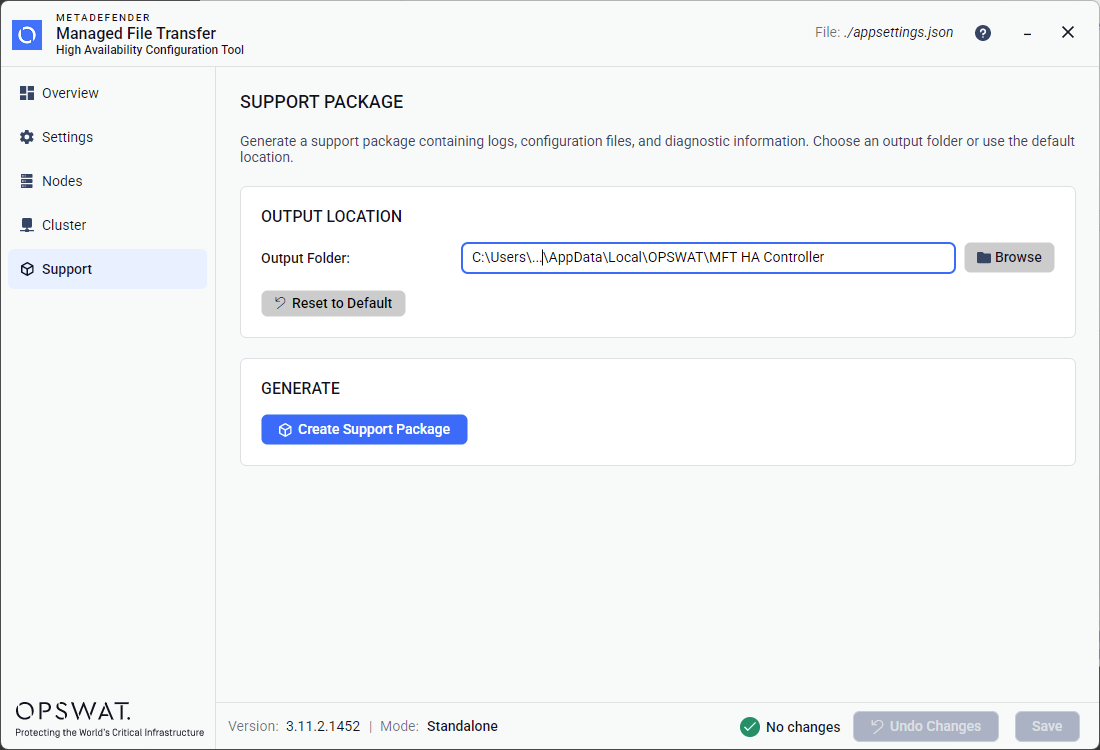
Generating a Support Package
Output Folder — by default, a system-appropriate temporary directory is used. You can:
- Type a custom path directly into the text field.
- Click Browse to open a folder picker dialog.
- Click Reset to Default to restore the default output folder.
Click Create Support Package to generate a ZIP file containing logs, configuration files, and diagnostic information.
After generation:
- A success banner shows the file path and an Open in Explorer button to reveal the file in your system's file manager.
- If the operation fails, an error banner with details is displayed.
Type to search, ESC to discard
Last updated on
Was this page helpful?
Next to read:
Troubleshootingnull
Discard Changes
Do you want to discard your current changes and overwrite with the template?
Archive Synced Block
Message
Create new Template
What is this template's title?
Delete Template
Message