
The Settings page configures HA operational parameters and the reverse proxy endpoint. It is divided into two side-by-side panels.
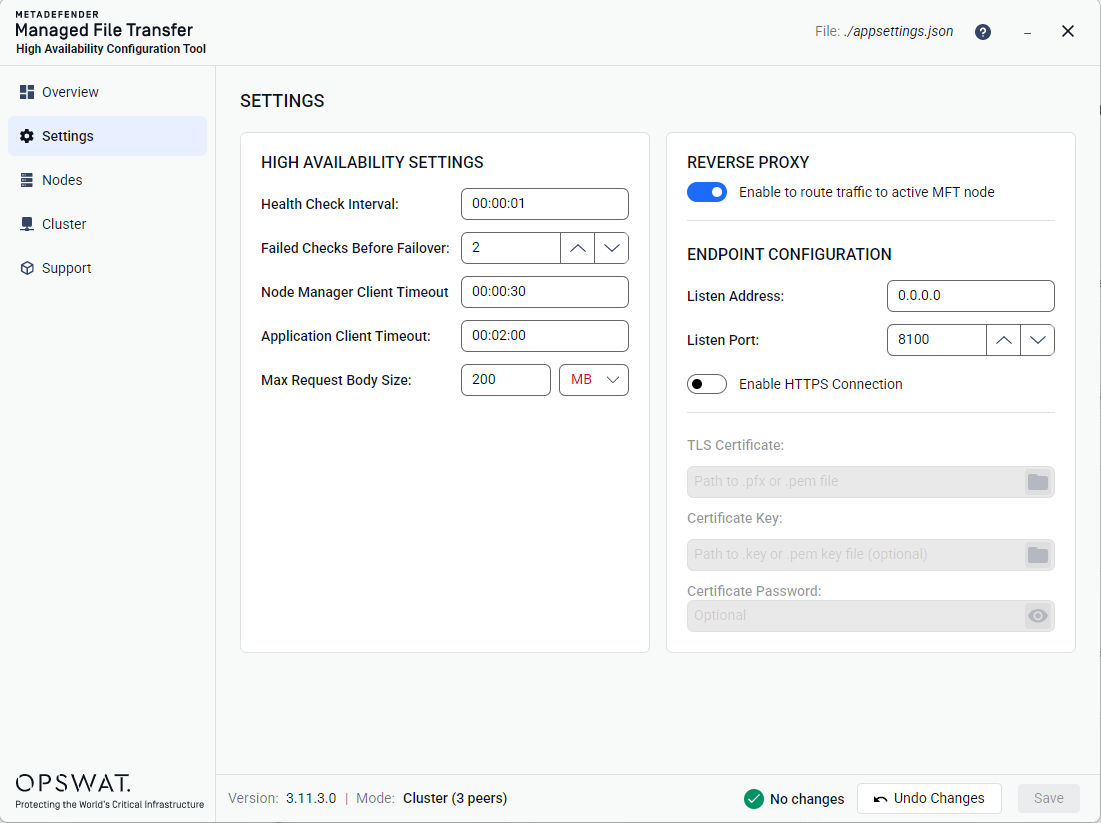
High Availability Settings
The left panel contains the following fields:
Field | Description |
|---|---|
Health Check Interval | How frequently nodes are polled for health status |
Failed Checks Before Failover | Number of consecutive failed checks before triggering failover |
Node Manager Client Timeout | HTTP timeout for Node Manager API calls |
Application Client Timeout | HTTP timeout for application level calls. |
Max Request Body Size | The largest HTTP request body the HA Controller will accept. Leave empty to use the server's built-in default. |
All Timeout and Interval fields must be entered in HH:mm:ss format (e.g., 00:00:01 for 1 second, 00:05:00 for 5 minutes).
Max Request Body Size units are binary (1024-based, so 1 MB = 1,048,576 bytes). The default is 200 MB and the maximum is 200 GB.
Reverse Proxy Configuration
The right panel controls the built-in reverse proxy:
Enable/Disable toggle — turns the reverse proxy on or off.
When disabled, the endpoint configuration below is grayed out.
Reverse Proxy Endpoint Configuration
When the reverse proxy is enabled, the following fields configure the HTTP endpoint:
Field | Description |
|---|---|
Listen Address | IP address to bind (e.g. |
Listen Port | TCP port number (1-65535) |
Enable SSL/TLS toggle | Switches between HTTP and HTTPS |
When SSL/TLS is enabled, additional fields appear:
Field | Description |
|---|---|
TLS Certificate | Path to the certificate file ( |
Certificate Key | Path to the private key file ( |
Certificate Password | Password to decrypt the certificate file (password-masked with reveal toggle). |