
1. Issue Summary
User currently can not access to Microsoft Apps (Word, Excel, …) from Okta, due to a callback error that originates from MetaDefender Endpoint with api returns cors error.
2. Root Cause
Chromium 142 introduces a new Local Network Access security policy requirement. Requests from web pages to loopback addresses such as localhost / 127.0.0.1 are blocked unless the user (or an admin policy) explicitly grants access.
Because gears-beta.opswat.com communicates with a local server to verify compliance before access, these restrictions can disrupt normal operation.
Starting in Chromium-based browsers v142+ (released Oct 28, 2025)—including Chrome, Edge, Brave, and Opera—access to protected apps from Okta may fail due to new local-network security rules.
3. Resolution
Step 1: Enable the “Local network access” flag in the browser to log in to Okta
Open Settings → Privacy and security
Locate the site to enable this flag
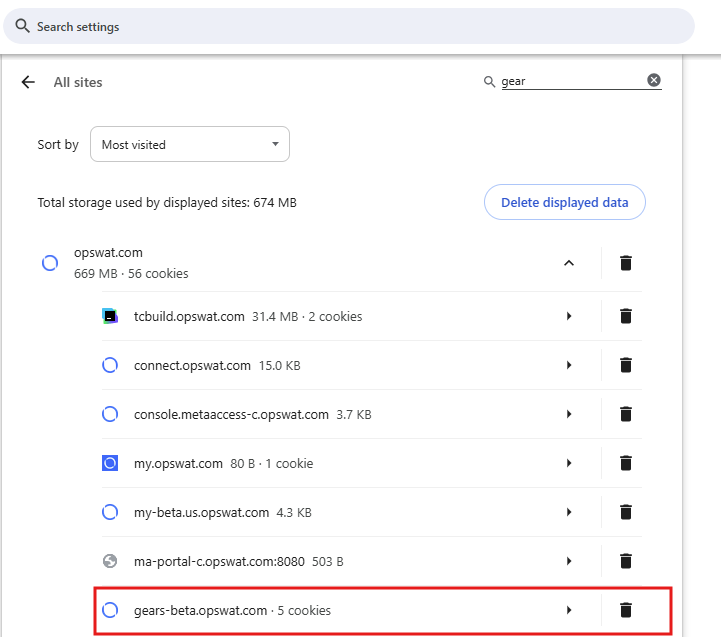
Expand and Locate the “Local network access” flag, and select “Allow”

Step 2: Apply This Setting Across an Enterprise
Enterprise administrators can deploy a Chrome and/or Edge policy to set the “Local Network Access” setting to “Allow” for your website.
Please refer to:
4. Next Actions
To improve UX when checking the “Local network access” permission, you can optionally query this permission at runtime. Although not required, this check allows you to notify users proactively and provide clearer guidance if the permission is missing.
5. References
Error message - Permission was denied for this request to access the unknown address space
New permission prompt for Local Network Access | Blog | Chrome for Developers