Knowledge Base
v4.4.1
Search this version
Knowledge Base
Knowledge Base
Title
Message
Create new category
What is the title of your new category?
Edit page index title
What is the title of the page index?
Edit category
What is the new title of your category?
Edit link
What is the new title and URL of your link?
Selected Engine is Disabled in After confirming on "below recommendation hardware"
Copy Markdown
Open in ChatGPT
Open in Claude
Issue
After selecting Continue to run with the recommendation settings, the selected scanning engine's status is Disabled.
Solution
- Trigger an online or a local update by pressing either Check for Online Updates and Check for Local Updates on the Engine and Database Status page.
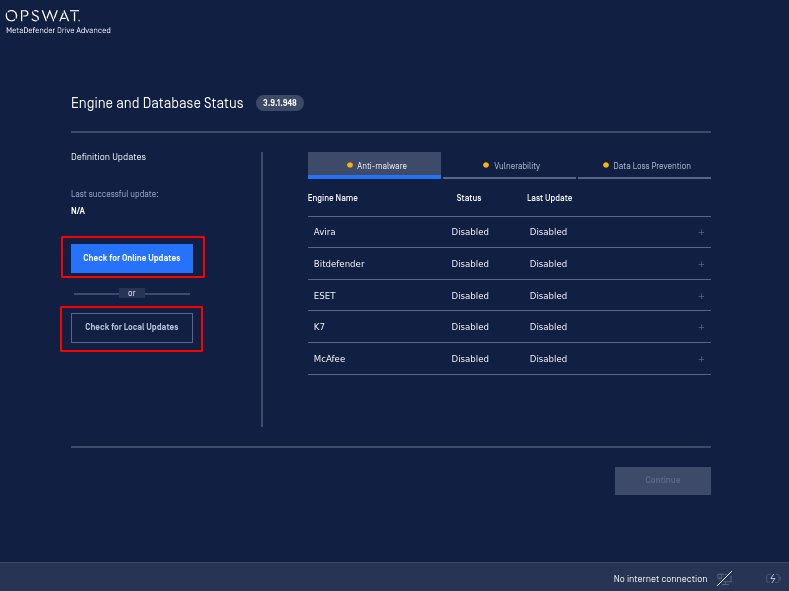
Engine and Database Status page with Disabled engines
- After triggering an update, the engine will start initiating and its status will change to Active.
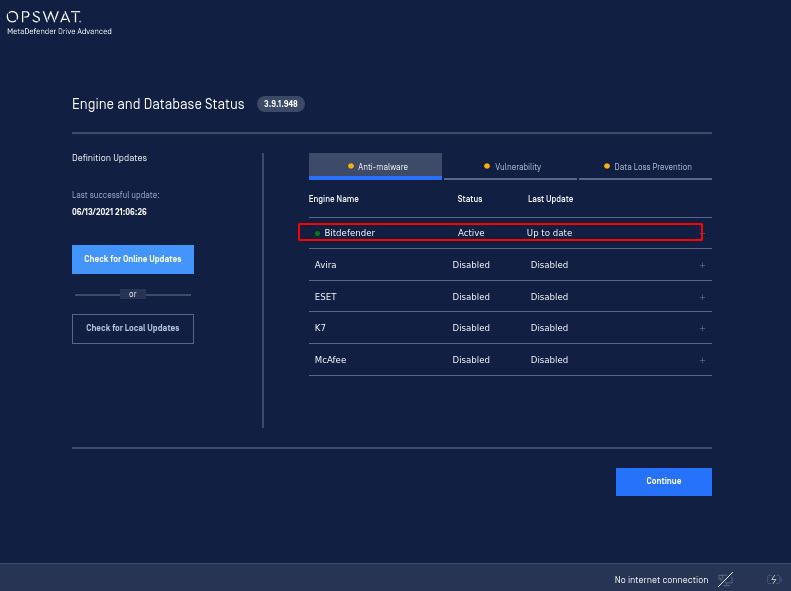
Engines are activated after an update is triggered
.
Type to search, ESC to discard
Last updated on
Was this page helpful?
Next to read:
No Wi-Fi Adapter FoundDiscard Changes
Do you want to discard your current changes and overwrite with the template?
Archive Synced Block
Message
Create new Template
What is this template's title?
Delete Template
Message
