
This article applies prior to MFT prior to 3.11.0 version.
Issue:
When using MetaDefender MFT to pull files from an SFTP server, jobs may enter a Stalled state if a connectivity interruption occurs during transfer. This behavior applies to both On-Demand and Scheduled pull jobs and is expected by application design.

A job is marked as Stalled after approximately 60 seconds without data transfer. However, this state does not always indicate a failure. In some cases, the job may still be actively processing a large file, performing backend operations, or waiting on I/O, even though no data is currently being transferred.
MetaDefender MFT does not automatically resume or retry an active SFTP pull job after a connectivity interruption. Manual user action is required to restart the job.
Troubleshooting
To minimize stalled jobs, verify the following connectivity and stability aspects between MetaDefender MFT and the SFTP server.
- Network Connectivity Validation
Ensure stable and continuous network connectivity between the two servers:
- Verify no intermittent packet loss or high latency
- Check for firewall or security appliances between servers
- Ensure required ports (default TCP 22) are consistently allowed
Recommended tests:
- Continuous ping between MFT and SFTP server - Traceroute to identify unstable network hops
- Firewall and Security Device Inspection
Firewalls, IPS/IDS, or deep packet inspection devices may:
- Terminate long-lived SSH/SFTP sessions
- Enforce idle connection timeouts
- Reset connections during file transfers
Actions:
- Review firewall session timeout values - Increase SSH/SFTP idle timeout thresholds - Whitelist MFT and SFTP server IPs if applicable
- SFTP Server Configuration Review
Confirm the SFTP server is properly configured for long-running transfers:
- SSH keepalive settings enabled
- Sufficient session timeout values
- Adequate resource limits (CPU, memory, file descriptors)
Common SSH parameters to review:
- ClientAliveInterval - ClientAliveCountMax - MaxSessions
Log Analysis Review logs on both sides:
MetaDefender MFT Logs
- Look for SFTP connection failures
- Session timeout or socket reset messages
SFTP Server Logs
- SSH disconnects
- Timeout or keepalive failures
- Forced session terminations
Cross-referencing timestamps is critical to identify the root cause.
Resolution:
To continue the transfer after ensuring the proper connectivity between two servers:
- Navigate to Jobs in the MFT UI.
- Locate the stalled job.
- Re-enable the job.
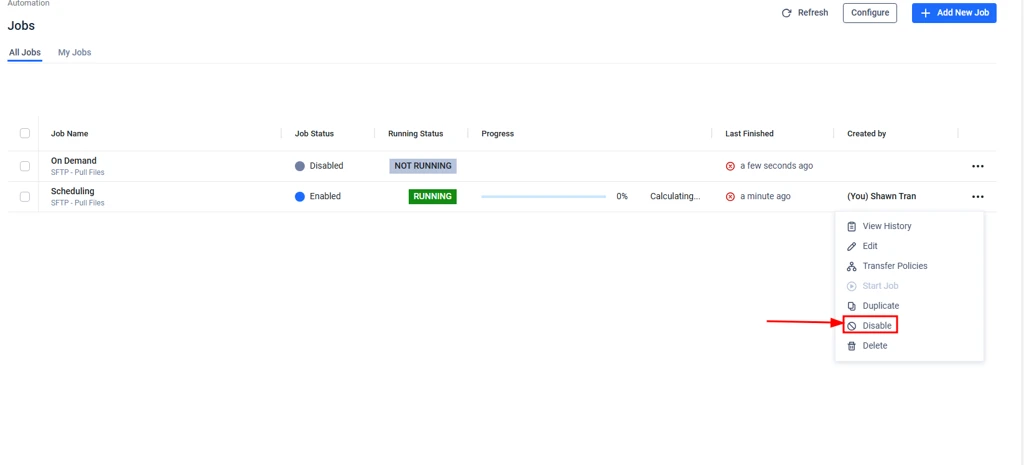
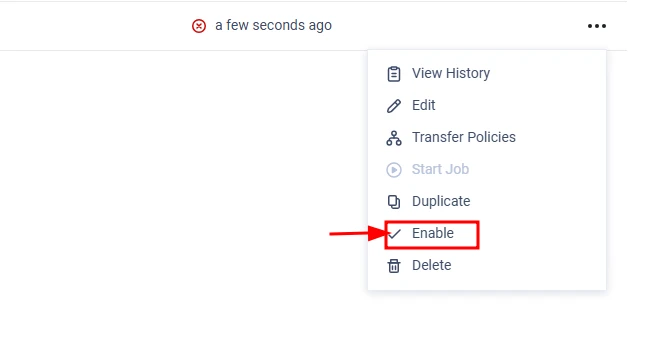
Once re-enabled:
- MFT initiates a new backend execution cycle.
- The job is restarted as a fresh execution.
- Any partially transferred files are downloaded again from the beginning.
MetaDefender MFT SFTP jobs do not support resuming. The disable/enable action restarts the job fully instead of continuing from a checkpoint.
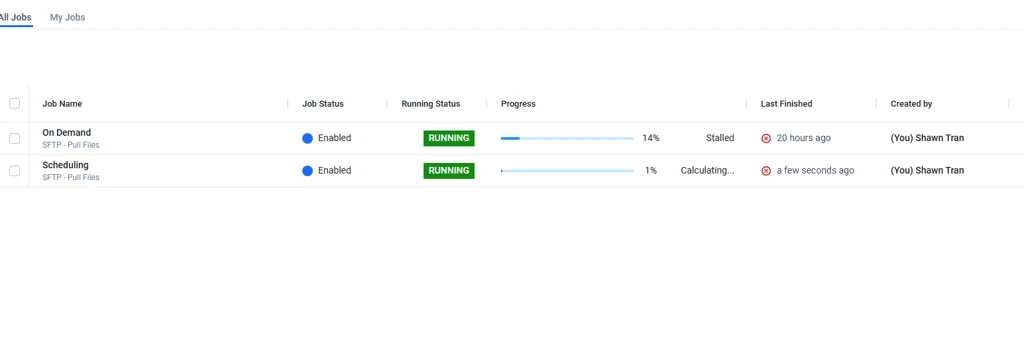
As a result - the job successfully continues and completes the download.

We are targeting to deliver an automated solution in an upcoming release after version 3.11.0.> > This enhancement will provide the following improvements:> > - The system will actively monitor stalled or inactive transfers.> - Jobs will automatically time out and fail gracefully after a defined period of no progress, rather than hanging indefinitely.> - Locked resources will be released, allowing subsequent scheduled jobs to proceed without manual intervention.
If you require further assistance, please follow these instructions on How to Create Support Package?, before creating a support case or chatting with our support engineer.

