
How does the recursion level work in MetaDefender Core?
This article applies to all MetaDefender Core version 5.0 and newer releases deployed on Windows and Linux systems.
Understanding Archive Recursion Level in MetaDefender Core
📘 Overview
The recursion level can be configured in the MetaDefender Core workflow, in the Archive tab.
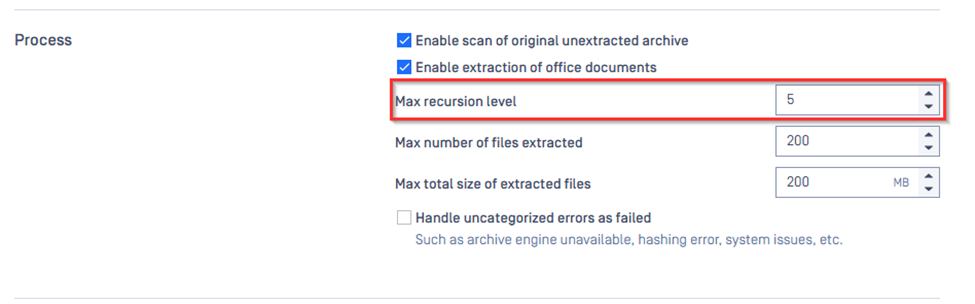
When MetaDefender Core scans files, it doesn’t just check the top-level file — it also scans inside archives (like ZIP, RAR, DOCX files). Some archives can contain other archives or files inside them. The archive recursion level setting controls how many layers deep MetaDefender Core will go to extract and scan files.
This article explains how it works.
🧩 What Is Archive Recursion Level?
Archive Recursion Level = How deep MetaDefender Core will unpack nested archives during a scan.
Archives: .zip, .rar, .7z, .tar, .gz, .docx, .xlsx, .pptx, .eml, etc.
Regular files: .txt, .jpg, .pdf, .exe, etc. — do not affect recursion level
Folders: Directory structures inside archives do not affect recursion level
! Important note:
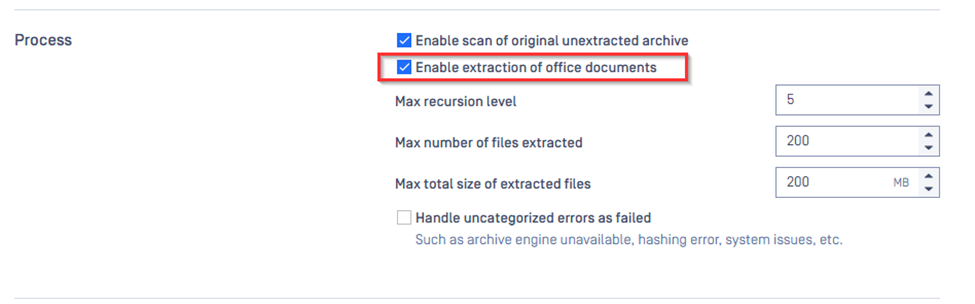
MetaDefender Core extracts the office documents by default due to the option “Enable extraction of Office Documents”. If this option is disabled, the office documents will not be extracted.
🎓 Recursion Level Breakdown
Recursion Level Description | |
|---|---|
Level 0 | The top-level archive being scanned |
Level 1 | Archives inside the first archive |
Level 2 | Archives inside level 1 archives |
Level 3 | Archives inside level 2 archives |
... | and so on... |
🧪 Detailed Example for Clarity
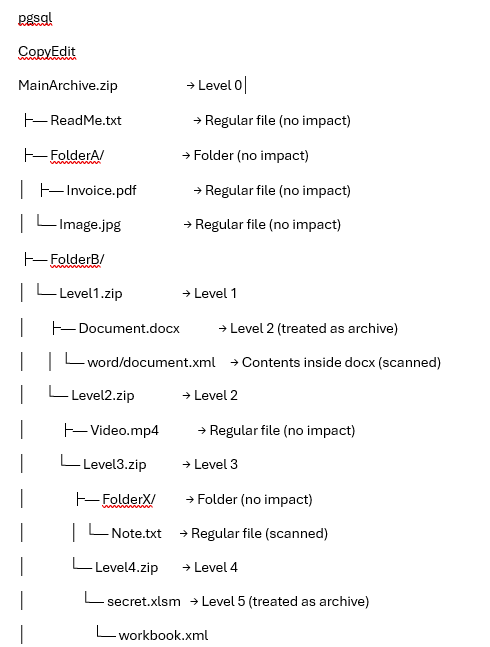
Let's say we scan the following file:
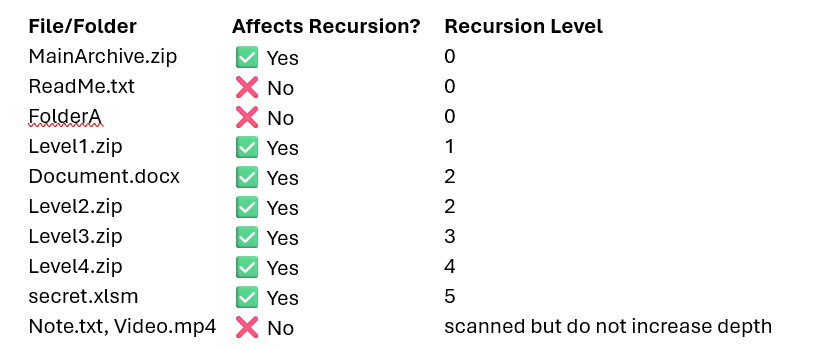
🔍 Recursion Level Impact Summary
⚠️ Important Notes
Recursion is about nested archives only.
Regular files and folders inside archives are scanned, but do not increase the recursion level.
If the recursion level limit is reached (e.g., set to 3), any deeper archives (like Level4.zip in this example) will not be extracted or scanned.
⚙️ Configuration Tip
You can set the maximum archive recursion level in the MetaDefender Core UI or configuration file:
Default: 5
Recommended:
10-30 for high-security needs
5-10 for environments needing better performance
If Further Assistance is required, please proceed to log a support case or chatting with our support engineer.