Introduction
This page provides recommended baseline configurations for a standard MetaDefender Core deployment. The goal is to offer secure, stable, and maintainable defaults that can be applied to new installations or used as a reference to validate existing environments. It focuses on three main areas:
- PostgreSQL configuration (performance, stability, SSL/TLS)
- NGINX configuration (HTTPS enablement, access restrictions, surface‑area reduction)
- MetaDefender Core internal settings (account lockout, password policy, data retention, email notifications, user roles, and proxy usage, …)
Postgres Config recommend
Remote PostgreSQL configuration recommend
Recommended baseline remote PostgreSQL settings for MetaDefender Core to balance stability, performance, and maintainability. Adjust values to your environment size (connections, RAM, workload) and monitor over time. You can apply these metrics for postgresql.conf
max_connections 100shared_buffers 128MBmax_wal_size 2GBmin_wal_size 80MBlogging_collector onlog_file_mode 0640work_mem 100MBmaintenance_work_mem 200MBautovacuum_vacuum_threshold 100000autovacuum_vacuum_scale_factor 0log_min_duration_statement 200The recommendation above applies primarily to remote PostgreSQL deployments. For bundled PostgreSQL that ships with MetaDefender Core, the corresponding configuration is already handled by the installer and default setup.
For some settings related to the hardware resources like work_mem , maintenance_work_mem (RAM), max_wal_size (disk), etc. You can adjust those setting to match with your current system.
PostgreSQL SSL
Enable SSL/TLS for connections between MetaDefender Core and PostgreSQL to encrypt credentials, queries, and results in transit, protect against eavesdropping on the network, and meet compliance requirements for data-in-transit encryption.
Enabling SSL introduces additional CPU overhead for connection setup and encryption, which can have an impact on database performance.
For more details, please check: SSL connection for bundled PostgreSQL
NGINX Config recommend
Enable HTTPS
For more details, please check: Enabling HTTPS
Enabling HTTPS encrypts all traffic between clients and MetaDefender Core, ensuring data confidentiality and integrity in transit.
Use TLS 1.3 for stronger security, faster handshakes, and modern cipher suites. Disable older protocols (TLS 1.2 and below) unless strict compatibility is required.
Restrictions
Apply additional NGINX security restrictions to limit which hosts, clients, and referrers can access MetaDefender Core. These rules help reduce attack surface by only allowing trusted domains, blocking abusive user-agents, filtering referrer spam, and denying access to sensitive APIs.
For more details, please check: Nginx configurations
- Only allow access to our domain only - Restrict access so that only the allowed MetaDefender Core domains can reach this service. Any request with a different Host header is immediately dropped with status code 444 (no response), which helps reduce attack surface and prevent abuse through unauthorized virtual hosts.
if ($host !~ ^(metadefendercore.in|www.metadefendercore.in|images.metadefendercore.in)$ ) { return 444;}- Deny certain user-agents - Block abusive or unwanted user-agents such as automated scanners, generic download tools, and known spam bots that may overload or probe your server for vulnerabilities. The following rules return HTTP 403 for matching user-agents to reduce noise, protect resources, and keep logs cleaner.
## Block download agents ##if ($http_user_agent ~* LWP::Simple|BBBike|wget) { return 403;}## ## Block robots ##if ($http_user_agent ~* msnbot|scrapbot) { return 403;}##- Block referral spam - Block requests that come from unwanted external websites (referrer spam). Only direct access or requests from legitimate pages are allowed; any request whose
Refererheader matches the patterns below is rejected with HTTP 403 to reduce spam traffic and potential malicious redirects.
## Deny certain Referers ###if ( $http_referer ~* (babes|forsale|girl|jewelry|love|nudit|organic|poker|porn|sex|teen) ) { return 403;}##- Block particular APIs - Deny direct access to sensitive administration endpoints that should never be exposed over the public interface. The following rule blocks requests to
/admin/config/sessionwith HTTP 403, reducing the risk of brute-force, session manipulation, or misconfiguration via HTTP calls.
## Block particular api ###location ~ "^/admin/config/session$" { return 403;}##MetaDefender Core recommend settings
Account lockout
Configure lockout thresholds to slow down brute-force attempts while minimizing impact on legitimate users. Use a low retry limit and a short, temporary lockout to balance security and usability.
Account lockout settings are accessible under Users Management > Roles tab
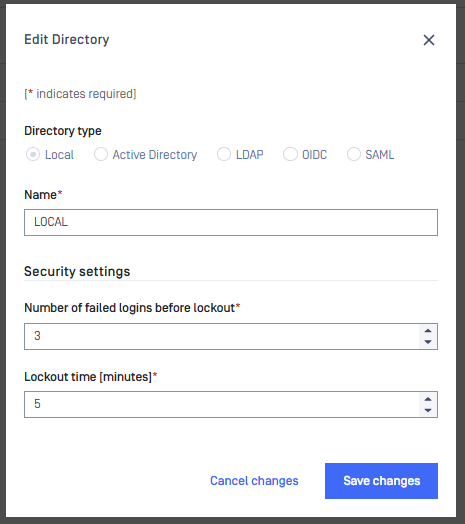
Only LOCAL/SYSTEM users have account lockout.
Password policy
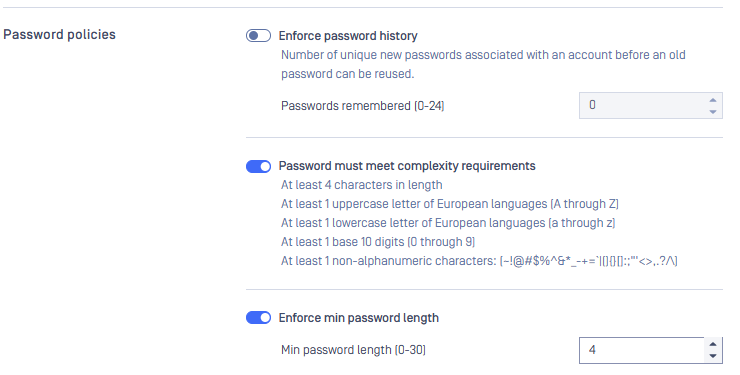
Define a minimum password complexity to protect local MetaDefender Core accounts from guessing and brute-force attacks. Use the following baseline policy as a secure default and tighten it further if your organization has stricter compliance requirements.
Password policies settings are accessible under Settings > Security tab
Session policy
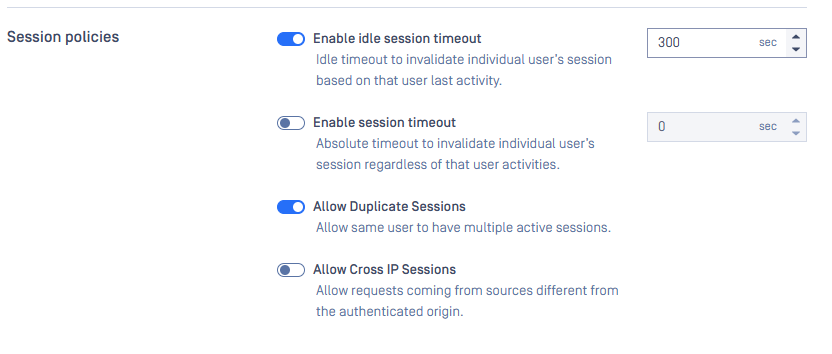
Configure session timeout and idle limits so that unused authenticated sessions are closed automatically, reducing the risk of account misuse on shared or unattended workstations. Set shorter timeouts for environments with stricter security requirements.
For more details, please check: Session Policy
Session Policy settings are accessible under Settings > Security tab
Secure API key
Store API keys in an encrypted form in the database to limit exposure in case of data leakage, unauthorized access, or backup compromise. Use strong encryption algorithm, protect encryption keys with strict access controls.
Only LOCAL/SYSTEM users have API key
Secure API key settings are accessible under Settings > Security tab

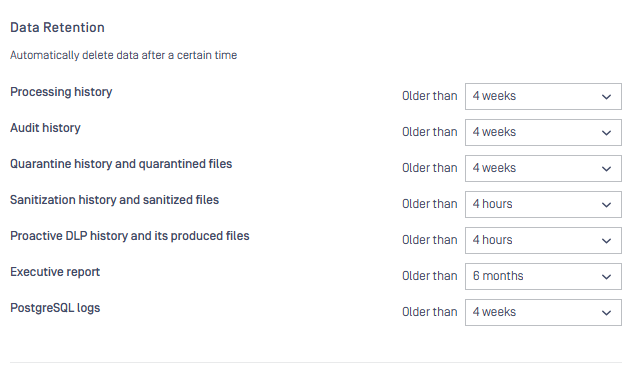
Data retention
Define how long different data types are kept in MetaDefender Core before automatic cleanup.
These retention rules help control storage growth, reduce liability, and keep the system performant while preserving the information needed for auditing and troubleshooting.
Data Retention settings are accessible under Settings > Data Retention tab
Email notification
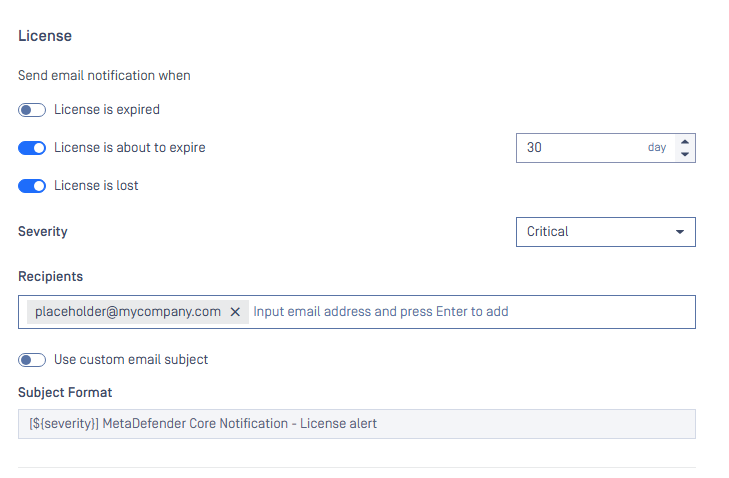
Configure alert emails for key system events so administrators are notified before issues impact service. Use the recommended thresholds and frequencies below (license, disk space, engine updates, certificates) to balance timely warnings with minimal noise.
| Notification type | Condition / Option | Recommended value |
|---|---|---|
| License | License is about to expire | 30 days |
| License check frequency | 4 hours | |
| Disk space | Disk space threshold | 80% |
| Engine Update | Engine remains outdated for | 7 days |
| Certificate | Certificate is about to expire | 30 days |
Email notification settings are accessible under Settings > Email Notification tab
Hardening External Scanner and Post Action
Apply additional hardening for external scanners and post-action integrations to prevent abuse, credential leakage, or data exfiltration through these components. Follow the security recommendations in the official guide and enable only the scanners, post actions that are strictly required for your workflows.
For more details, please check: Hardening External Scanner and Post Action feature
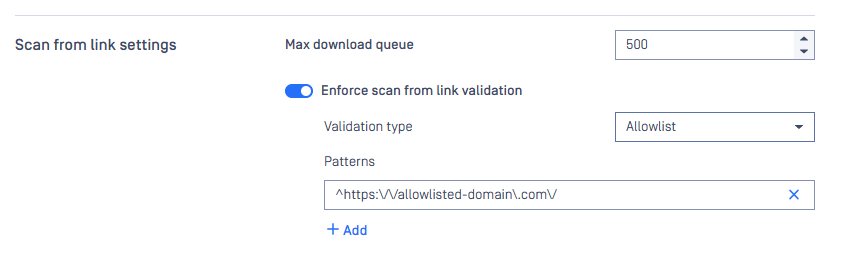
Enforce scan from link validation: use allowlist over blocklist
When enforcing scan-from-link validation, prefer an allowlist-based approach. Only permit downloads from explicitly trusted domains or URLs and block everything else by default. This reduces the risk of users downloading files from malicious or typo squatted domains that are not yet known or listed as blocked.
For more details, please check: Scan from link settings
Enforce scan from link validation settings are accessible under Settings > Security tab
Encryption quarantined files
Enable encryption for files stored in Quarantine so that, even if the underlying storage or backups are accessed by an unauthorized party, the quarantined payloads remain unreadable. Use strong, modern encryption algorithm, protect keys carefully and ensure only strictly necessary roles can download or decrypt quarantined items.
For more details, please check: Encryption for Quarantined Files
Encryption quarantined files settings are accessible under Settings > Security tab

Request rate limiting
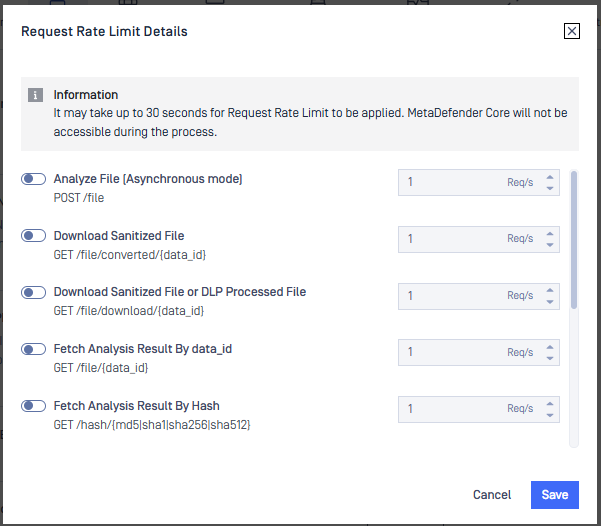
Configure request rate limits for result‑fetching APIs (for example, GET /file/{data_id} and GET /file/{batch_id}) to prevent excessive polling from draining MetaDefender Core resources and degrading scan performance. Without rate limiting, high‑frequency GET requests can starve scanning and processing. From MetaDefender Core 5.13.0 onward, you can set per‑API limits and use webhooks (callbackurl) to avoid constant polling.
Set reasonable per‑second limits for result‑fetching APIs to balance system performance and how quickly clients receive results.
Prefer webhook callbacks when throughput and performance are top priority, so MetaDefender Core pushes results when ready instead of clients polling frequently.
For more details, please check: Request Rate Limit
Request Rate Limit settings are accessible under Settings > Security tab