
Introduction
The TCP protocol guarantees delivery and avoids data loss. But TCP Protocol handshaking and control requires bi-directional communications between the initiating TCP Data Sender and the responding TCP Data Receiver. This bi-directional communication is not possible with the MetaDefender Diode X because a Data Diode, by definition, implements physically enforced one-way communication.
We will explain how the Diode X handles these situations and what strategies have been implemented to minimize data loss. We will explain how to configure streaming protocols on Diode X. The streaming connector supports TCP and UDP (unicast and multicast), Syslog (TCP and UDP) and HTTP.
TCP in a one-way environment
The Source (BLUE) side of the Diode X establishes a Read TCP connection with the specified data source on the Sender network and reads data from the data source. The data (payload only) is transmitted across the fiber optic link in a proprietary non-routable packet format to the Destination (RED) side of the Diode X. The RED side of Diode X establishes a Write TCP connection with the specified data destination on the Receiving network and then streams the data from RED via TCP to the specified destination.
If the RED side is not able to transmit data to its specified destination as quickly as the BLUE side is transmitting or if there is a RED side network outage, then RED must buffer that data. If the situation persists, then RED will be overrun with data as it runs out of buffer space. Buffer overrun results in data loss.
Several mechanisms can be implemented to reduce data loss due to buffer overrun:
Control of the bit rate for a TCP Stream on BLUE.
Control of the buffer size for a TCP Stream on RED.
These mechanisms are available on the Optical Diode User Interfaces on both the BLUE and the RED appliances.
Bit Rate Control
A TCP Stream or a collection of TCP Streams configured for a given TCP Port connection on BLUE can be constrained to a specific bit rate. This slows down the transmission rate of data across Diode X and alleviates potential data loss due to overrun on RED.
Bit Rate Control is configured using the Diode X User Interface on the BLUE side. Having smaller bitrates can alleviate data overruns however data transfer can be slower as well.
Buffer Size Control
All TCP data transmitted from BLUE to RED is accumulated in a buffer on RED. Each TCP Stream or a collection of TCP Streams configured for a given TCP Port connection on RED has its own buffer. Each buffer entry is a block of data, where the block ranges from one to several thousand bytes.
Buffer size is configured using the Diode X User Interface on the RED side. The default size of the buffer is 5000 entries and the size of an entry can be from 1 to 9000 Bytes.
Prerequisites
A security dongle must be inserted in the BLUE and RED servers to change configuration.
Before you configure any transfer parameters:
Ensure that the Optical Diode BLUE and RED network addresses are configured.
Ensure the current license and personality are uploaded.
Streams must be configured on both the BLUE and RED sides.
Diode X BLUE
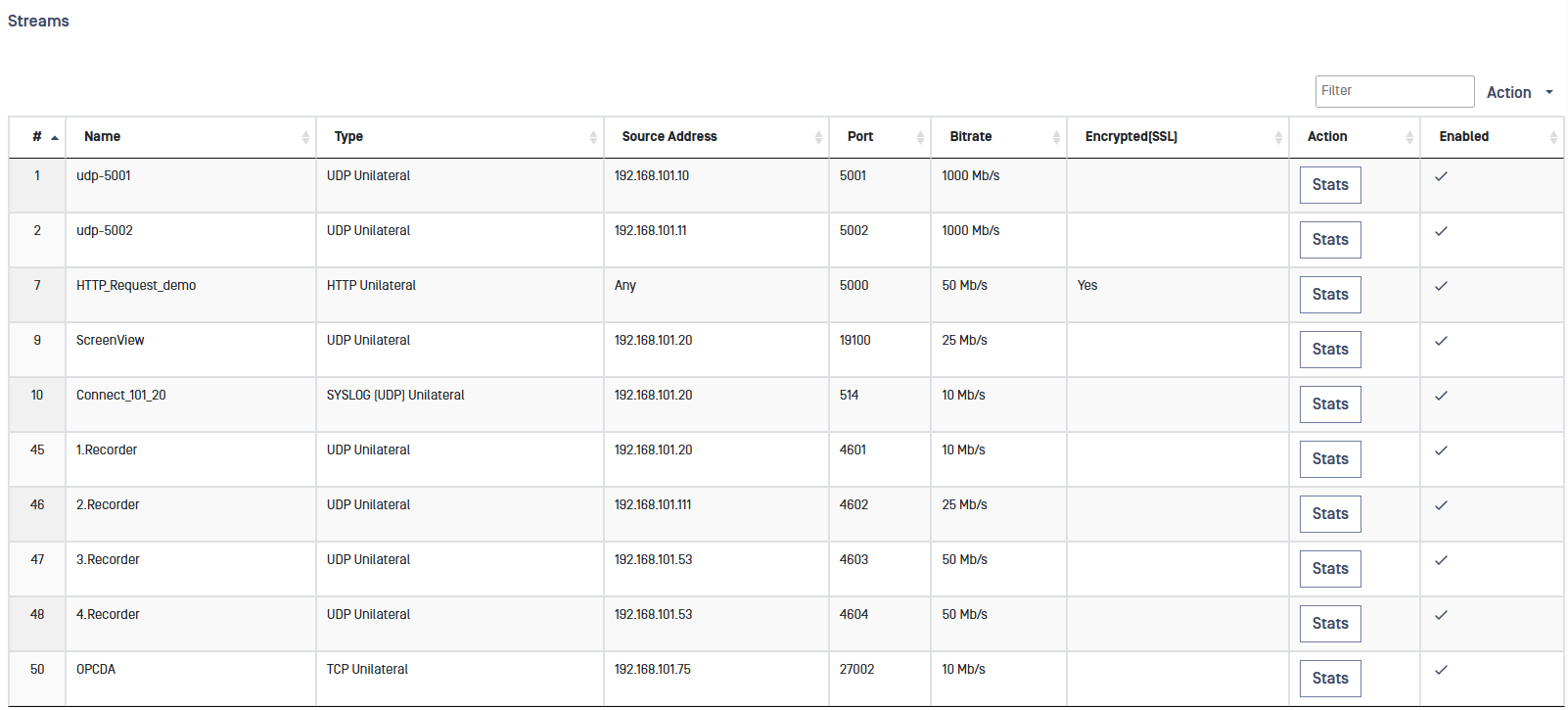
Click the Streams link and then click on the Action button. Click on the type of stream (HTTP, Syslog, TCP or UDP) to be configured.
Complete the following:
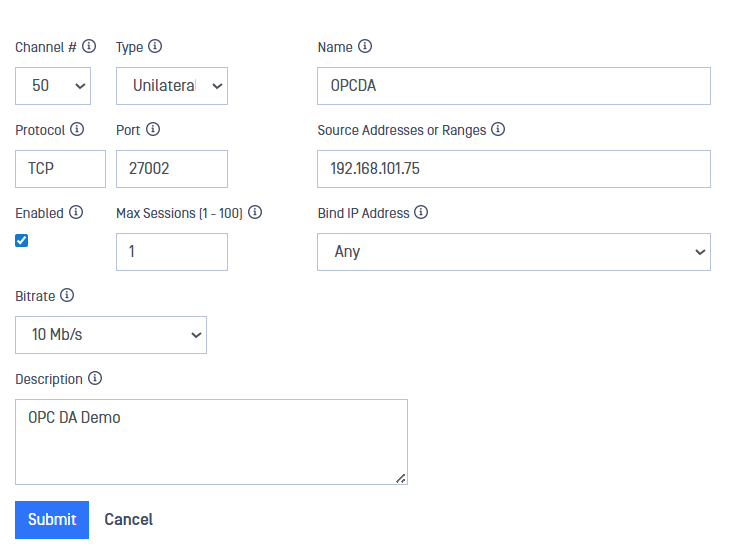
Channel: Assign a channel number. The channel number assigned must be the same on both the BLUE and RED sides.
Type: Type of stream being tracked. Unilateral is the only option available on Diode X.
Name: Friendly name of the stream
Protocol: Protocol of the stream. This is preselected according to the stream selected.
Port: Port number to listen on.
Source Addresses: IP address(es) in the BLUE zone where the stream will originate. If you are entering more than one address, separate the addresses with a semicolon.
Enabled: Checkbox to enable/disable the stream.
Max Sessions: Maximum number of sessions for the stream. Max session is not utilized for UDP streams.
Bind IP Address: IP address that the stream will bind to. The IP addresses displayed in the dropdown list are the IPs configured under Advanced > Networking > IP Addresses. Default value is Any. For UDP Multicast, select Multicast from the drop down menu then key in the Multicast IP in the Multicast address field.
Bitrate: Maximum bitrate that BLUE side will reach for this stream. This is used to tune the bitrate in the event of overload on the RED side.
Description: User-friendly description
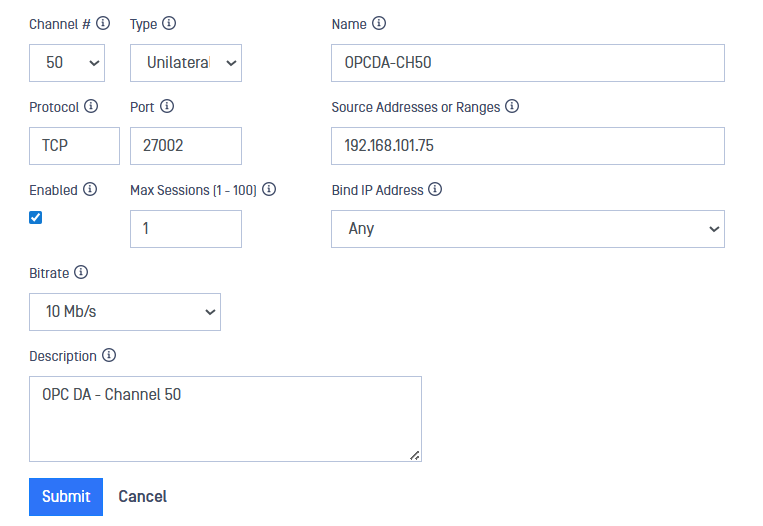
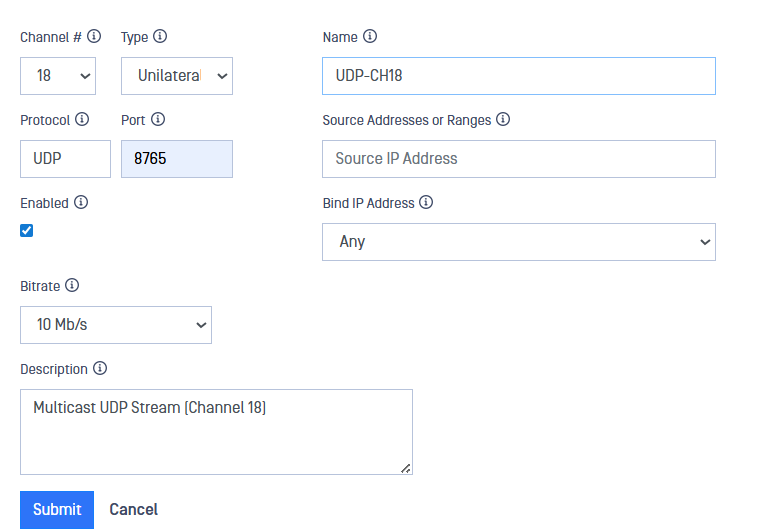
After filling in the fields, click on the Submit button to save configuration.
Diode X RED
Click the Streams link and then click on the Action button. Click on the type of stream (HTTP, Syslog, TCP, UDP) to be configured.
Complete the following:
Channel: Assign a channel number.
The channel number assigned must be the same on both the BLUE and RED sides.
Type: Type of stream being tracked. Unilateral is the only option available on Diode X.
Name: Friendly name of the stream
Protocol: Protocol of the stream. This is preselected according to the stream selected.
Destination port: Port number of the destination IP.
Destination address: IP address in the RED zone where the stream will terminate. You can enter only one address.
Terminate on Failure (TCP & HTTP only): Checkbox controls what happens in the event of data overrun. When the box is checked, the relevant connection on RED will be closed, all data buffers discarded and a new connection re-opened to allow for synchronization recovery. If left unchecked, the relevant connection remains intact and communication continues after the data buffers have been discarded.
Max Buffer Items (TCP & HTTP only): select the size of the buffer items queued on RED. For high speed streams, a larger buffer is preferred in order to avoid data overruns. Please, note that buffering data consumes memory.
Enabled: checkbox to enable/disable the stream.
Description: user-friendly description.
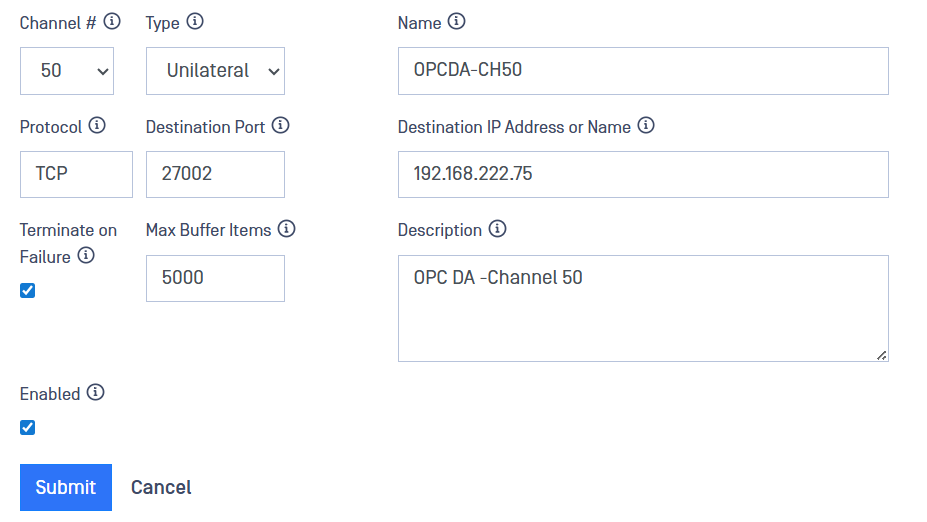
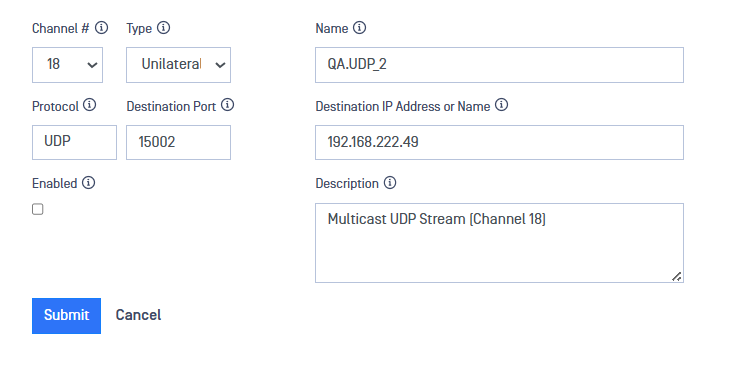
After filling in the fields, click on the Submit button to save configuration.
Modify a stream
In the Streams section, click on the stream to be modified. Modify the Stream and click Submit to save the changes.
Syslog Over SSL/TLS
Diode X BLUE
Create/Import SSL/TLS Credentials
Navigate to: Advanced>Encryption>SSL/TLS Credentials.
Select "Create Local Keypair" or "Import Keypair".
Fill in the associated fields for Create or Import Keypair.


Configure Syslog Over SSL/TLS Stream
Click the Streams link and then click on the Action button. Click on Add Syslog TCP.
Complete the following:
** Channel: Assign a channel number. The channel number assigned must be the same on both the BLUE and RED sides.
Type: Type of stream being tracked. Unilateral is the only option available on Diode X.
Name: Friendly name of the stream
Protocol: Protocol of the stream. This is preselected according to the stream selected.
Port: Port number to listen on.
Source Addresses: IP address(es) in the BLUE zone where the stream will originate. If you are entering more than one address, separate the addresses with a semicolon.
Enabled: Checkbox to enable/disable the stream.
Max Sessions: Maximum number of sessions for the stream. Max session is not utilized for UDP streams.
Certificate: Select a certificate to enforce SSL for the stream. The certificate is defined in Configuration>Settings>Certificates.
When configuring multiple Syslog streams the certificate must be the same for all streams.
Bitrate: Maximum bitrate that BLUE side will reach for this stream. This is used to tune the bitrate in the event of overload on the RED side.
Description: User-friendly description

Diode X RED
Click the Streams link and then click on the Action button. Click on Add Syslog TCP.
Complete the following:
Channel: Assign a channel number.
The channel number assigned must be the same on both the BLUE and RED sides.
Type: Type of stream being tracked. Unilateral is the only option available on Diode X.
Name: Friendly name of the stream
Protocol: Protocol of the stream. This is preselected according to the stream selected.
Destination Syslog Address: IP address in the Red zone where the stream will terminate. Up to three IP Addresses are supported.
Enabled: Checkbox to enable/disable the stream.
Port: Port number of the syslog address. Default is 514. Range: 1- 65535.
Protocol: Protocol of destination IP/Port. Default TCP.
SSL Checkbox: Check to enable SSL on the connection. A CA certificate is needed, located under Advanced>Encryption>X509 Certificates. All certificates defined within Advanced>Encryption>X509 Certificates are deemed as valid.
