Configuration
v1.8.1/2.3.1
Search this version
Configuration
Configuration
Title
Message
Create new category
What is the title of your new category?
Edit page index title
What is the title of the page index?
Edit category
What is the new title of your category?
Edit link
What is the new title and URL of your link?
Software Updates
Copy Markdown
Open in ChatGPT
Open in Claude
Please, notice that the process to update from 1.7.X to 2.3.0 is different than the normal process explained in this section. Please, refer to support in order to update to version 2.3.0.
A security dongle must be inserted in the server that you want to change, RED or BLUE. Both sides, BLUE and RED, are updated independently.
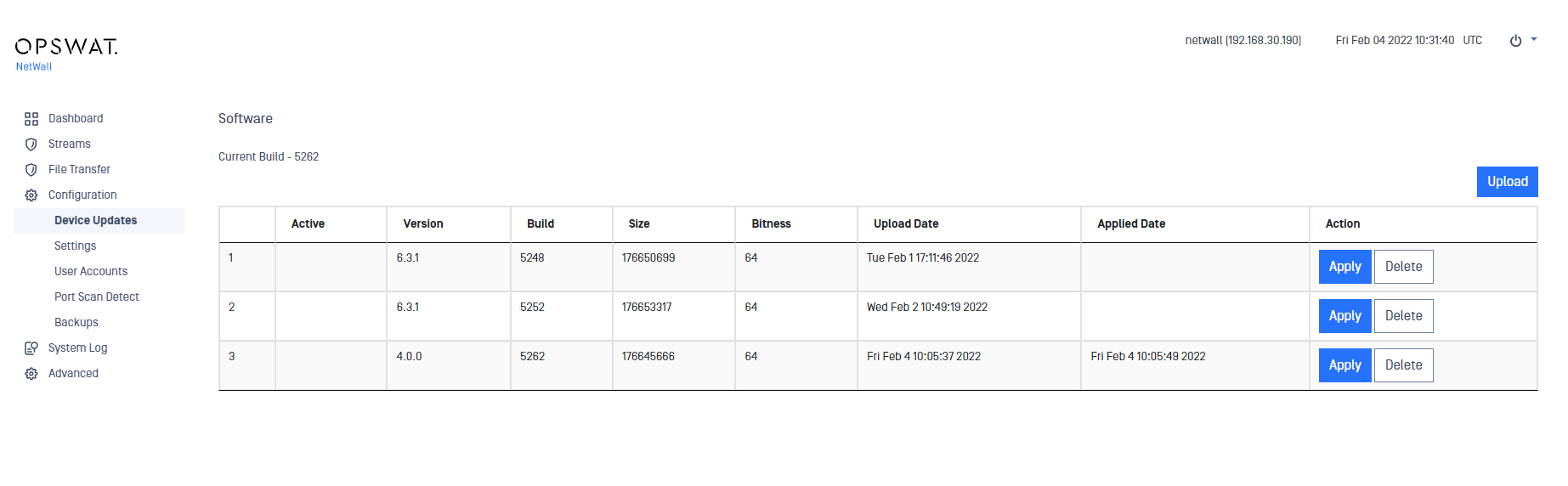
You can easily update the software from the management UI.
- Login using right credentials in the management UI
- Go to Configuration-> Device Updates
- Click on Upload button
- Select a valid personality and click on Upload Package
- Then click on Apply button, the system needs to reboot to apply the personality, continue by clicking on Apply and Reboot
Type to search, ESC to discard
Last updated on
Was this page helpful?
Next to read:
System LogDiscard Changes
Do you want to discard your current changes and overwrite with the template?
Archive Synced Block
Message
Create new Template
What is this template's title?
Delete Template
Message
