
GetProductVulnerability (method ID 50505) reports which CVEs exist on an endpoint and which Windows KB addresses each one. GetLatestInstaller (method ID 50300) reports which update the endpoint should install next. The KB numbers in the two responses are often different, because Microsoft rolls older fixes into newer cumulative updates, and both are correct. This article explains what each method returns and how to read the two together.
This article applies to Windows OS vulnerabilities on the system signature 1103. Third-party applications, macOS and Linux use different mapping keys.
What each method returns
GetProductVulnerability (50505) reports the CVEs detected on the endpoint for its OS version and build. For each CVE, the details.resolution object carries:
patches[]: the direct KB, the KB Microsoft published as the fix for this CVE. Itsinstallableflag says whether that KB can be applied on this endpoint.remediation_patches[]: the optimal KBs to deploy to close this CVE, each with aninstall_order. This list already accounts for supersedence (a newer cumulative update that contains the fix) and prerequisites (a servicing stack or checkpoint update that must be installed first). It is returned when the request setsinclude_remediation_patches: true.advisory_url: the Microsoft advisory link for the CVE.
GetLatestInstaller (50300) reports the next update the endpoint should install:
security_update_id: the optimal KB the SDK will install, the latest cumulative update applicable to the endpoint.analog_id: the unique identifier of that patch.urlandexpected_sha1[]: the download link and hash of the installer.
The two methods cover each other. GetLatestInstaller always returns the optimal KB. GetProductVulnerability shows both the direct KB and the optimal KB, in patches[] and remediation_patches[] respectively, so a CVE can be tied to what fixed it and to what should be installed in one response.
How the workflow fits together
One scan, one resolve, one install, one re-scan. GetProductVulnerability finds the CVEs and names the KBs. GetLatestInstaller turns those KBs into the update the endpoint will accept. InstallFromFiles (method ID 50301) installs it. A fresh GetProductVulnerability scan proves the CVE is closed.
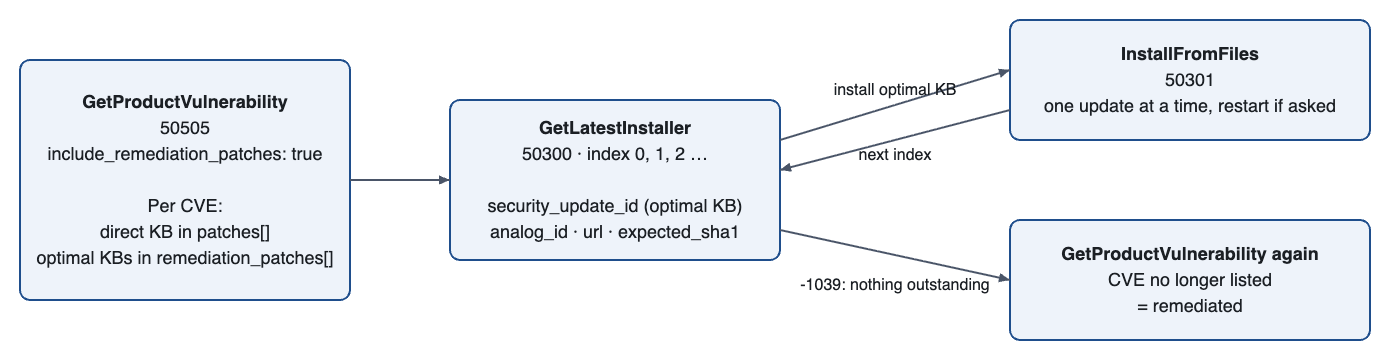
Workflow at a glance: GetProductVulnerability (50505) → GetLatestInstaller (50300, index 0) → InstallFromFiles (50301) → GetLatestInstaller (next index) … repeat until it returns -1039 → GetProductVulnerability again to verify the CVE is gone.
The loop in the middle exists because prerequisites such as servicing stack and checkpoint updates are evaluated against the endpoint's current state. The next update in the chain becomes visible only after the previous one is installed.
Scan. Call
GetProductVulnerabilitywithsignature: 1103andinclude_remediation_patches: true. For each CVE, record the direct KB frompatches[], itsinstallableflag, and the optimal KBs fromremediation_patches[]ininstall_order.Resolve. Call
GetLatestInstallerwithsignature: 1103,index: 0. The response gives the optimal KB (security_update_id), theanalog_id, and the downloadurlwithexpected_sha1[].Install. Call
InstallFromFileswith the optimal KB. Install one update at a time, ininstall_order, and restart when the return code asks for it.Repeat. Call
GetLatestInstallerwithindex: 1, 2, …and install each result until it returnsWA_VMOD_ERROR_OUT_OF_RANGE(-1039), which means nothing is outstanding.Verify. Run
GetProductVulnerabilityagain. A CVE that no longer appears is remediated. An install return code alone does not close a CVE.
Worked example
CVE-2024-38081 was fixed by KB5039893, which Microsoft later superseded with KB5041019. Both KBs close the CVE; KB5041019 is the one to install.
Scan request:
Scan response, one CVE, trimmed:
Resolve request:
Resolve response, trimmed:
KB5039893 is the direct KB for CVE-2024-38081; KB5041019 is the optimal KB, and both responses agree on it. Install KB5041019; it contains KB5039893, so the CVE disappears on the next scan.
Response patterns in remediation_patches
KB numbers are illustrative.
Pattern |
|
|
|---|---|---|
Single KB, nothing newer | KB5021234 | 1. KB5021234 |
Superseded: KB5021234 replaces KB5010001 | KB5010001 | 1. KB5021234 |
Supersedence chain: KB5002000 → KB5001000 → KB5000001 | KB5000001 | 1. KB5002000 (latest only) |
Prerequisite needed | KB5021234 | 1. KB5008000 2. KB5021234 |
Two independent fixes | KB5008000, KB6009000 | 1. KB5008000 2. KB6009000 |
Superseding KB needs a checkpoint update first | KB5010001 | 1. KB5008000 (checkpoint); KB5021234 appears on the next scan after it is installed |
If Further Assistance is required, please proceed to log a support case or chatting with our support engineer.