
Background
When upgrading a product to a new version, some products may require either an OS restart (reboot) or an application restart to complete the upgrade.
On the endpoint, if a product requires a restart to complete the upgrade, the SDK reports this requirement to the agent software by:
Returning the special success code
WA_VMOD_INSTALLATION_NEED_RESTART (1003).Setting the flag
require_restartto1in the output of theInstallFromFiles (50301)API.
On the server side, customers can check the restart requirement using the requires_reboot field in patch_aggregation.json. Supported values are:
"yes"- A restart is required."no"- Does not require any restart."maybe"- A restart may be required, depending on runtime conditions.
Problem
Currently, the SDK uses a single return code WA_VMOD_INSTALLATION_NEED_RESTART (1003) to indicate all restart scenarios (both OS and Application restarts). This makes it difficult for our customers to recommend the appropriate action to their end users.
As a result, this limitation may lead to unnecessary OS reboots or incomplete upgrades if the correct action is not taken.
Solution Overview
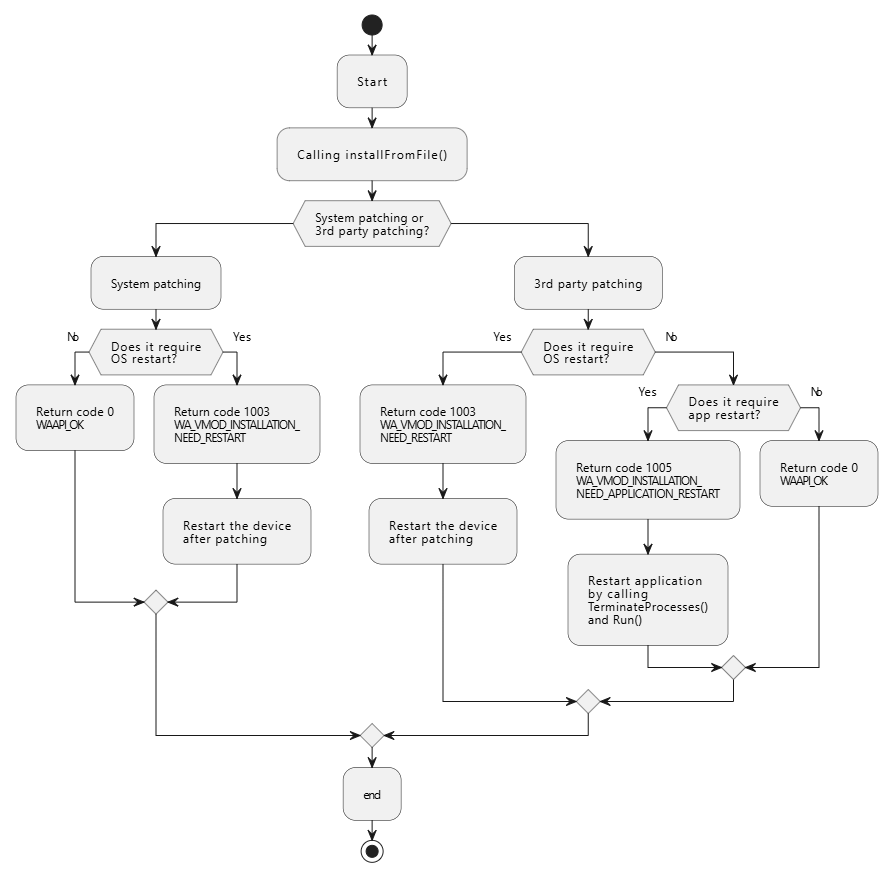
Introduce a new return code WA_VMOD_INSTALLATION_NEED_APPLICATION_RESTART (1005) to indicate that an application restart is required.
The existing return code, WA_VMOD_INSTALLATION_NEED_RESTART (1003), will be used exclusively to indicate an OS restart.
The workflow for Checking Restart Requirements:
The list of applications that are compatible with the new success code WA_VMOD_INSTALLATION_NEED_APPLICATION_RESTART (1005) :
Platform | Application |
|---|---|
Windows | Microsoft Edge |
Google Chrome | |
Mozilla Firefox | |
VMWare Workstation | |
7-Zip | |
GoToMeeting | |
iTunes | |
Microsoft .NET Core Runtime 2.1 | |
Microsoft .NET Core Runtime 3.1 | |
Microsoft ASP.NET Core 2.1 | |
Microsoft ASP.NET Core 3.1 | |
macOS | 8x8 Work |
Compatible SDK Version
Windows: 4.3.5434 or later
Windows V3V4 Adapter: 4.3.3552 or later
Mac: 4.3.4881 or later
Mac V3V4 Adapte: 4.3.3473 or later
Linux: 4.3.4481 or later
Linux V3V4 Adapte: 4.3.3462 or later