
Overview: Process/DLL architecture at a glance
OESIS is a native Windows library that your application loads directly into its own process. There is no separate SDK service process for the core API.
Your application loads exactly one entry-point DLL, libwaapi.dll, which exposes the public C API:
wa_api_setupwa_api_invokewa_api_freewa_api_register_handlerwa_api_unregister_handlerwa_api_teardown
Those six are the entire exported surface. Anything else you find in the SDK package is internal.
Two support libraries — libwautils.dll (shared utilities) and libwaheap.dll (shared-heap helper) — must reside in the same directory. Windows loads them at the same moment it loads libwaapi.dll, before any SDK code runs, so both must be present before you call anything.
Everything else is modular: each SDK feature ships as its own module DLL. The SDK loads all of them during wa_api_setup. There is no on-demand or lazy loading. Your process's baseline memory and handle footprint therefore reflects every feature that is licensed and deployed, not just the subset you call.
Some features additionally use a separate helper process for out-of-process work. It ships as three architecture-specific executables, and there is no unsuffixed variant:
wa_3rd_party_host_32.exewa_3rd_party_host_64.exewa_3rd_party_host_ARM64.exe
The SDK picks the executable matching the architecture a given feature needs, so more than one of these can be running at the same time.
Furthermore, there is one more helper process for libwaremoval named rm.exe. Helpers start when a feature first needs them, stay running for the rest of the SDK session, and exit during teardown. Expect one or more long-lived child processes while the SDK is initialized, and use these exact names when you build antivirus exclusions or EDR allowlists.
Lifecycle Diagram
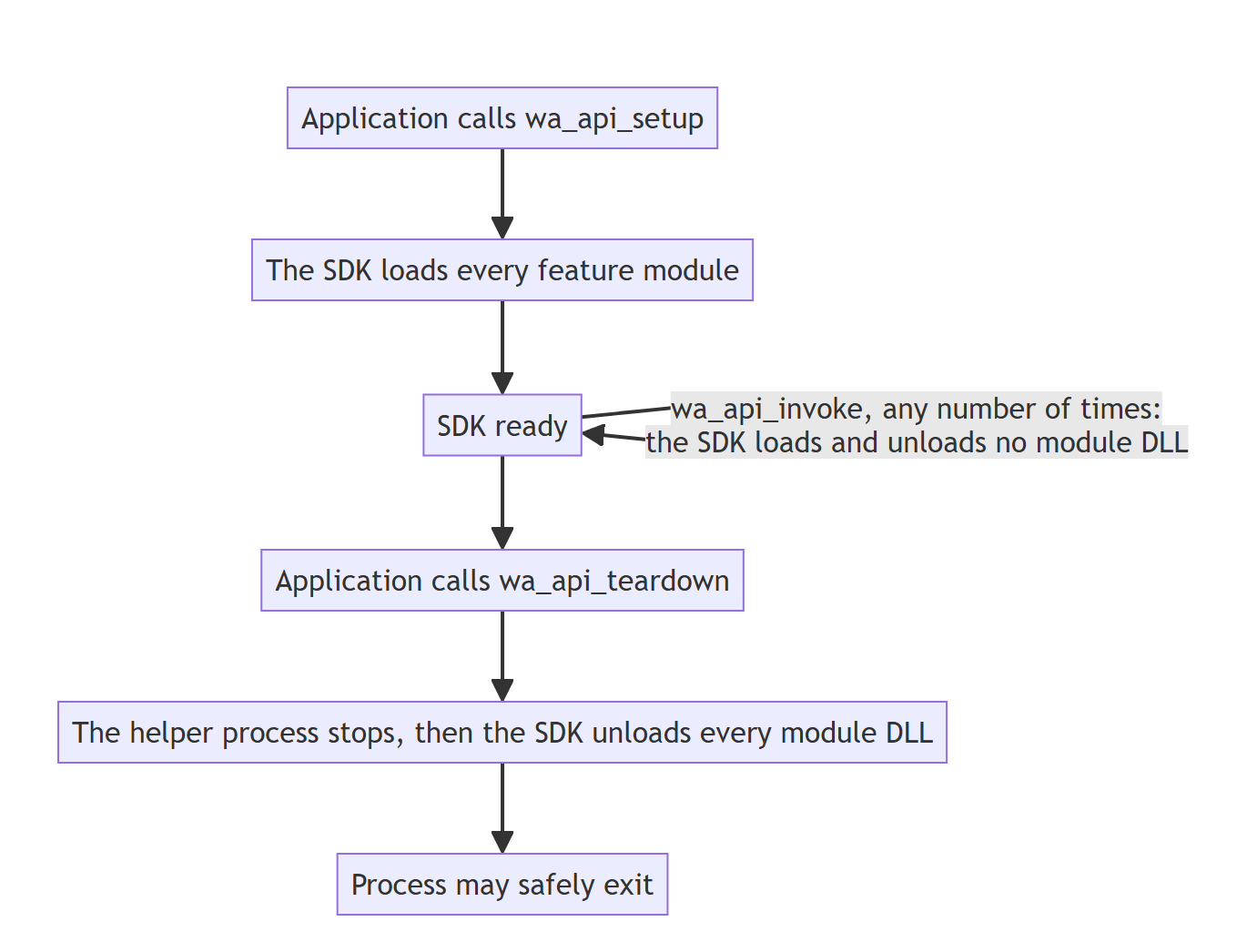
Read this before you integrate
Call wa_api_teardown on the same thread that called wa_api_setup, and before your process starts exiting — never from DllMain, an atexit handler, or a signal/exit handler. The SDK cannot detect a violation of either rule and returns no error code for it; it reaches you as an intermittent crash at process exit.
DLL unloading behavior (teardown) explains why, and checking your code against these rules gives you the assertions.
DLL loading behavior
Loading the SDK files
Your application loads one file explicitly: libwaapi.dll. Windows loads libwautils.dll and libwaheap.dll at the same moment, because libwaapi.dll depends on them, not because wa_api_setup needs them.
That distinction matters for troubleshooting. If either support file is missing, libwaapi.dll cannot be loaded at all, and the failure happens inside Windows before any SDK code runs. In these cases, Windows returns a system error, and no SDK-specific error code is generated.
You see it either as a failing LoadLibrary call, or as a process that will not start if you link the SDK statically.
What to check: the Windows error (
GetLastError, the loader error dialog, or the Windows
event), and that all three files are present in your deployment path.
When feature modules load
Every feature ships as its own module DLL, and the SDK loads all of them during wa_api_setup, not on first use. There is no on-demand or lazy loading. Your process's baseline memory and handle footprint therefore reflects every feature that is licensed and deployed, not just the subset you call.
Once loaded, a module stays loaded for the rest of the session and is reused by later calls to the same feature. There is no per-call load and unload cycle.
wa_api_invoke loads no SDK DLL. It routes each call to the feature that owns the method you asked for. Windows may still load its own libraries on a feature's behalf — when a feature uses COM or WMI, for example — but the SDK loads and unloads nothing of its own during a call.
Initializing with wa_api_setup
wa_api_setup brings the SDK up and loads the feature modules. It returns one code for initialization as a whole.
Code | Message | Meaning |
|---|---|---|
|
| Initialization succeeded. Nothing needs your attention. |
|
| Initialization succeeded, but one or more features are unavailable. |
|
| Initialization succeeded, but the reference data ( |
|
| The SDK was already initialized and the option you passed cannot be changed without restarting it. Nothing was changed. |
any other negative | — | Initialization failed. The code tells you why. |
Two things to be careful about:
3and8are not negative, so they pass a normalrc < 0success check. An initialization that looks successful can still have features missing.If both
3and8apply, you see8. So8can hide the fact that features are unavailable.
Do not judge a feature's availability from this code. Use the setup output instead, described next.
Checking which features are available
The setup output lists every feature module by its DLL file name, in one of two arrays:
configs: the module is available.errors: the module is unavailable, with a code explaining why.
Example:
Look up the module your integration needs and read its code:
Code | Message | What to do | What to do |
|---|---|---|---|
|
| Available and ready to use. | — |
|
| Available, but part of the configuration you supplied could not be applied. Appears in | Review the configuration options you passed for this feature. |
|
| Your license does not cover this feature. | Confirm the license file you deployed covers it. |
|
| The license covering this feature has expired. | Deploy a renewed license. |
|
| The license file is not valid. | Replace the license file. |
|
| The module's DLL was not found where the SDK looked for it. | Check that the DLL is in the directory |
|
| The module's DLL failed its digital signature check. | Redeploy the file from an unmodified SDK package. |
|
| The module's DLL was found but could not be used. Usually a missing dependent DLL, a Visual C++ redistributable mismatch, or antivirus quarantine. | Check those three causes, in that order. |
|
|
| Pass a valid directory, or omit the option entirely. |
Features are evaluated one by one, so initialization can succeed for some and not others.
If every feature is unavailable with the same code, the cause is component_location, not the features.
-9on all of them means it points at the wrong directory.-67on all of them means it was passed as an empty string (""). Omitting the option is safe, the SDK defaults to its own deployment directory.
Note
You cannot swap a license into a running SDK. Applying a new or renewed license requires a full teardown and setup.
Reference data ships separately
The SDK's reference data ships in a separate file, libwaresource.dll. Despite the extension, the SDK reads it as data rather than as executable code. It is one shared file used by every feature, not a file per feature.
DLL unloading behavior (teardown)
Unlike loading, unloading is not driven by call frequency or by an idle timer. The SDK unloads its feature modules in one place only: your call to wa_api_teardown.
What you can observe during teardown
Teardown works through the following, in this order:
The event/callback subsystem stops, the SDK releases any handlers still registered via
wa_api_register_handler, so no further events reach your callbacks.Background work stops. Work already running is allowed to finish. Queued work that has not yet started may be discarded. Any results produced by a worker after teardown has commenced will not be delivered.
Internal caches and databases are written to disk.
Operating-system integrations are released and every running helper process is stopped. The SDK asks each one to exit and then waits for it.
The SDK calls each loaded feature module's own teardown function, and then unloads its module DLL. That function always runs before the DLL is unloaded.
Remaining internal resources are released.
Teardown has rules about which thread calls it and when, and the SDK cannot report a violation of them. See Integration best practices
Calling the SDK while teardown is running
If your application calls wa_api_invoke while teardown is already in progress, the SDK rejects it immediately and returns -66 (WAAPI_ERROR_TEARDOWN_BUSY). This is by design, not a failure.
Why teardown may take longer than expected
Teardown time is not fixed; it depends on what the SDK is coordinating with when you call it. Common causes:
Waiting for background work to finish. Teardown waits for the background workers to stop. An idle worker notices the stop signal only when its next wait expires, so stopping is not instantaneous. If an asynchronous method is actually in flight (a full scan, say, or a slow query against a third-party source), teardown waits for that call to finish.
Helper processes. If any feature used one, teardown stops every helper that is running and waits for each to exit, before it unloads the feature modules.
A long-running synchronous call still executing on another thread. Teardown coordinates with in-flight work rather than forcibly terminating it.
Integration best practices
Initialize once, tear down once. Call
wa_api_setuponce to bring the SDK up, andwa_api_teardownexactly once to bring it down. Initialization is heavyweight: it loads every licensed and deployed feature module. Do not cycle setup and teardown per operation or per request.Always call
wa_api_teardownfrom the same thread that calledwa_api_setup, and always before the process begins its exit sequence, never fromDllMain,atexit, or a signal/exit handler.Before calling teardown, let any asynchronous
wa_api_invokecalls you started complete, or give them the chance to. This avoids avoidable delay, and it is the only reliable way to know your own work finished (See Why teardown may take longer than expected).Explicitly call
wa_api_unregister_handlerfor handlers you no longer need, rather than relying solely on the automatic release during teardown.Do not call any SDK API while
wa_api_teardownis executing.
Calling wa_api_setup again is supported
It does not re-initialize. On an already-initialized SDK the call is a reconfiguration request, and it is the intended way to do three things:
Change a configuration option that can be applied live: output formatting, language, online/offline mode, caching, server and proxy settings, and similar. The SDK applies the change, re-runs its connectivity check, and re-configures the feature modules.
Read the current configuration back, by passing
get_current_config. The SDK returns the live configuration in the setup output.Reset options to their defaults, by passing
reset_defaults.
An option that cannot be applied without re-initializing (such as the license or component_location) is refused: the SDK changes nothing and returns -6 (WAAPI_ERROR_ALREADY_INITIALIZED). So a second setup either reconfigures or does nothing; it never partially re-initializes.
What it is not is a way to recover from a failed initialization or to restart the SDK. For that, tear down and set up again. That is also how you pick up a new or renewed license, or point the SDK at a different component directory.
What a reconfiguration call does to the modules
It re-runs feature-module configuration exactly as first setup does: a module that is already loaded is not reloaded, it simply receives the new configuration, while a module that failed to load earlier is retried, and can come online this time, once you have deployed the module DLL that was missing. The setup output is regenerated in full on every such call, so read it again rather than assuming it matches the first one. Because every feature module is re-configured, a reconfiguration call is not free, do not put one on a per-request path.
Checking your code against these rules
Violating these rules does not trigger an error code or a test failure. It produces a crash at process exit that happens only sometimes, often first at a customer site. Nothing will tell you, so add the checks yourself.
1. Teardown runs on the setup thread. Save the thread id where you call setup, and assert it where you call teardown.
2. Teardown finishes before the process starts exiting. Assert that wa_api_teardown has returned before your exit path begins. Then search your own code for SDK calls inside DllMain, atexit, and signal handlers: there must be none.
3. Teardown reported success. The SDK treats any non-negative code as success (rc >= 0), so test for that, not for 0 (WAAPI_OK) alone. A negative code means teardown did not finish cleanly. Investigate it before you ship, a teardown that fails quietly today is the crash you debug later.
The example below is in C. The same three assertions apply in any language you integrate from; only the thread-id call changes.
If Further Assistance is required, please proceed to log a support case or chatting with our support engineer.