
How does the Server is a load balancer option works?
Check Your Version:
This article applies to all MetaDefender Kiosk V4 releases deployed on Windows systems.
The “Server is a Load Balancer” option in the MetaDefender Kiosk settings allows administrators to configure a third-party load balancer for distributing the Kiosk processing load to multiple MetaDefender Core instances.
Configuring a Third-Party Load Balancer in MD Kiosk
Navigate to the MD Kiosk Console > Configuration > Integrations.
Under the Primary MetaDefender Core Server tab, add the load balancer URL. The API Key field can be ignored as it is not needed in this scenario.
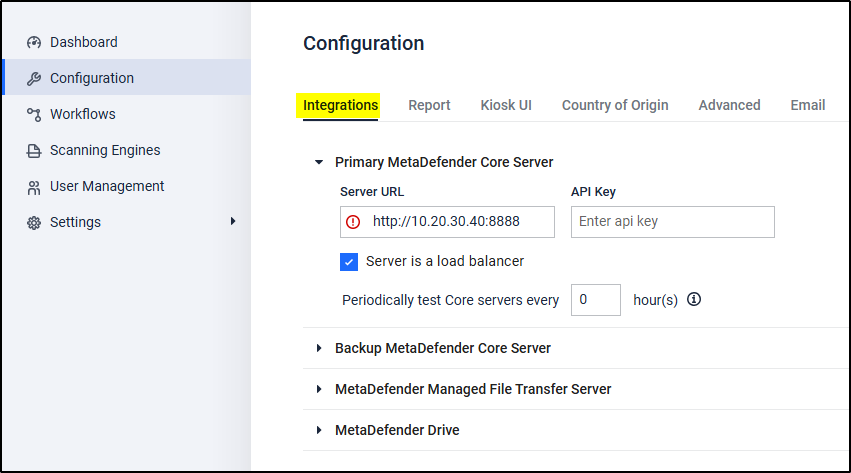
Save the configuration to apply the changes.
Purpose
This option allows end users to integrate and configure a third-party load balancer, enabling efficient distribution of traffic across multiple MD Core deployments.
Outcome
Once enabled, the system will route requests through the configured load balancer, improving scalability and redundancy.
If you have any difficulty Activating or Deactivating a MetaDefender Email Gateway Security Deployment Via API Calls, please follow these instructions on How To Create a Support Package, before logging a Support Ticket with the OPSWAT team.