
Why can't I sanitize HEIC files?
Issue:
You may encounter issues when attempting to sanitize HEIC image files using MetaDefender Core with Deep CDR enabled.
Symptoms include:
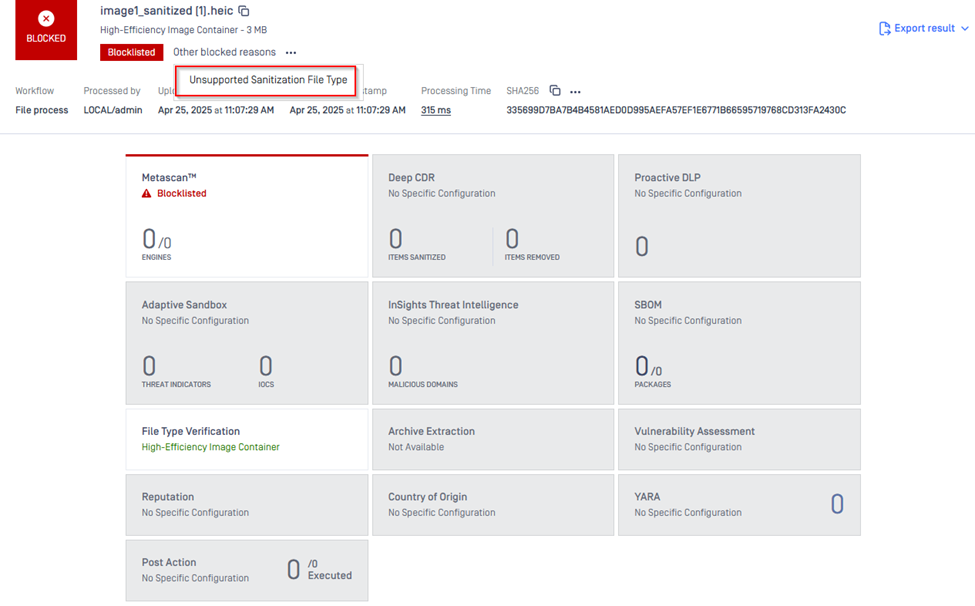
HEIC files are blocklisted with the reason: "Other reasons"
When viewing additional details, the message "Unsupported Sanitization File Type" is shown
This occurs even though HEIC is listed as a supported file type on the Deep CDR Supported File Types documentation page
Please refer to the screenshot below for more details on the error message related to the failed scan of a HEIC file:
Solution:
Support for sanitizing HEIC files is available on-demand. The HEIC file format is based on x256 encoding, it requires a special license from a 3rd Party library to process.
If you are seeing them blocked due to unsupported file type errors, it's likely because your current license does not include this feature.
To resolve this:
Please contact OPSWAT Customer Support or your Sales representative to request an update to your license key that enables HEIC sanitization.
Once the license is updated, HEIC sanitization should function as expected.
If you encounter any issues during the activation process or require further assistance, please contact OPSWAT support via My OPSWAT.
Our support team will be able to provide you with the necessary guidance and resolution for any license-related concerns.