
How can I configure the maximum queue size in MetaDefender Core v5 ?
This article applies to all MetaDefender Core V4 and V5 releases deployed on Windows and Linux systems.
There are two ways of configuring maximum queue size in MetaDefender Core.
REST API:
The maximum queue size can be configured in MetaDefender Core v5 via REST API, as follows :
Set scan config
Request | Value |
|---|---|
Method | PUT |
URL | /admin/config/scan |
Request HTTP header parameters:
Name | Type | Required | Value |
|---|---|---|---|
apikey | string | true | Session id, can be acquired by POST - Login |
Request body:
JSON path | Type | Required | Value |
|---|---|---|---|
max_queue_per_agent | int | true | Max queue size allowed per agent |
Example:
An example of a successful response can be found below :
HTTP status code: 200
Response contains information about the modified scan configuration
In case the configuration change was not correct, an error response like the one below will be returned :
Internal error
HTTP status code: 500
MetaDefender Core UI
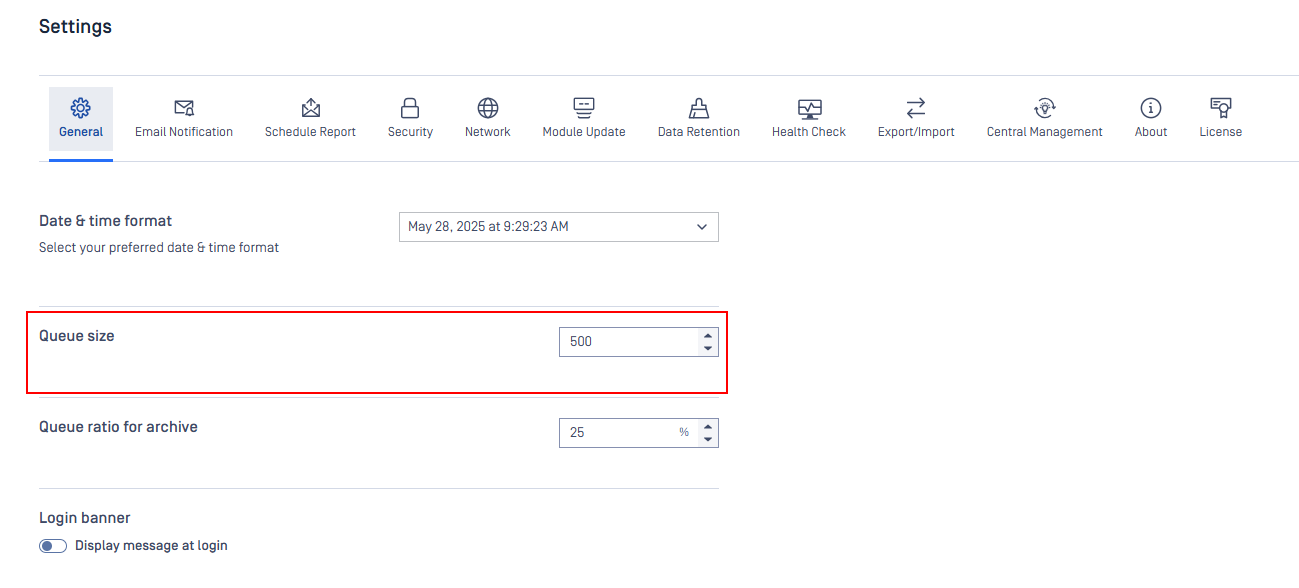
You can go to Settings → General and change the queue size to the number you want.
If Further Assistance is required, please proceed to log a support case or chat with our support engineer.