
Executive Summary
The RADIUS Proxy feature in MetaDefender NAC enables administrators to forward 802.1X authentication requests to external RADIUS servers while retaining centralized policy management through My OPSWAT Central Management. This feature supports both Failover and Load Balancing connection modes, allowing flexible and resilient authentication paths across multiple RADIUS servers.
Key Benefits:
Ensures high availability for authentication services
Supports distributed authentication workloads
Simplifies integration with existing RADIUS infrastructure
Provides redundancy in case of server outages
Enables seamless transition between Primary and Backup servers
Prerequisites
Before configuring RADIUS Proxy Servers, ensure the following requirements are met:
Required Permissions
Administrative access to My OPSWAT Central Management
NAC Configuration permissions
System Requirements
MetaDefender NAC Edge VM version 1.9.0 or later
At least one reachable upstream RADIUS server
Feature Overview
The RADIUS Proxy feature provides a mechanism for MetaDefender NAC Edge to forward authentication requests to one or more external RADIUS servers. Administrators can configure individual RADIUS Proxy server profiles and assign them to NAC Edge Authentication Methods.
Connection Types
MetaDefender NAC supports two primary connection modes:
Failover Mode
In Failover, RADIUS Proxy servers operate in a priority sequence.
The first server in the list acts as the Primary
Additional servers act as Backup
NAC Edge always attempts authentication with the Primary
Backup servers are used only when the Primary is unreachable
This mode ensures authentication continuity during outages.
Load Balancing Mode
In Load Balancing, authentication requests are distributed evenly across all configured servers.
Each request is assigned to a server based on a balancing algorithm
If one server becomes unreachable, traffic is automatically routed to remaining servers
This mode is ideal for environments with multiple active RADIUS servers.
When to Use RADIUS Proxy
Primary Use Cases
Organizations with existing RADIUS infrastructure (Cisco ISE, NPS, FreeRADIUS)
Environments requiring fallback authentication during outages
Distributed authentication workloads
Multi-site networks with multiple authentication backends
Migration scenarios where NAC temporarily delegates authentication
RADIUS Proxy Configuration Step-by-Step Procedures
Accessing RADIUS Proxy Management
Navigate to My OPSWAT Central Management → RADIUS NAC → Configuration → RADIUS Proxies
The RADIUS Proxy list displays:
Proxy Name
IP Address
Authentication Port
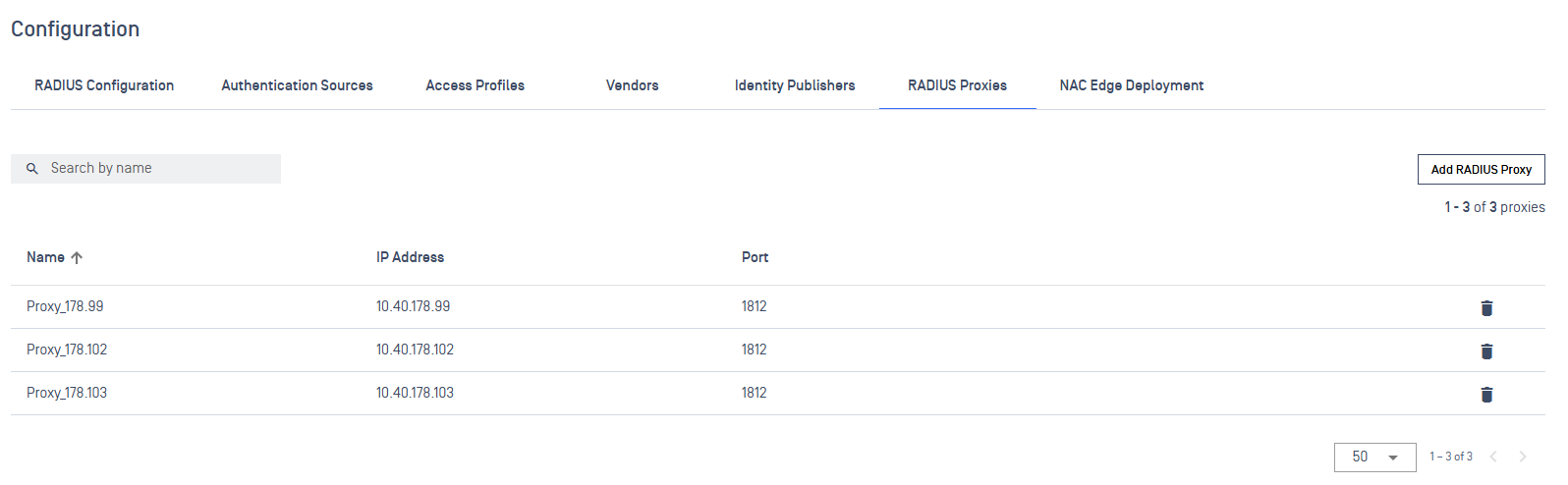
Create a New RADIUS Proxy Server
Click Add RADIUS Proxy
In the RADIUS Proxy Configuration dialog:
Name – Provide a descriptive name
IP Address – Enter the RADIUS server address
Auth Port – Default is 1812
Secret – Enter the shared secret
Click Save
Expected Result: RADIUS Proxy server is created successfully and appears in the list.
Assigning RADIUS Proxy to Authentication Methods
Navigate to RADIUS NAC → Configuration
Select the target NAC Edge
Open the Authentication Methods tab
Select RADIUS Proxy
Under Connection Type, choose one:
Failover
Load Balance
Click Add to include one or more RADIUS Proxy servers
Click Save
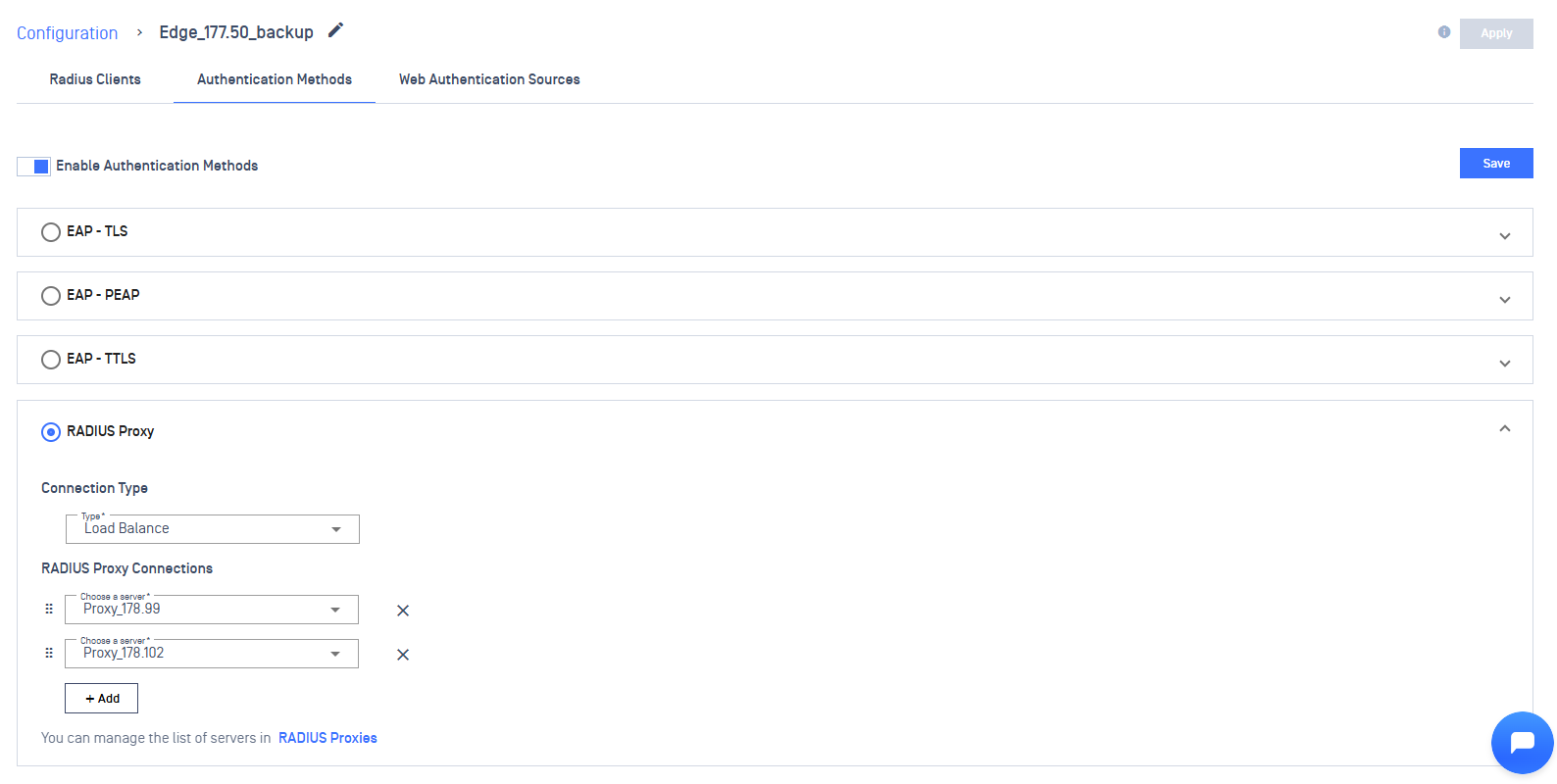
Expected Result: Authentication configuration updates successfully.
Verification & Post-Configuration Checks
After configuring RADIUS Proxy:
Connect VM to the NAC network
Validate successful authentication
Review session logs in: RADIUS NAC → Sessions
Confirm RADIUS server selection matches expected Failover/Load Balance logic
Use NAC Edge logs for advanced troubleshooting