Secure Access Solution
10.7.26091
Search this version
Enable Secure Access on My OPSWAT Central Management account
Summarize Page
Copy Markdown
Open in ChatGPT
Open in Claude
Connect to Cursor
Connect to VS Code
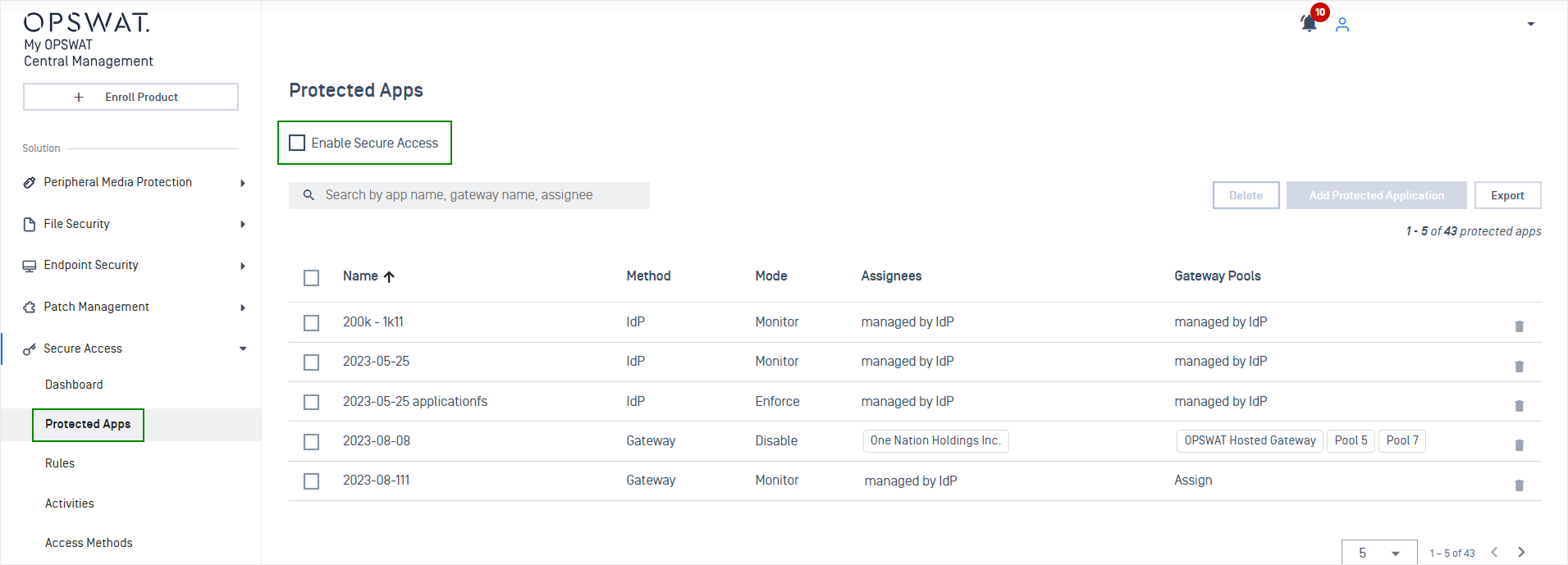
This step tells My OPSWAT Central Management if you want to enforce device posture check for every request which is forwarded from an IdP when a user accesses to a protected application. If you have not enabled Secure Access, My OPSWAT Central Management just simply forwards the SAML authentication from IdP to the specified application (service provider) in the request.
To enable Secure Access,
Log into the My OPSWAT Central Management console as an administrator
Navigate to Secure Access and then Protected Apps
Check "Enable Secure Access"
Enter your PIN to confirm the change
Last updated on
Was this page helpful?
Next to read:
Add Protected Applications with IdP Methodnull
Discard Changes
Do you want to discard your current changes and overwrite with the template?
Archive Synced Block
Message
Create new Template
What is this template's title?
Delete Template
Message
Secure Access Solution
Single Sign On (SSO)
IdP MFA Based
Access Policy
Monitoring & Audit
Proxy Method
Omnissa UAG
Page
Code Steps
Category
Label
Link
Separator
Title
Message
Page icon
No icon. This page keeps the plain index row.
orSVG or PNG, square, at least 32×32.
Create new category
What is the title of your new category?
Edit page index title
What is the title of the page index?
Edit category
What is the new title of your category?
Edit link
What is the new title and URL of your link?