
Unmanaging a Product in OPSWAT Central Management
To disassociate (unmanage) a specific product from the OPSWAT Central Management (OCM) console, please follow the instruction on this support article: Deleting an existing MetaDefender Core instance.
On the Product Console UI
To disassociate a product instance from OPSWAT Central Management using the product's console interface, follow the steps below. Ensure you are logged in as an administrator before proceeding.
On the top-right corner of the console, click Managed if the instance is currently managed by OPSWAT Central Management.
Click the Disconnect button to disassociate the product from OPSWAT Central Management.
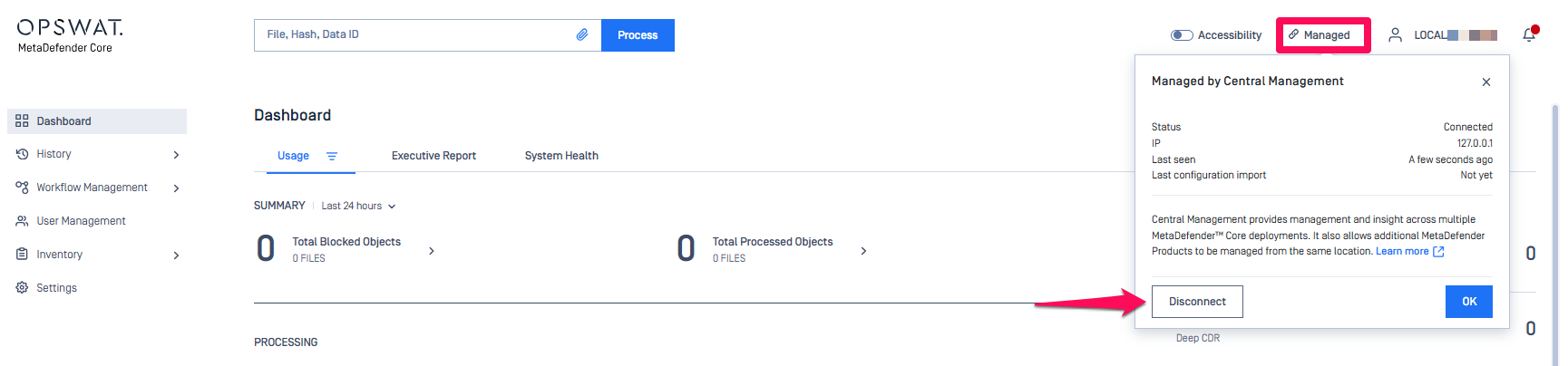
Once the product is no longer managed, the label on the top-right will change to Unmanage, confirming that the instance has been successfully disconnected.
If Further Assistance is required, please proceed to log a support case or chatting with our support engineer.