
This article is applicable only for MetaDefender Storage Security deployed on Windows Server.
If your MetaDefender Storage Security is deployed on Linux based distributions, please follow this article.
In order to integrate SMB Compatible Storage with MetaDefender Storage Security please follow these steps:
From the left side menu, navigate to Inventory, click Add New > Account, choose SMB Compatible and click Next
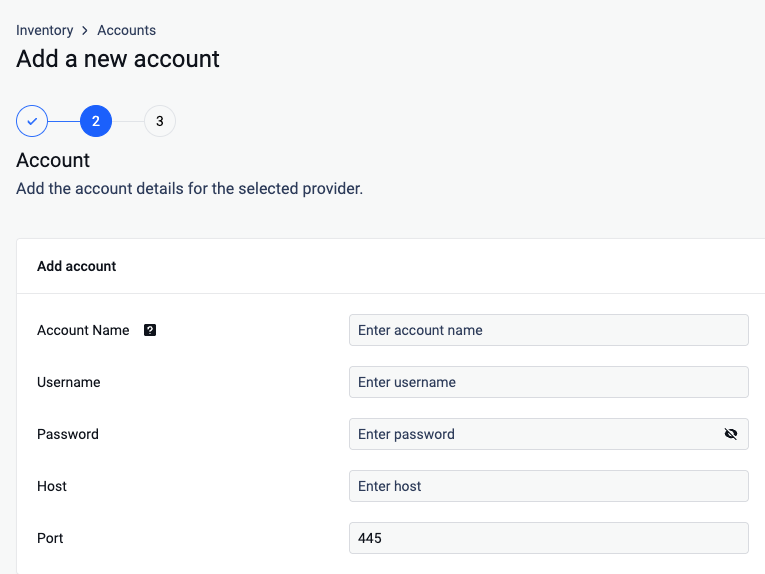
Give your account a name so you can easily identify it later
Enter the name of the user that will be used to access the SMB share
Enter the password of the above user.
Enter the IP (or hostname) of the SMB server you wish to connect to.
Specify the port number used for the SMB connection, 445 being the default SMB port
Click on Next to finish the process.
From the left side menu, navigate to Inventory, click Add New > Unit, choose the previously created account and click Next
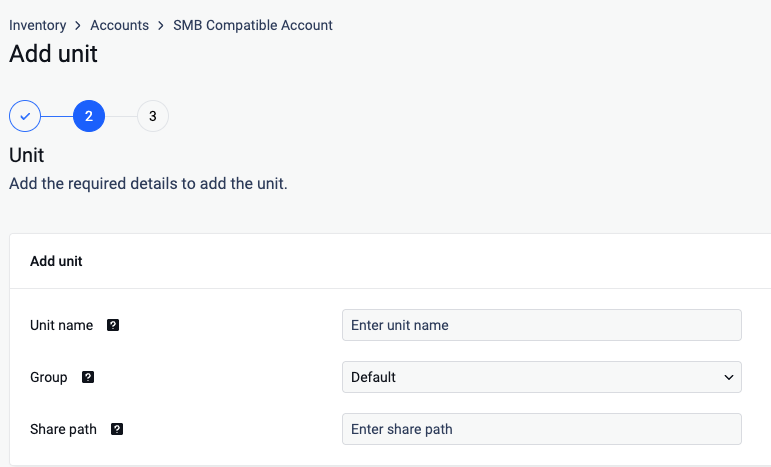
Give your unit a unique name so you can identify it later.
Assign your unit to a Group
Indicate the specific share path on the SMB server from which you want to access files. The Share path is the share name as published on the SMB server, optionally followed by a subfolder path inside that share. It must not contain the server. The server comes from the account, and MDSS builds the UNC path
\\<server>\<share path>itself.
Format:<share name>[/<subfolder>/<subfolder>...]Forward slashes and backslashes are both accepted.
Leading and trailing slashes are ignored.
The value is used exactly as typed, so avoid leading or trailing spaces.
Examples (server 10.0.0.5 configured on the account):
Share path
Connects to
finance
\\10.0.0.5\finance
finance/reports
\\10.0.0.5\finance\reports
finance\reports\2026
\\10.0.0.5\finance\reports\2026
Backups$
\\10.0.0.5\Backups$ (hidden share)
Click Next in order to finish the process.
To avoid authentication issues the Username should have one of the following formats:
local users should be .\username (for example: .\Administrator)
domain users should be username@domain or domain\username
A Samba file server needs to be enabled in order to connect to a Unix-based system SharePath. Since Samba doesn’t use the system account password, it needs to be set up using the sudo smbpasswd -a username command.
If you use a hostname in the host portion of IPv4/v6 socket address, the program may show a non-deterministic behavior. The socket address will be resolved differently into an actual IPv4/v6 address, depending on the results from DNS resolution and/or the host configuration. For deterministic behavior use a numeric address in host portion.
Windows client shares have a default configuration of 20 connections in the same time. Our default configuration will require 50 connections. To adjust this SMBSERVICE_SESSIONS_ON_STORAGE should be set to a value lower than 4
Please note that SMB over QUIC is not supported at this time - only traditional SMB over TCP connections are compatible with this integration. See [Windows] How to Expose an SMB Share as an NFS Storage Unit for more details.