
Overview
When integrating OESIS Framework with macOS systems, several limitations and expected behaviors may occur when using the InstallMissingPatches method of the Software Update component. Internally, this method relies on the macOS softwareupdate command-line tool to perform patch installation. Many of the behaviors documented below originate from this underlying command.
This article provides a quick-reference compatibility matrix followed by detailed descriptions of each known issue.
The findings in this article are based on internal testing results available as of April 2026. Testing is ongoing, and not all macOS version and configuration combinations have been fully covered. Cells marked — in Matrix indicate combinations that have not been tested or where testing has not been completed; they should not be interpreted as either working or broken.
Terminology
Term | Meaning |
|---|---|
| Allow the system to restart if the patch requires it |
| Do not allow the system to restart |
Service mode | OESIS runs as a background service (non-interactive, no GUI) |
Admin mode | OESIS runs interactively with administrator privileges |
Non-admin mode | OESIS runs interactively without administrator privileges |
Blocking application | An application that prevents macOS from completing a restart because it cannot be terminated automatically (e.g., an application with unsaved changes, or a long-running terminal process). See Known Issues for details. |
Compatibility Matrix
The table below summarizes the observed behavior of InstallMissingPatches across macOS versions, execution modes, and restart_action settings.
Legend
Symbol | Meaning |
|---|---|
Xn | Tested — works as expected |
Xn | Tested — works with caveats (see referenced finding) |
Xn | Tested — known limitation (see referenced finding) |
N/S | Not supported — returns |
— | Not tested or testing not completed |
The pattern Xn could be specified by E1, L1, where:
X= E (expected, see Expected Behaviors) or L (limitation, see Known Limitations)n= numeric index
Matrix
macOS version | Service mode with RA=0 | Service mode with RA=1 | Admin mode with RA=0 | Admin mode with RA=1 | Non-admin (any RA) |
|---|---|---|---|---|---|
26 (Tahoe) | tested | tested | E2 | tested | E1 |
15.5 (Sequoia) | E2 | tested | L2 | tested | E1 |
14.x (Sonoma) | tested | tested | L2 | L2 | E1 |
13.x (Ventura) | — | tested | — | — | E1 |
12.x (Monterey) | L1 | N/S | L2 | N/S | E1 |
10.x (Catalina) | L3 | N/S | L3 | N/S | E1 |
RA = restart_action. macOS 11 (Big Sur) was not included in this test cycle and is omitted.
Expected Behaviors
[E1] Non-admin Mode Returns Access Denied
Running InstallMissingPatches in non-admin mode returns "code": -22 (WAAPI_ERROR_ACCESS_DENIED). This is expected — macOS requires administrator privileges to install system updates.
[E2] OESIS May Return Error Code Despite Successful Installation
In certain user-role configurations, OESIS returns "code": -1 (WAAPI_ERROR_GENERAL) even though the patch installs successfully. This has been observed in the following scenarios:
macOS 26 (Tahoe): Admin mode, non-admin mode,
restart_action = 0— returned-1but the system upgraded successfully.macOS 15.5 (Sequoia): Service mode, non-active user,
restart_action = 0— returned-1but the patch installed successfully.
The primary test scenarios (admin-role user in admin mode, active admin user in service mode) return correct result codes on these versions. Integrators should verify the actual system update state independently when a -1 result code is returned under non-primary user-role configurations.
[N/S] restart_action=1 Not Supported on macOS 12 or Earlier
Setting restart_action = 1 on macOS 12 or earlier returns "code": -11 (WAAPI_ERROR_COMPONENT_METHOD_NOT_SUPPORTED). These macOS versions do not support the restart-action control during updates.
Although OESIS does not explicitly pass a --restart parameter, the system may still restart based on internal macOS behavior when restart_action = 0 is used.
Known Limitations
[L1] OESIS Hangs in Service Mode on macOS 12 (Monterey)
Conditions: Service mode, restart_action = 0, macOS 12, no blocking applications present.
Observed behavior
Running InstallMissingPatches in service mode with restart_action = 0 on macOS 12 may cause OESIS to hang and not return results. The underlying update may or may not complete on the system, but the caller receives no confirmation.
If a blocking application is also present, the blocking-application issue (see Known Limitations) will take effect before this hang is encountered.
[L2] OESIS May Hang During Patch Installation in Admin Mode
Conditions: Admin mode, macOS 14 (Sonoma), macOS 15.5 (Sequoia), or macOS 12 (Monterey).
Observed behavior
On certain macOS versions, InstallMissingPatches running in admin mode hangs because the underlying softwareupdate command does not return after the operation completes. The outcome of the patch operation itself depends on whether the patch requires a restart:
Patch requires restart: The patch is downloaded and staged successfully (ready for reboot to install), then OESIS hangs waiting for
softwareupdateto return.Patch does not require restart: The patch is downloaded and installed successfully, then OESIS hangs waiting for
softwareupdateto return.
This hang occurs regardless of the restart_action setting. The difference is that when restart_action = 0, the system may initiate a restart, which terminates the hanging process along with any remaining OESIS operations.
Caution: When restart_action = 0 is used in admin mode on the affected versions, integrators should anticipate that a successful update may still result in no response from OESIS. Application-level post-restart verification logic is recommended.
[L3] Compatibility Limitations on macOS 10.x
Conditions: macOS 10.x, any execution mode, restart_action = 0.
Observed behavior
On macOS 10.x, InstallMissingPatches with restart_action = 0 returns "code": -1 (WAAPI_ERROR_GENERAL) due to compatibility issues between OESIS and the softwareupdate tool on these older macOS versions.
Known Issues
Blocking Applications May Prevent Restart
Description
When InstallMissingPatches is invoked with restart_action = 0 and a blocking application is running on the system (e.g., an application that prompts before closing, such as an unsaved document editor or a long-running terminal process), the macOS restart process may fail to proceed after the patch has been downloaded and staged. The system can become stuck on the blocking-application dialog, preventing the update from completing. This can occur on any macOS version, in both service mode and admin mode.
OESIS is designed to detect this condition and return "code": -92 (WAAPI_ERROR_FAILED_TO_RESTART). However, on macOS versions where OESIS experiences a separate hang issue (see [L1], [L2] in Known Limitations), the hang may prevent OESIS from reaching the restart-failure detection logic, resulting in no response or inconsistent result codes instead.
Workaround
Ensure that applications which may block system shutdown or restart are closed before invoking InstallMissingPatches with restart_action = 0.
Calling InstallMissingPatches Immediately After Boot or Wake
Description
If the machine has just booted (or resumed from sleep) and InstallMissingPatches is called immediately, the underlying softwareupdate command may hang. This issue is inconsistent and appears to be device- and VM-dependent, but it has been commonly reproduced when testing right after a VM boots.
Workaround
Do not call InstallMissingPatches immediately after boot or wake. Allow the system to fully settle before invoking the method.
Password Prompt During Patch Installation (UI Applications)
Description
When OESIS is used in a user interface (UI) application, macOS prompts the user for their password during patch installation. This is expected behavior enforced by Apple as a security measure and cannot be suppressed by OESIS.
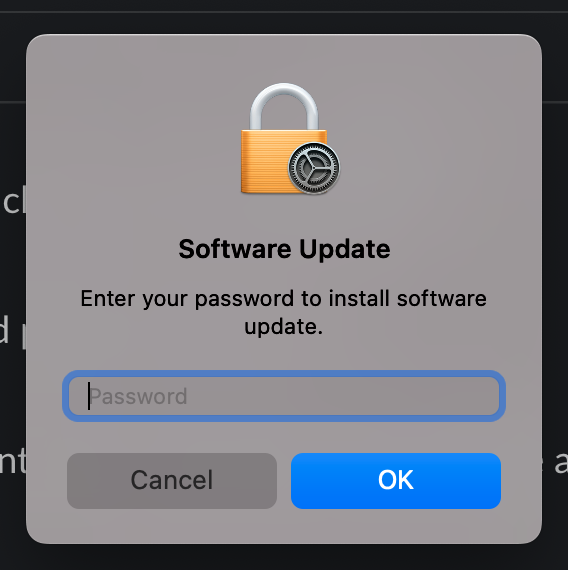
Solution:
Recommendation: Integrate OESIS into a non-GUI process such as a helper tool, daemon, or agent to avoid this prompt.
Alternative: If the above is not feasible, the user must enter their password via the macOS popup.