
The Sensor Management section of the Administration page is where system administrators govern the sensor fleet that feeds MetaDefender NDR. This chapter describes the complete sensor lifecycle. It starts with adoption and grouping. It continues through per-sensor configuration, bulk operations, and eventual decommissioning. It also lists troubleshooting patterns for sensor problems.
This chapter is for system administrators and Site Reliability Engineers (SREs) who deploy, configure, and retire sensors. It assumes an installed Manager, an administrator account, and familiarity with the Administration page layout described in the Administration Page and with the Manager-global settings documented in Manager Configuration.
First-use acronym expansions in this chapter:
API (application programming interface)
CA (certificate authority)
CPU (central processing unit)
DNS (Domain Name System)
FRD (Functional Requirements Document)
HTTPS (Hypertext Transfer Protocol Secure)
IDS (Intrusion Detection System)
IP (Internet Protocol)
IPS (Intrusion Prevention System)
MTU (Maximum Transmission Unit)
MVP (Minimum Viable Product)
NIC (network interface card)
NMS (network management station)
NTP (Network Time Protocol)
PCAP (packet capture)
PEM (Privacy-Enhanced Mail, the text encoding for X.509 certificates)
REST (Representational State Transfer)
RSS (Receive Side Scaling)
SLA (service-level agreement)
SOAR (Security Orchestration, Automation, and Response)
TLS (Transport Layer Security)
UDP (User Datagram Protocol)
UI (user interface)
YAML (YAML Ain't Markup Language).
Overview of the sensor lifecycle
Every sensor in a MetaDefender NDR deployment moves through the same five stages. The Manager is the control plane at every stage. The sensor itself is nominally passive. It acts on signed, versioned configuration bundles that the Manager delivers over a mutually authenticated control channel.
Adoption. The Manager authenticates a new sensor. It collects inventory and assigns the sensor to a group with an initial policy. The sensor is not considered operational until the adoption workflow completes every health check.
Grouping. Administrators organize sensors into logical groups by location, department, environment, business unit, or risk tier. Group membership drives policy inheritance and bulk-operation scope.
Policy assignment. Each sensor runs an explicit, versioned policy that bundles detection signatures, intelligence feeds, and suppression rules. Policy changes are version-controlled and one-click reversible.
Ongoing operation. The sensor streams events to the Manager. It receives policy and configuration updates. It reports health telemetry. The Manager continuously monitors it for configuration drift.
Disown. When an administrator retires a sensor, the Manager revokes its certificates and management state. The Manager instructs the sensor to stop transmitting. The audit store preserves its historical data.
A single Manager instance supports between 1 and 200 sensors depending on its deployment tier. OPSWAT validates ManagerSTD for 1-50 sensors. OPSWAT validates ManagerXL for up to 200. All management operations have a specified completion time of 300 seconds per sensor. These operations include adoption, policy push, configuration update, software update, and disown.
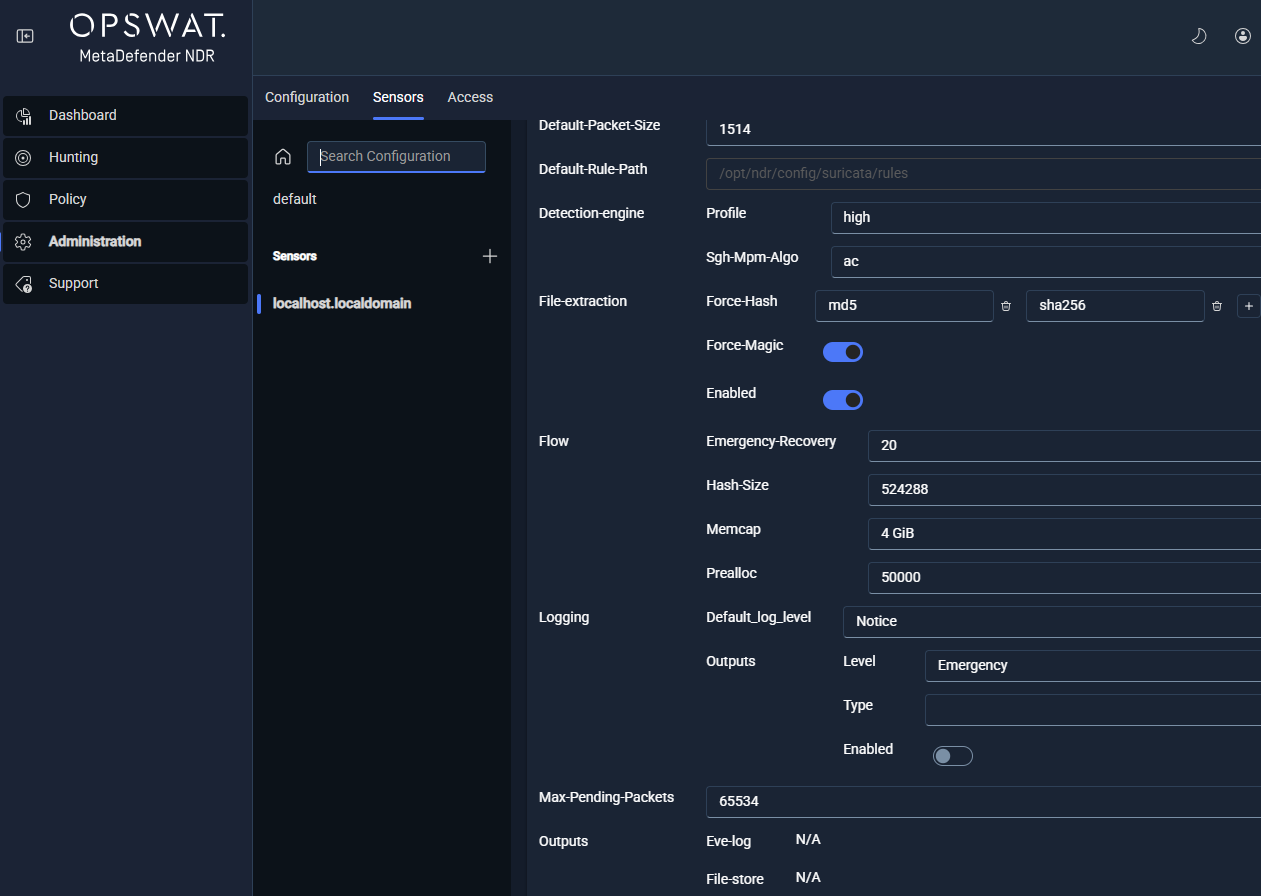
A note on MVP delivery. The full sensor-management capability described in this chapter is the MVP end-state. The shipping UI today exposes a single sensor-configuration form on the Sensors tab; the full fleet list, group management views, and bulk-operation panels documented below are partly API-first in MVP, with graphical surfaces landing progressively. Administrators reach every API-first capability through the Manager's server-manager REST API. Each workflow identifies the endpoints inline.
Adoption
Adoption is the automated onboarding process that brings a new sensor under Manager control. The goal is to eliminate manual certificate provisioning and automate inventory capture. The process applies the correct initial policy and runs a baseline health check before the sensor becomes operational. The target window is five minutes.
Adoption workflow
Issue an adoption token. An administrator issues a one-time adoption token from the Manager. In MVP this is an API call:
POST /api/server/sensor/enrollment/token. The administrator delivers the token out-of-band to the operator who performs the sensor installation.Install the sensor software and run the enrollment script. The installer on the sensor host calls
POST /api/server/sensor/enrollwith the adoption token. The Manager and sensor complete a mutual TLS handshake with the token as the initiating credential. The Manager issues the sensor's long-lived identity certificate during this handshake.Inventory retrieval. The Manager pulls the sensor's hardware inventory (CPU, random-access memory, NIC models), software version, kernel parameters, and interface configuration. The Manager stores results in the Manager database and shows them in the sensor detail view.
Initial configuration and policy push. The Manager delivers the initial configuration bundle and applies the assigned group's policy atomically. If either operation fails, the Manager rolls the adoption back and notifies the operator with the failure reason. The sensor is not marked adopted until it acknowledges the bundle.
Group assignment. On successful configuration, the Manager places the sensor into the designated sensor group. The target group is configurable as part of the adoption flow -- administrators pick the group before issuing the token.
Baseline health check. The Manager runs automated health checks: connectivity test, service status verification, packet-capture interface status, and software-version confirmation. The sensor transitions to the Healthy operational state only after every check passes.
Approval (self-service enrollment only). If the sensor used the self-service enrollment path, the administrator reviews pending enrollments on
GET /api/server/sensor/pendingand approves or rejects each withPOST /api/server/sensor/enroll/:id/approveorPOST /api/server/sensor/enroll/:id/reject.
The Manager fully audits adoption. The audit log captures the actor, the adoption token identifier, the target sensor and group, the initiation and completion timestamps, and the outcome (success, failure, partial).
Adoption security properties
Mutual TLS with a one-time token. The Manager consumes the adoption token on first use. The Manager rejects a replayed token.
Short-lived sensor certificates. Management-channel certificates issued during adoption have a maximum lifetime of 24 hours. The Manager renews them automatically before expiry. Certificate revocation takes effect within 60 seconds of the revocation command.
Outbound-initiated connections. All Manager-to-sensor traffic is outbound-initiated from the Manager.
Atomic rollback. If any adoption step fails, the Manager reverses every preceding step so that no partial state remains.
Sensor groups
Group-based management is what makes a 200-sensor fleet operationally tractable. A policy change applied to a group propagates to every member sensor in a single operation. A configuration override at the group level takes precedence over any conflicting per-sensor setting.
Group model
Hierarchical tree. The Manager models groups as a tree with a configurable maximum nesting depth of at least five levels. Each group node carries a name, description, parent reference, assigned policy identifier, and a list of member sensors.
Flexible grouping dimensions. Administrators define groups by location, department, environment (production, staging, development), business unit, risk tier, or any combination.
One group per sensor (MVP). Each sensor belongs to exactly one group at a time. Multi-group membership is on the PostMVP roadmap.
Policy inheritance. A group carries an assigned policy. Every member sensor runs that policy unless an administrator explicitly sets a per-sensor override.
Precedence. Where a group-level setting conflicts with a per-sensor setting, the group setting takes precedence. The UI shows this rule by marking inherited values distinctly from overrides.
Creating and managing groups
In MVP, group management is driven by the server-manager REST API:
GET /api/server/groups-- list groups.GET /api/server/groups/:name/sensors-- list members of a group.PUT /api/server/sensors/:id/group-- assign or clear a sensor's group membership.
Every group mutation -- creation, rename, deletion, membership change -- emits an audit log entry that records the actor, target sensor and group identifiers, timestamp, and the previous and new state. If an administrator deletes a group with active members, the Manager returns a conflict response until the administrator reassigns the members.
Per-sensor configuration
Per-sensor configuration has two concerns. The first concern is the settings that a sensor inherits from the Manager and can override. The second concern is the Suricata IDS engine configuration unique to each sensor.
Settings inherited from the Manager
Four Manager-global settings can be overridden on a per-sensor basis when the sensor sits in a different network or administrative context from the Manager:
DNS. Per-sensor DNS resolvers override the Manager default.
NTP. Per-sensor NTP servers override the Manager default.
Upstream HTTP proxy. Per-sensor proxy configuration overrides the Manager default.
Timezone. Per-sensor timezone overrides the Manager default; affects timestamp rendering in sensor-local logs.
Sensors inherit all four by default. Overrides are an exception for sensors deployed in network segments with different operational constraints. The UI marks inherited values distinctly from overrides, and every override change is audit-logged. Manager Configuration documents the Manager-global defaults.
Suricata configuration surfaces
The Administration FRD exposes eight sections of the sensor's suricata.yaml through the Manager. Each section is configurable at the sensor level or through a group-level policy.
Section | Purpose |
|---|---|
Detect Engine | Detection-engine parameters: rule profiling, prefilter settings, inspection order, and MPM (Multi-Pattern Matcher) algorithm selection. |
Basic Global Settings | General Suricata parameters: default packet size, runmode, maximum pending packets, and default log directory. |
AF_PACKET | Interface configuration for the Linux AF_PACKET capture path: interface name, capture threads, cluster identifier, cluster type, defrag and checksum-offload flags, and IPS-mode toggles. |
Threading and CPU Affinity | CPU core assignment for capture, worker, and management threads. Supports receive-side scaling alignment and NUMA-locality tuning. |
Stream and Flow | Stream reassembly configuration, flow tracking parameters, memory caps (memcaps), and timeout windows. |
File Extraction | File-store rules, storage caps, file-info emission settings, and hash calculation policy (MD5, SHA1, SHA256). |
Logging and Stats | Logging verbosity, stats.log emission cadence, and per-module log filters. |
Output | Output module configuration -- Eve JSON emission settings, Unix-socket output parameters, file logging destinations. |
The REST surface for per-sensor Suricata configuration is:
GET /api/server/sensor/suricata/defaults-- the base template a new sensor starts from.POST /api/server/sensor/suricata/validate-- compile and preview a candidate configuration without saving.GET /api/server/sensor/:id/suricata/config-- the structured configuration currently assigned to a sensor.POST /api/server/sensor/:id/suricata/config-- push a new configuration to a sensor (queues a pending update).GET /api/server/sensor/:id/suricata/yaml-- the compiled, sensor-facingsuricata.yaml.GET /api/server/v1/admin/sensors/:id/config/versions-- the per-sensor configuration version history.
The Manager signs and versions configuration bundles. The sensor validates the checksum before applying. It rejects tampered or invalid bundles. Rejected bundles notify the Manager and leave the sensor's running configuration unchanged.
Bulk operations
Bulk operations are the mechanism for applying a single change across every sensor in a group -- the operational multiplier that makes fleet-scale management workable.
Supported bulk operations
Group policy push. Apply one policy to every member of a group. The Manager parallelizes distribution across members. It retries failed pushes automatically up to three times. Then it surfaces the operation to the administrator for intervention.
Configuration update. Apply one configuration change (for example, a Threading and CPU Affinity revision) to every member sensor.
Software update. Initiate a coordinated software update across every member sensor. The Manager paces rollout to respect the 300-second-per-sensor SLA.
Service restart. Restart sensor services (for example, a rule-reload after a signature update) across every member sensor.
Bulk job tracking
Every bulk operation creates a trackable background job. Administrators monitor progress through:
A per-sensor status table (pending, in progress, complete, failed).
Retry-on-failure controls that re-run only the failed sensors without restarting the entire operation.
An aggregate-status summary in the group management view.
REST endpoints backing bulk operations:
POST /api/server/v1/admin/sensors/config/state-- read configuration state across many sensors in a single call.POST /api/server/v1/admin/sensors/suricata/config/bulk-- push Suricata configuration to many sensors.POST /api/server/v1/admin/sensors/groups/:name/suricata/config-- push Suricata configuration to every member of a named group.
Partial failures do not abort the bulk operation; the Manager completes the successful targets and records the failures for retry.
Sensor health monitoring
The Manager collects continuous telemetry from every sensor. Telemetry includes throughput (megabits per second), packet rate (packets per second), and CPU utilization. It also includes memory utilization, packet drop rate, capture-interface link status, service status, software version, and the hash of the sensor's running configuration. The Manager aggregates telemetry through the real-time pipeline (RisingWave). Thus, dashboard queries and status refreshes do not compete with active management operations for database write throughput.
The sensor list view refreshes at an interval of at most 30 seconds. The sensor detail view plots each metric over the previous 24 hours at minimum. Configuration drift -- a running-configuration hash that does not match the assigned policy version -- triggers an alert within two polling cycles of the default 15-minute drift-detection interval.
The operational deep dive on sensor health, including per-metric interpretation, performance troubleshooting, and drift remediation, lives in Health and Monitoring. This chapter covers only the configuration surfaces that feed health monitoring. The Health and Monitoring chapter analyzes the metrics and explains how to act on them.
Disown and decommission
Disowning a sensor revokes every credential and management binding, stops the sensor from transmitting data, cleans up downstream references, and preserves historical data for the configured audit retention period.
Disown workflow
Initiate disown. An administrator issues
POST /api/server/sensor/disown/:id, or (for a sensor-initiated request) processes an incomingPOST /api/server/sensor/disown/request. The UI prompts for explicit confirmation before the Manager executes the operation.Revoke sensor certificate. The Manager's internal certificate authority (CA) revokes the sensor's management-channel certificate. Revocation propagates to the sensor communication layer within 60 seconds.
Signed disown command. The Manager sends a signed command to the sensor instructing it to wipe local management state, clear cached credentials, and cease all outbound management-channel activity. The sensor acknowledges the command before executing it.
Stop data transmission. The sensor ceases forwarding events, telemetry, and any other traffic to the Manager.
Clean up active state. The Manager removes the sensor record from all active policy assignments, group memberships, and scheduled reports. No references to the disowned sensor remain in operational views.
Preserve historical data. The Manager tags all data associated with the disowned sensor with the disown timestamp and operator identity. This data includes alerts, flow records, audit logs, and configuration history. The Manager moves the data to the audit-only retention store. Retention duration is configurable; the default is 365 days. Data remains queryable but no longer editable.
Log the disown. The Manager writes a disown completion entry to the audit log with the timestamp, the operator identity, and the retention classification of the historical data.
Offline-sensor disown
If the sensor is unreachable at the time of disown, the Manager marks the sensor as disowned-pending, completes credential revocation server-side, and queues the wipe-state command to be delivered on the sensor's next connection attempt. The Manager notifies administrators that the disown is pending physical confirmation. The audit log captures the initiating action and the final reconciliation.
Troubleshoot sensor issues
The operational problems most commonly seen across a managed sensor fleet fall into three categories.
Symptom | Likely Cause | Resolution Steps |
|---|---|---|
Sensor shows Offline in the fleet list | Management channel is down; sensor host unreachable; sensor service stopped; short-lived certificate expired without renewal. | Verify host network reachability from the Manager. Check the sensor service status on the host. Confirm the Manager's internal CA is issuing renewal certificates successfully. If the sensor is reachable but not connecting, restart the sensor service and inspect the management-channel logs for TLS handshake errors. |
Configuration drift alert on a sensor | Operator changed a running configuration out of band; a failed configuration push left the sensor on an older policy; storage corruption on the sensor host. | Review the drift report in the sensor detail view -- it identifies the divergent parameters. Re-apply the assigned policy with the one-click re-application action; the Manager audits the re-application. If drift re-occurs, audit recent out-of-band changes and restrict sensor-host shell access through the deployment's change-management policy. |
Elevated packet-drop rate on a sensor | Insufficient CPU on capture threads; incorrect AF_PACKET cluster configuration; NIC-level RSS misalignment with capture-thread CPU pinning; policy too heavy for link throughput. | Review the sensor detail view for CPU saturation on capture threads. Revisit the Threading and CPU Affinity configuration. Pin capture threads to CPUs aligned with the NIC's receive queues. If the link is saturated, reduce the active policy scope or upgrade the capture hardware. Use fewer signatures or narrower IOC feeds. |
A broader troubleshooting reference including log collection and diagnostic-bundle generation lives in Health and Monitoring.
Quick-start checklist: adopt a new sensor
The checklist below runs through the steps to adopt a new sensor into a deployment. Items assume that the sensor hardware is racked, networked, and reachable from the Manager. They also assume that an administrator account is available.
Item | Action | Verification |
|---|---|---|
Sensor group chosen | Identify or create the target group for this sensor based on location, environment, or risk tier. |
|
Sensor group policy assigned | Confirm the target group has an active policy assigned. | The group record shows a non-null policy identifier with the expected version. |
Adoption token issued |
| The Manager returns a token string scoped to the target group. |
Sensor software installed | Run the sensor installer on the sensor host with the adoption token. | The sensor host reports the installer completed without error. |
Enrollment handshake complete | The sensor calls | The Manager issues the sensor's long-lived identity certificate and transitions the sensor to Adopting state. |
Inventory captured | The Manager retrieves hardware and software inventory automatically. | The sensor detail view populates CPU, memory, NIC models, software version, and interface list. |
Initial policy applied | The Manager pushes the group's policy to the sensor atomically. | The sensor acknowledges the configuration bundle and the sensor record shows the expected policy version. |
Baseline health check passed | The Manager runs connectivity, service, capture-interface, and version checks. | Every check returns healthy; the sensor transitions to Healthy. |
Self-service enrollment approved (if used) | Approve the pending enrollment from |
|
Sensor visible in the list view | Confirm the sensor appears in the fleet list with expected status, throughput, and policy assignment. | The sensor row renders with the expected values and a Healthy status indicator. |
First events received | Verify raw events begin flowing from the sensor. | Event volume from the sensor appears on the Dashboard and in the Hunt page within a few minutes. |
Audit entry recorded | Confirm that the Manager logged the adoption. | The audit log shows the adoption entry with the actor, token identifier, target group, and success outcome. |
Roadmap
OPSWAT tracks the capabilities below for a release beyond MVP. This chapter does not document them in the body. Administrators running a current deployment should plan around the MVP feature set:
Multi-group membership for a single sensor.
Automated machine-learning-driven configuration-drift remediation.
Federated multi-Manager deployments and cross-Manager visibility.
Advanced group-scoped role-based access controls.
Integration with third-party configuration management databases (CMDBs) and asset inventory systems.
See also
Administration Page -- the Administration page structure, access control, audit trail, and chapter map.
Manager Configuration -- the Manager-global defaults that sensors inherit and can override (DNS, NTP, proxy, timezone).
Updates Management -- feed and signature delivery to sensors, per-sensor distribution status, and policy-based enable/disable.
Health and Monitoring -- live sensor telemetry, performance graphs, drift-alert triage, and diagnostic-bundle collection.