
Version | 4.8.7 |
|---|---|
Release date | 6 Nov 2026 |
Scope | This release gives administrators safer and more flexible handling of blocked files, with the option to quarantine blocked files on the original media, granular control over which scan results trigger blocked-file actions, and an alert when users keep blocked files on their media. It extends remote management through My OPSWAT Central Management (CM10) with configuration backup and restore, remote reboot and shutdown, and per-Kiosk syslog settings, and adds hardware health checks with proactive alerts. The release also avoids duplicate remediated files when media is scanned again, improves Microsoft Entra ID sign-in under Conditional Access policies, adds file search when retrieving files, strengthens Kiosk UI protection against Windows accessibility tools, clearly reports sessions that lose their connection to MetaDefender Core, and includes fixes for single sign-on, display languages, email timestamps, and session cleanup. |
Kiosk 4.8.7.1102 | |
Release date | 6 Nov 2026 |
New Features | |
Quarantine Blocked Files on the Original Media | Administrators can now choose to quarantine blocked files on the user's original media as a blocked-file handling option in a workflow. Instead of being deleted or moved to a quarantine on the Kiosk or MetaDefender Core, each blocked file is kept on the media as a password-protected quarantined copy, so a file blocked as a false positive can still be recovered. Kiosk generates a unique password for each session, stores it with the session details, and syncs it to My OPSWAT Central Management (CM10); the user is shown the session ID to give to an administrator, who can look up the password. 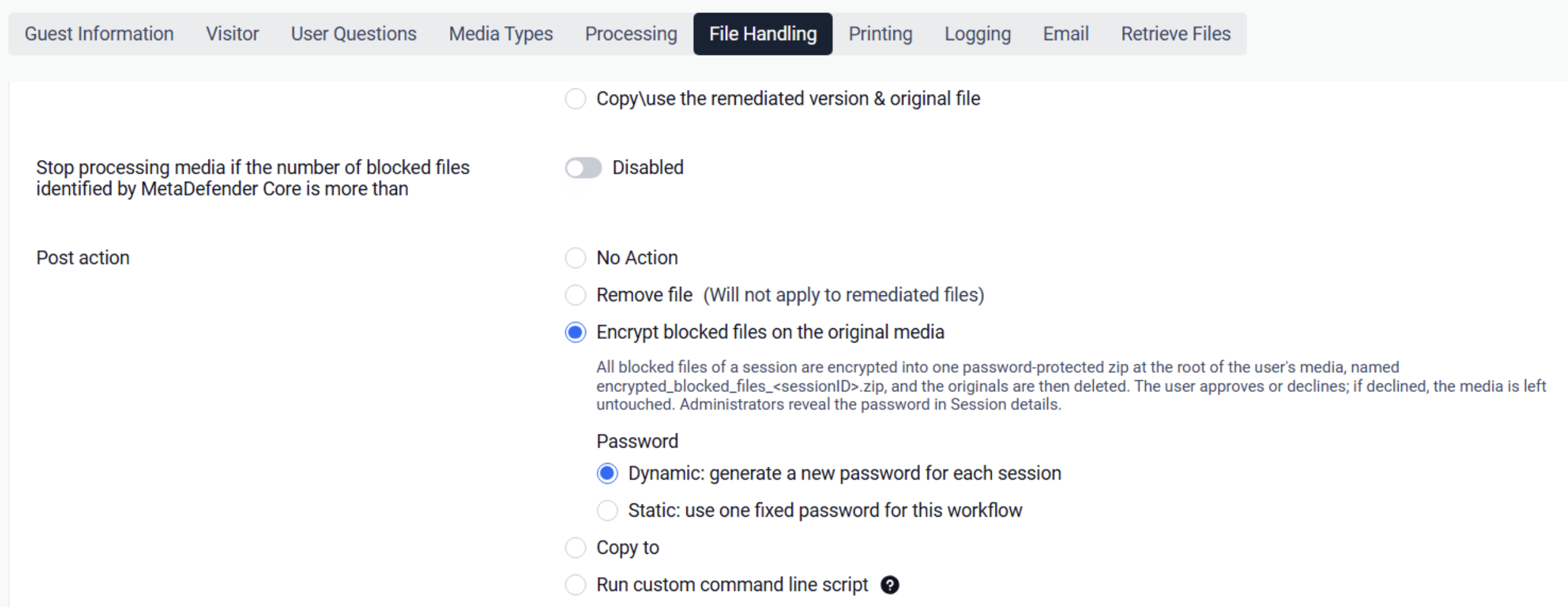 |
Admin Alert When Blocked Files Are Retained | Administrators can now enable "Send an alert when blocked files are retained" in a workflow's email settings. When a workflow lets users decide which blocked files to remove and a user leaves one or more blocked files on their media, Kiosk sends a separate alert email with the user, session, Kiosk name, and the list of kept files and their block reasons, in addition to the normal session report. 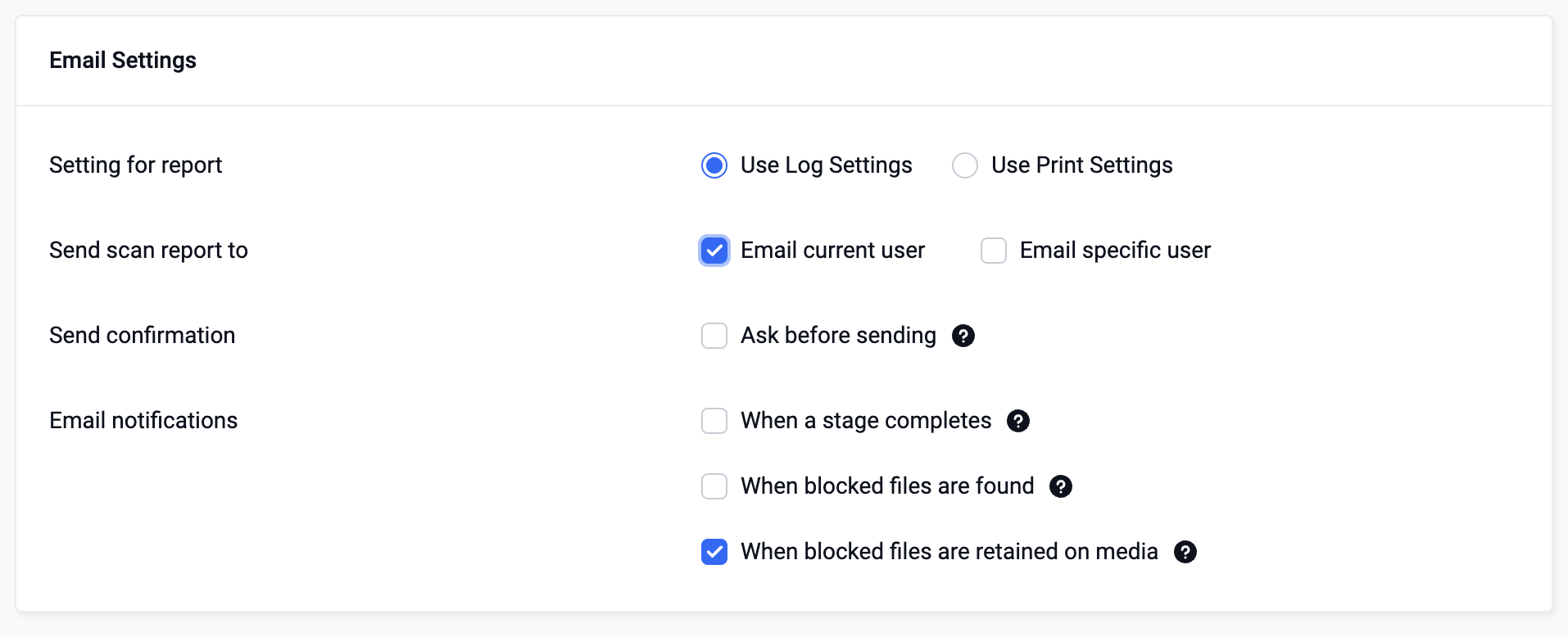 |
Back Up and Restore Kiosk Through Central Management (CM10) | Administrators can now back up a Kiosk's configuration to My OPSWAT Central Management (CM10) and restore it from there. 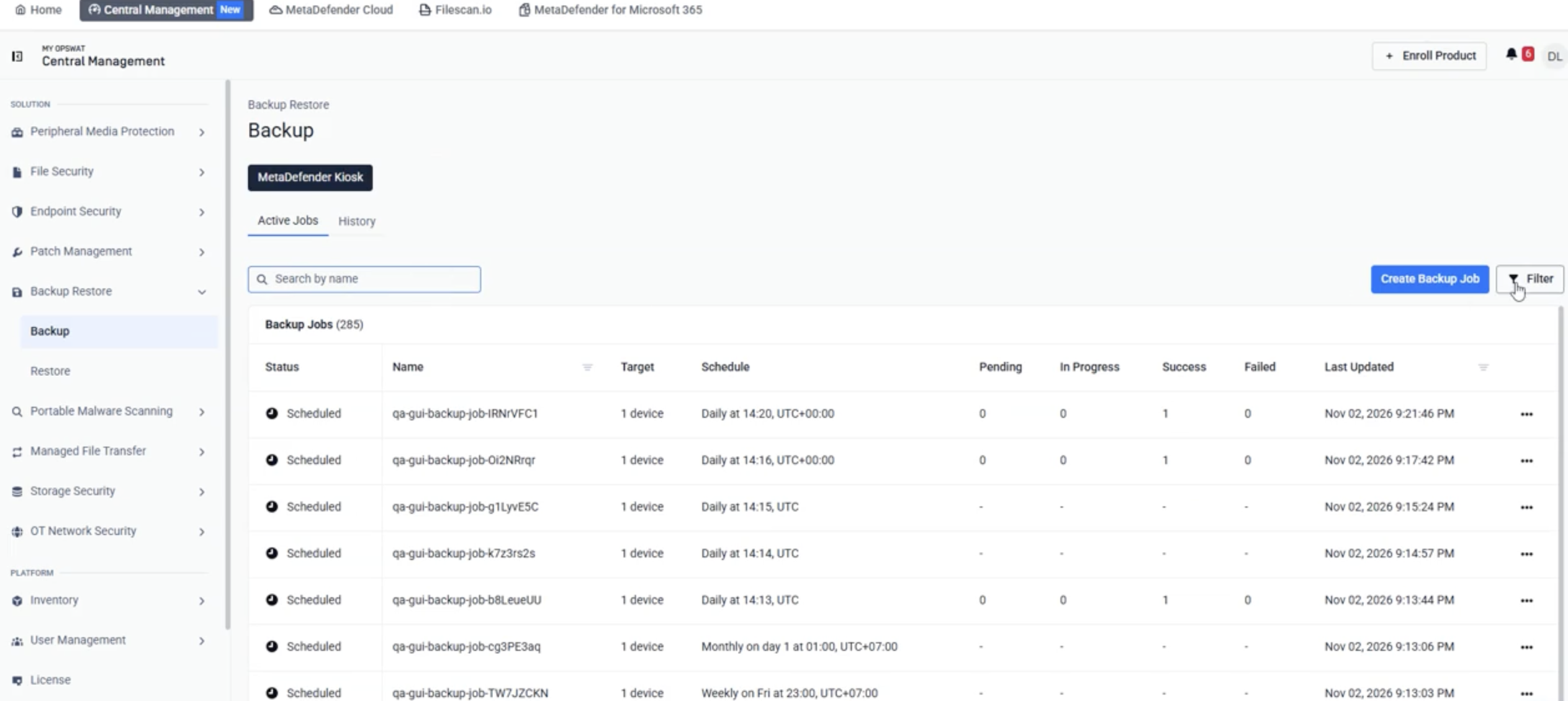 |
Reboot and Shut Down Kiosk Remotely from Central Management (CM10) | Administrators can now reboot or shut down an enrolled Kiosk from the My OPSWAT Central Management (CM10) console. Kiosk declines the command while it is busy, for example during a scan session or an upgrade, and CM10 shows the reason; every command and its outcome is recorded in the Kiosk Application Log. 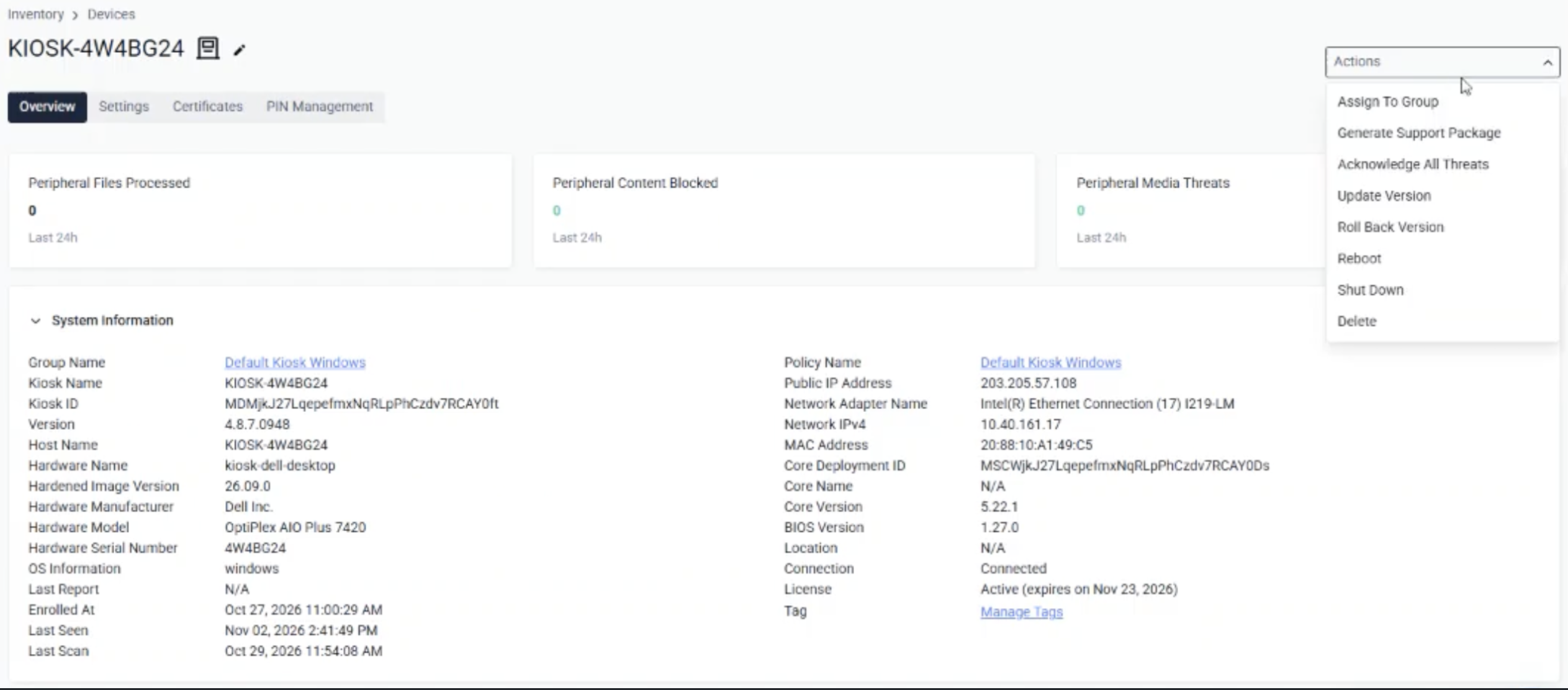 |
Hardware Health Check and Proactive Alerts | Kiosk now periodically checks the health of the device hardware, such as disk health, disk wear and reliability, and device drivers, and alerts administrators to problems that can indicate an upcoming hardware failure. 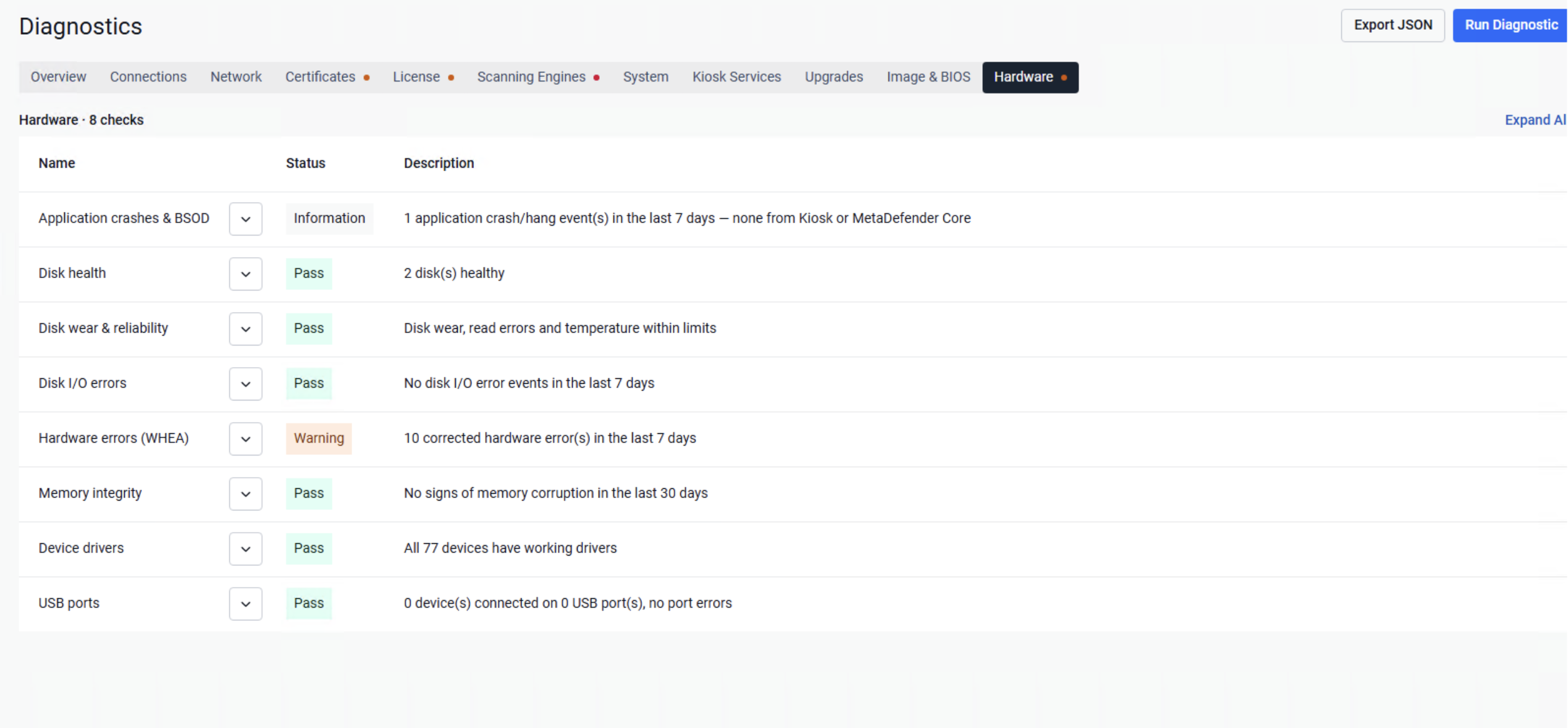 |
Enhancement | |
Avoid Re-Sanitizing Already Sanitized Files | When the same media is scanned again, Kiosk no longer sanitizes files that it has already sanitized and written back, so users do not receive duplicate remediated files. Administrators can turn this on with the "Avoid Duplicate Remediated Files" option and set a retention period; with MetaDefender Core 5.24 or later, Core also skips sanitizing its own sanitized output. |
Granular Control over Blocked Files | Administrators now have more granular control over blocked files. By enabling "Remove files with result" in a workflow's blocked-file handling, they can select the specific scan results to act on, such as infected files, so only those blocked files are removed, quarantined, or replaced with tombstone files. Files blocked for other reasons, such as password-protected archives, stay on the media. 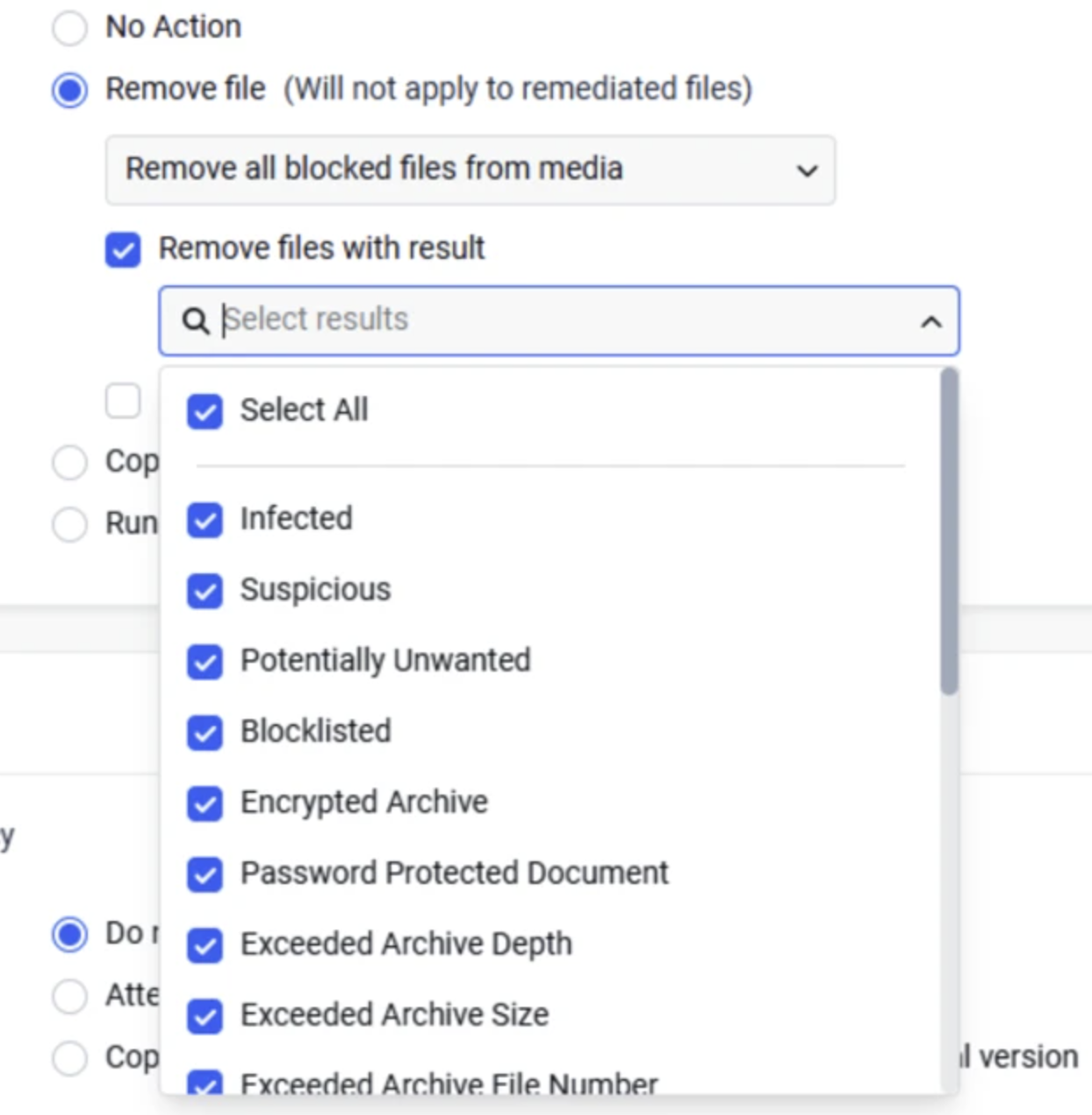 |
Search for Files When Retrieving | Users can now search by file name on the "Select files" screen when retrieving files from a Directory, MetaDefender Managed File Transfer (MFT), SharePoint, or OneDrive, the same way they can when selecting files on their media. |
Enhanced Microsoft Entra ID Support for Conditional Access Policies | Kiosk now has enhanced support for Microsoft Entra ID single sign-on (SSO), so users can sign in to the Kiosk UI when the organization enforces Conditional Access policies that require a compliant or Entra-joined device. |
Keep Per-Kiosk Syslog Settings Under a Central Management (CM10) Policy | Administrators can now turn on "Do not apply this configuration to the device" on the Syslog page of a My OPSWAT Central Management (CM10) group policy, so each Kiosk keeps its own syslog servers instead of having them replaced by the policy. This option takes effect on Kiosk 4.8.7 and later. |
Clear Result When the Connection to MetaDefender Core Is Lost | If the connection to MetaDefender Core is lost during a scan, the Kiosk UI now shows "Not all files were processed by MetaDefender" at the end of the session, and each unprocessed file is marked as skipped with the reason "Connection lost with MetaDefender", so the session can no longer be mistaken for a normal completion. |
Improved Kiosk UI Protection Against Windows Accessibility Tools | Kiosk has improved how the Kiosk UI blocks Windows accessibility tools, such as Narrator, Magnifier, and the On-Screen Keyboard, that could be used to leave the Kiosk UI. Kiosk now uses built-in Windows controls for this, so endpoint security software no longer raises alerts against Kiosk. |
Bug Fixes | |
Single sign-on failed after the Kiosk was enrolled in Central Management (CM10) | Fixed an issue where users could not sign in to the Kiosk UI with single sign-on (SSO) through an identity provider such as Microsoft Entra ID once the Kiosk was enrolled in My OPSWAT Central Management (CM10), and received an error stating that they did not have permission, even though sign-in worked before enrollment. |
Newer display languages missing on Kiosks managed by a Central Management (CM10) policy | Fixed an issue where display languages added in recent releases, such as Italian, Turkish, and Traditional Chinese, were not available on Kiosks managed by a My OPSWAT Central Management (CM10) policy created on an earlier Kiosk version. |
Email date shown one hour off during daylight saving time | Fixed an issue where emails sent by Kiosk, such as session reports and test emails, used the standard-time offset instead of the daylight saving time offset, so mail clients showed the message one hour late. |
Explorer windows and system tray icons accumulated after exiting Kiosk | Fixed an issue where Explorer windows and system tray icons opened during a session were not closed when the Kiosk UI exited, so they built up across repeated sessions. |
Known issues | |
Trend Micro USB Security popup appears over the Kiosk UI when unlocking an Elecom MF-PUVT3 drive | When an Elecom MF-PUVT3 drive is unlocked, the drive's own Trend Micro USB Security "Protection Expired" window may appear on top of the Kiosk UI and the on-screen keyboard. |
BioCryptodisk ISPX Track drive disconnects when its Public volume is scanned | When a session processes the Public volume of a BioCryptodisk ISPX Track drive, the drive disconnects about 20 seconds after the files on that volume are read, and the session ends with "Not all files were processed". This behavior comes from the device itself and also occurs outside Kiosk. Workaround: Process only the drive's Secure volume. |
MetaDefender KIOSK Documentation
The users can consult this web page or, alternatively, they can download the manual in pdf format from the link below:
MetaDefender KIOSK manual (SHA256: 9BB644060CE8A8FE92645EAD93B20D6BA6E3D81239DAAD0EA322147C6AC6C780).
OPSWAT MetaDefender AGD Documentation_v1.6 (SHA256: 78A69F89D3C0D0FCA8A4B8D30B2C92E55D80CC559583F23AC61158F67CE04988).