
To increase the session timeout on the Kiosk console via API call you will need the following resources from the Kiosk instance:
An API key generated from the Kiosk console.
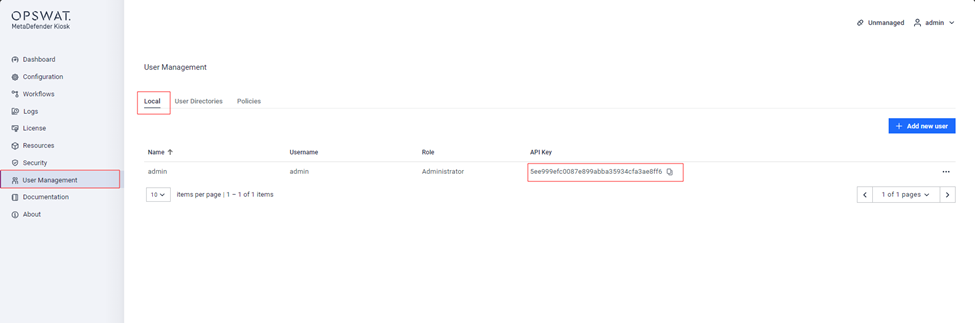
A valid URL from the Kiosk instance we are trying to make this change.
Once we have the two items mentioned above, we will need to use the following API call to make the change to the session timeout value:
curl --request PUT \ --url 'http://localhost:8009/admin/config/session' \ --header 'Content-Type: application/json' \ --header 'apikey: {apikey}' \ --data '{ "absoluteSessionTimeout": 0, "allowCrossIpSessions": true, "allowDuplicateSession": true, "sessionTimeout": 300000 }'
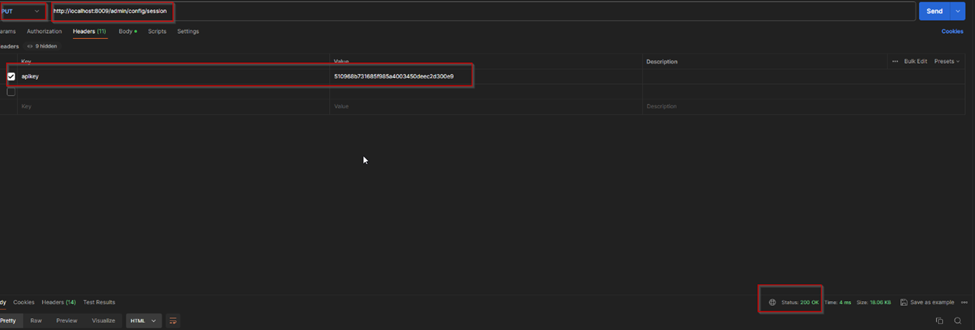
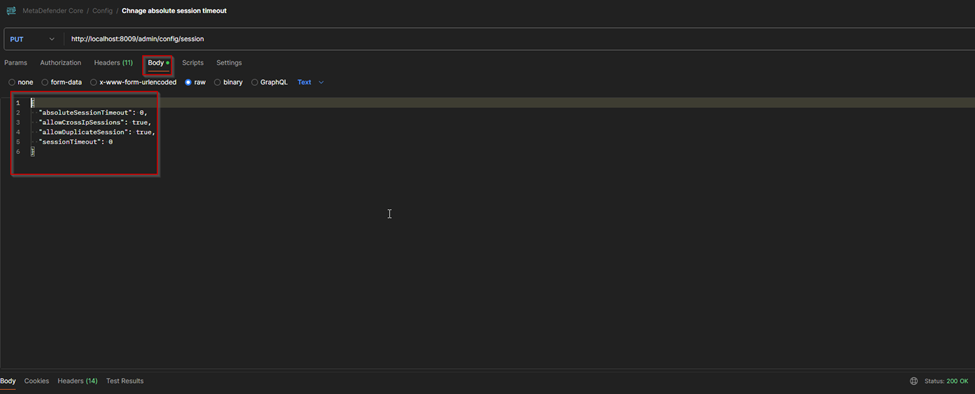
The value for the highlighted images from above is set to milliseconds.
Having the “0” value as can be seen in the image above will result in the timeout setting to be disabled.
Support:
If Further Assistance is required, please proceed to create a support case or chat with our support engineer.
Was this page helpful?
Knowledge Base