Knowledge Base
v4.7.1
Search this version
Knowledge Base
Knowledge Base
Title
Message
Create new category
What is the title of your new category?
Edit page index title
What is the title of the page index?
Edit category
What is the new title of your category?
Edit link
What is the new title and URL of your link?
How can I generate an API key on the Kiosk side?
Copy Markdown
Open in ChatGPT
Open in Claude
In order to generate an API key on the KIOSK side (necessary for different OPSWAT product integrations) you will need to take the following steps:
1. Navigate to the admin/login settings tab.
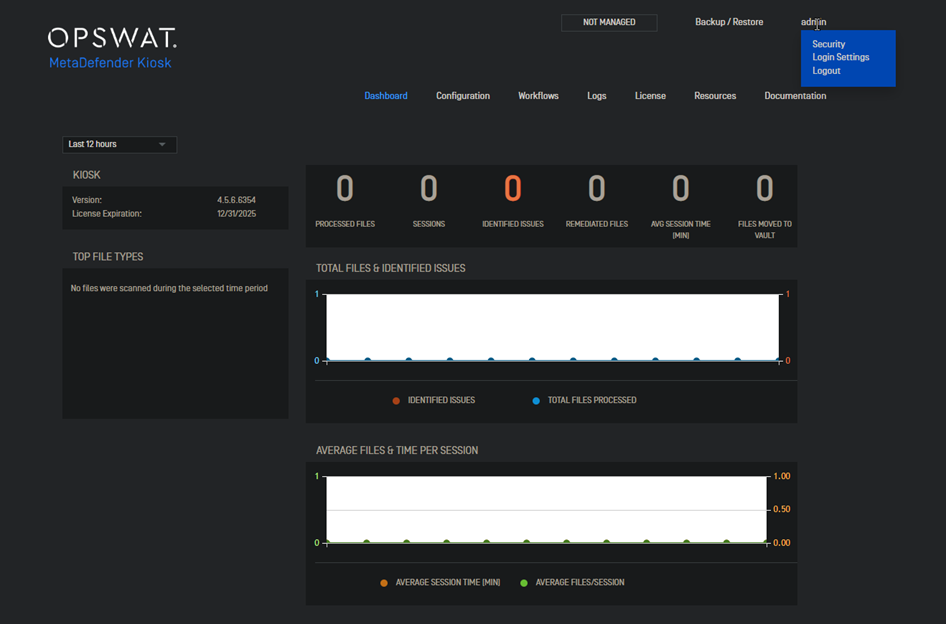
2. Access the local user's tab and select one of the users.

3. Once a user is selected click on the generate tab and an API key will be created.
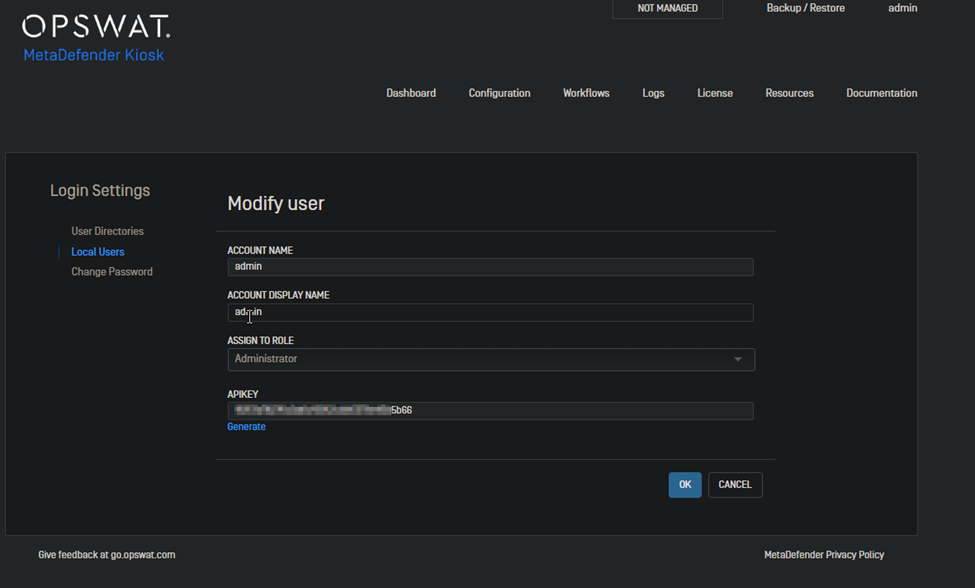
Once all the steps above have been completed the API key will be saved for the selected user and can be used in different integrations. (The API key does not have an expiration date).
If Further Assistance is required, please proceed to log a support case or chat with our support engineer.
Type to search, ESC to discard
Last updated on
Was this page helpful?
Next to read:
How can I create a new workflow?Discard Changes
Do you want to discard your current changes and overwrite with the template?
Archive Synced Block
Message
Create new Template
What is this template's title?
Delete Template
Message
