
Info:
This article applies to MetaDefender Kiosk versions 4.8.5 through 6.0.1.
Summary:
MetaDefender Kiosk may show a failed status on the Diagnostics page when a check is not configured or when a resource is intentionally unavailable in a restricted environment. This can occur with an unconfigured email server setting or in isolated, restricted, or air-gapped deployments where outbound internet access is not expected.
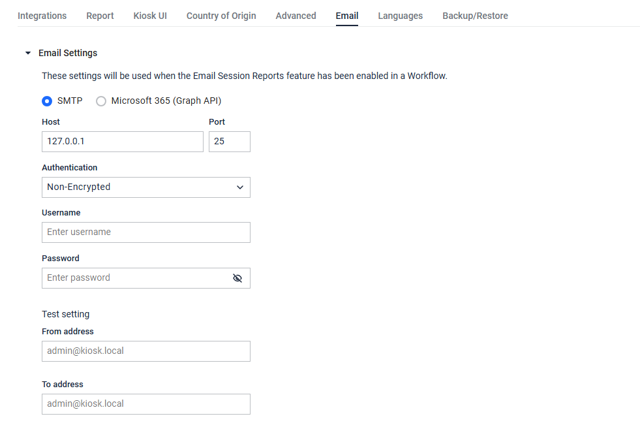
The behavior is related to how earlier Diagnostics checks report unavailable or unconfigured services. In these cases, the status may not represent a product service failure, but rather the current configuration or expected network access level of the environment.
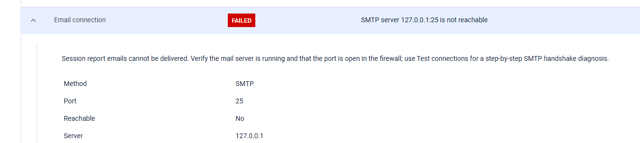
Cause
In versions earlier than MetaDefender Kiosk 6.0.1, Diagnostics checks may treat an unconfigured service or intentionally unavailable network access as a failed check. For example, an email server that has not been configured may be reported as FAILED instead of Not Configured.
Resolution
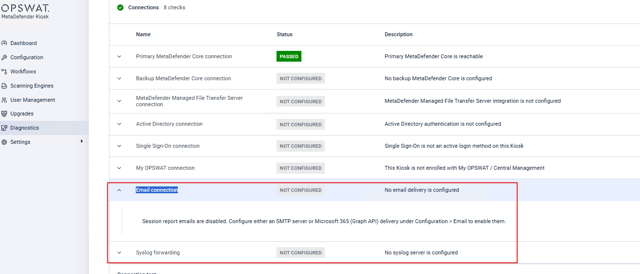
This behavior is addressed in MetaDefender Kiosk release 6.0.1. Upgrade MetaDefender Kiosk to version 6.0.1 or later. After the upgrade, review the Diagnostics page again to confirm that unconfigured or intentionally unavailable checks are reported appropriately.
After upgrading, unconfigured email settings should be reported as Not Configured instead of FAILED.
Support: If you require further assistance, please follow these instructions on How to Create Support Package?, before creating a support case or chatting with our support engineer.