
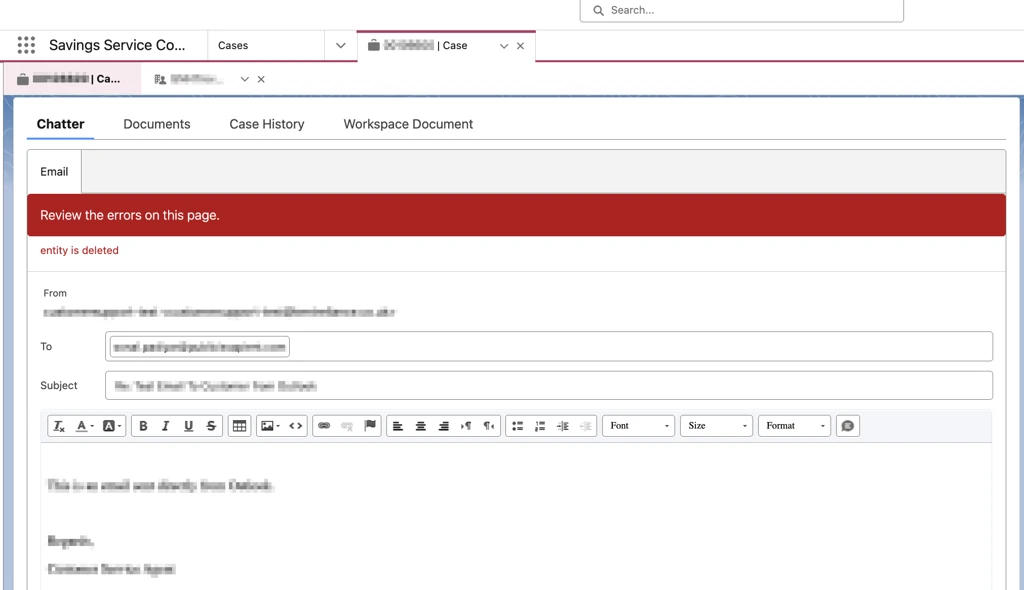
When the “Delete Original File” option is enabled in Content Disarm and Reconstruction (CDR), attachments may appear to disappear. This behavior is expected and stems from how Chatter handles file references.
What’s Actually Happening
When a file is uploaded to Chatter, Chatter stores a reference to the original file version. If CDR is configured to delete the original file after scanning, that original file record is removed. However, Chatter does not automatically update its reference to point to the newly created sanitized version of the file.
As a result, once the original file is deleted, Chatter continues to reference a file that no longer exists - causing the attachment to disappear or trigger an “entity is deleted” error.
Intended vs. Actual Behavior
The intended use case is:
Upload a file to Chatter.
Wait for the file to be scanned and sanitized.
Send an email with the sanitized version attached.
In practice, this flow breaks because Chatter remains linked to the original file instance and does not switch to the sanitized file automatically.
Platform Limitation, Not a Bug
This behavior is best described as a Chatter platform limitation, not a product defect. When “Delete Original File” is enabled:
The original file has its own
ContentSize,ContentDocumentId, andContentBodyId.The sanitized file is created as a new, separate file with different IDs and a different size.
Because the sanitized file is treated as a new file, existing references to the original file are not preserved.
Recommended Workaround
To ensure the sanitized file is sent successfully:
Upload the file to Chatter.
Wait for the scan to complete.
Allow the original file to be deleted.
Locate the newly created sanitized file.
Manually attach the sanitized file in Chatter or to the email.
This approach ensures that the attachment references the correct, sanitized file version.