
If you don't have access to MetaDefender Drive Toolkit, you can add the downloaded engine definition packages directly to a MetaDefender Drive device.
Before you begin, make sure you have downloaded the MetaDefender Drive engine packages using MetaDefender Update Downloader. See Update MetaDefender Drive Offline for setup instructions.
Add the Engine Packages to MetaDefender Drive
Download the MetaDefender Drive engine package files from Update Downloader.
Open the NTFS partition of MetaDefender Drive and extract the .zip files into the /update/defs/ folder. Make sure each engine.yml and engine.zip file is placed in the root of /update/defs/.
Delete any files with extensions other than .zip or .yml.
Restart your system and boot from the MetaDefender Drive to install the engine updates.
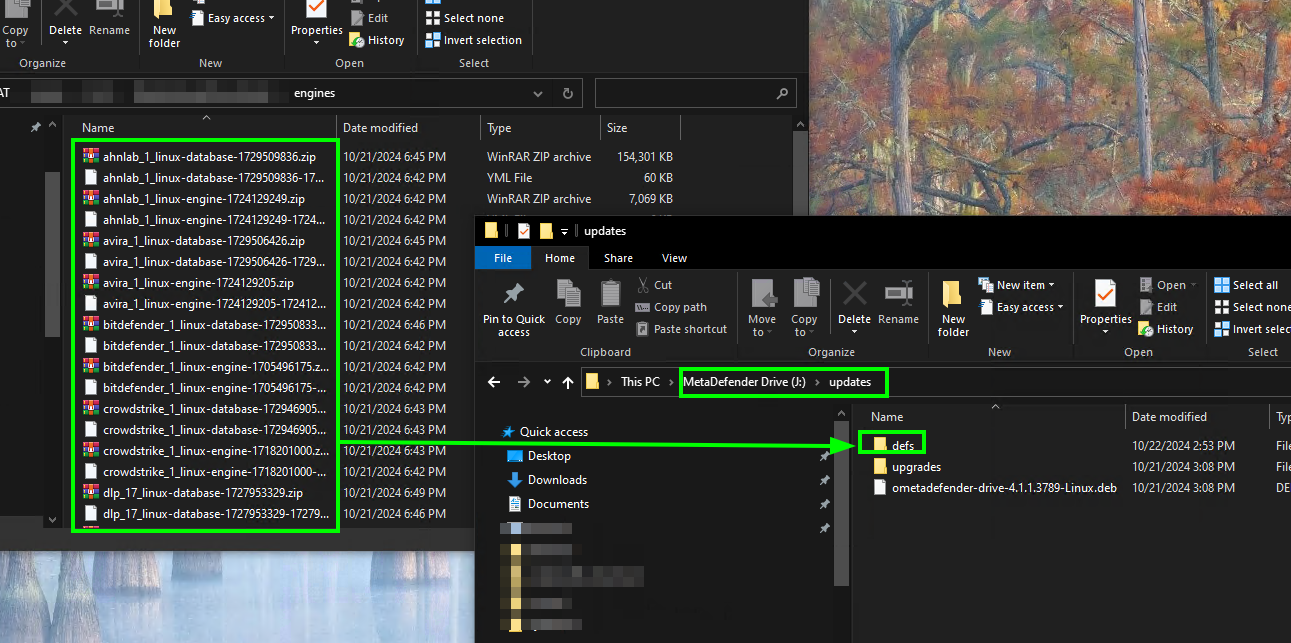
After following the steps above, the engine definitions will only be copied to MetaDefender Drive. The engines will be fully installed and initiated with the next boot.