
This article applies to all MetaDefender Core V4 and V5 releases deployed on Windows or Linux systems.
As an overall simplified explanation of the topic, file processing on MetaDefender Core is orchestrated via workflow management.
Any file processing request must be tied to a specific “workflow rule” whereas all product configurations and rules are defined.
Each “workflow rule” must be tied to specific “template” and “security zones”:
A “template” is literally a template that one or many “workflow rule” can be based on, which means, inherit all configurations' values that “template” defines to use for that “workflow rule”. Of course, you can customize configuration values for “workflow rule” after inheriting configurations' values from “template”. Similar relational concept like users & groups, or files & folders permission.
A “security zones” is created as network filtering rule based IP address range for that corresponding “workflow rule”. That means, any client source’s address going out of that IP address range, that client is not allowed to use that “workflow rule” for file processing.
The term Security Policies refers to three highly configurable objects that work in combination to accomplish MetaDefender’s primary security function.
These objects are:
Workflows
Security Zones
Templates
Workflows
A Workflow is the object that each file interacts with directly when being processed by MetaDefender.
I.e, each file is processed through one (and only one) of the user-defined Workflows.
The workflow is identified by its name.
It defines eligibility parameters to use it (i.e. whether a client is in the proper Security Zone and/or the actual logged-in user is in the specified Role and/or the client has provided the required user_agent).
It inherits processing characteristics (i.e. whether to scan files with the malware engines, if and how to use data sanitization, if and how to extract archives, etc.) from a Workflow that gets assigned to it.
It also allows direct assignment of processing characteristics that override the characteristics of the Workflow.
You create a Workflow by giving it a name and assigning a Security Zone and a Template to it. You can also assign specific processing characteristics to it.
A file's eligibility to be processed by the Workflow is determined by the filtering parameters under the General tab.
If all the required parameters are matching, the processing actions performed on that file are then determined by the specific processing characteristics set on the Workflow such as:
General tab
Archive tab
Filetype tab
Metascan tab
Deep CDR tab
Proactive DLP tab
Threat Intelligence tab
Vulnerability tab
Blocklist tab (as shown in the screenshot below)
Allowlist tab
Yara tab
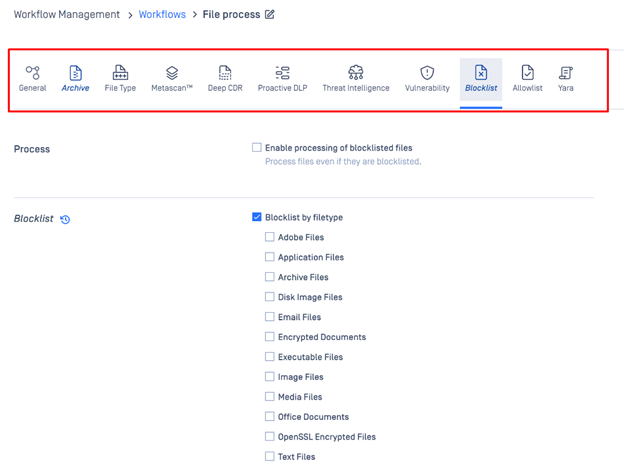
Workflows can be reordered using drag & drop.
A file that is eligible to be processed by more than one Workflow will still only get assigned to one Workflow (the assignment logic is described below).
A file that is not eligible for any Workflow will not be processed.
Security Zones
A Security Zone is the object that defines a network or a set of networks (as defined by IP masks).
Only files with a source location in that network (or set of networks) are eligible to be routed to a Workflow that is assigned to that Security Zone.
Templates
A Template is the object where you define a set of process actions (and associated properties) such as malware scanning, sanitization, archive handling, etc.
The Template does not get applied directly to the file. Instead, the Workflow is associated with one or more Templates, and it is the Workflow that gets applied to the file.
The Template can be thought of as a template of process settings.
By assigning the Workflow to a Template, the Workflow inherits the Template settings for each field that has not been directly populated on the Workflow.
Templates that are included out-of-the-box with each MetaDefender Core V5 installation are:
Default
Skip Images
Executables Only
These Workflow Templates cannot be altered or deleted, but they can be copied to custom Workflows that can then be edited.
Only the three Workflows mentioned above will be migrated when you upgrade from MetaDefender Core V4 to V5.
If you have any issues navigating MetaDefender Core’s Security Policies, please follow these instructions on How to Create Support Package With Bundle Tools?, before creating a support case or chatting with our support engineer.