
How Does MetaDefender Core Rotate PostgreSQL Logs?
This article applies to all MetaDefender Core releases deployed on Windows and Linux systems.
Overview
MetaDefender Core uses PostgreSQL default settings for log rotation. By default:
Logs are rotated after 1 day or when the PostgreSQL log reaches 10MB.
Restarting the
ometascan-postgresqlservice will also rotate logs.
MetaDefender Core includes a Data Retention mechanism to retain PostgreSQL logs.
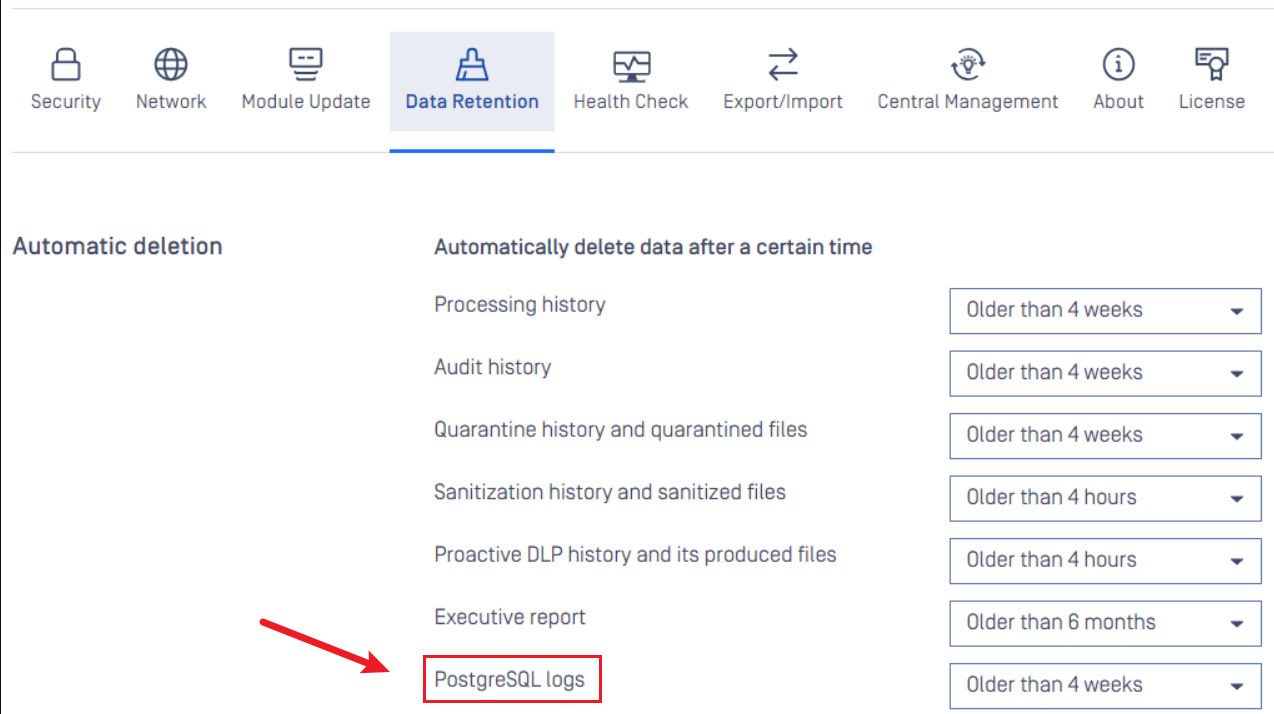
For more information, please refer to this article: Data Retention
Configuration
You can configure log rotation settings by creating a *.conf file in the <MetaDefender Core>\postgres folder if you are using the bundled database.
Configuration Example
log_rotation_age = 1minlog_rotation_size = 10kB
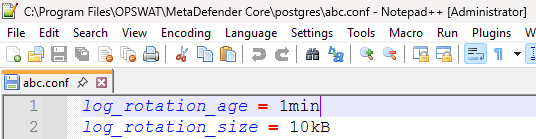
Please note that the configuration and example provided apply only to the bundled local PostgreSQL database. If you are using a remote database, you will need to configure log rotation directly on that remote PostgreSQL instance.
If Further Assistance is required, please proceed to log a support case or chatting with our support engineer.