
Does the Deployment ID change at any time?
This article applies to all MetaDefender Core V4 and V5 releases deployed on Windows or Linux systems.
License holders should be aware that changes or updates to the hardware or network components of the system on which MetaDefender Core is installed could result in changes to the Deployment ID.
To check whether your Deployment ID has changed, go to your MetaDefender Core Management Console>Settings>License tab, where your package ID, activation key, deployment ID and license expiry date are all listed.
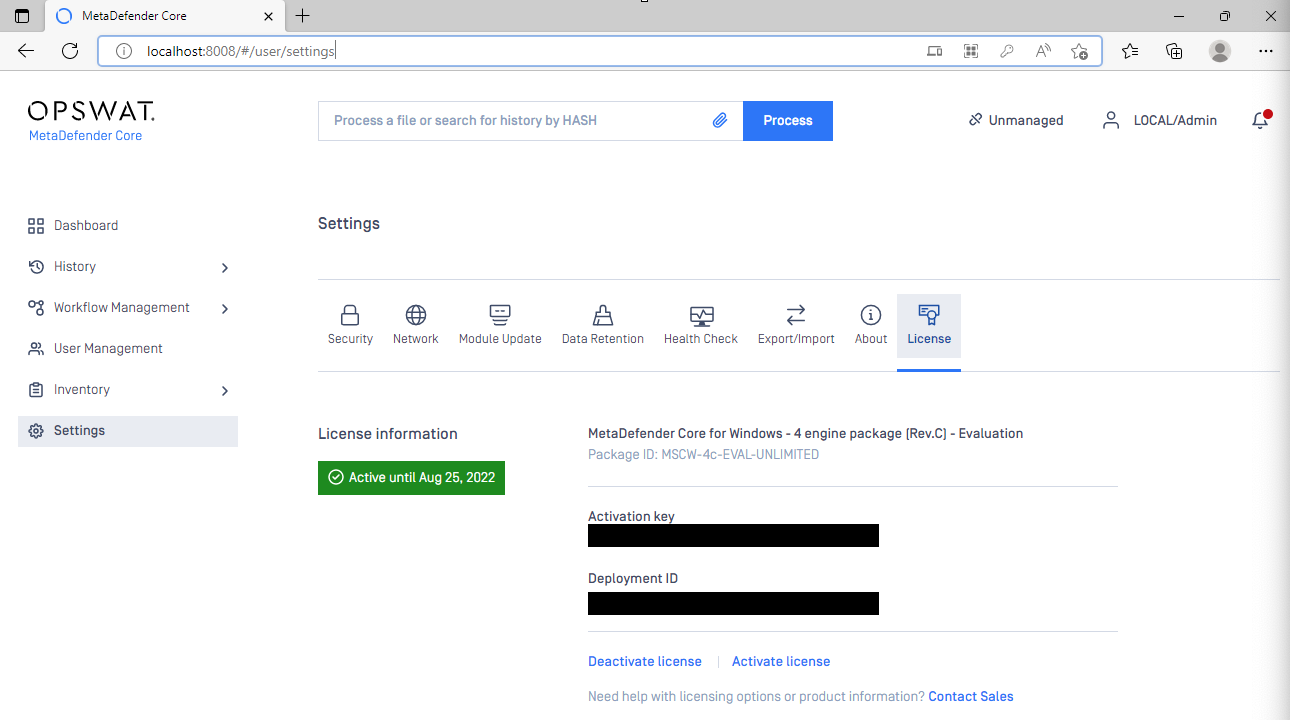
In some cases, if MetaDefender Core is deployed on a server using teamed NIC, the deployment ID may change due to changing physical (MAC) address of the server’s network adapter.
Cause: NIC teaming, also known as Load Balancing/Failover (LBFO) or NIC bonding, allows you to combine multiple physical network adapters into a single logical network card
When using teamed NIC, because the primary team member (primary NIC) might change in a non-deterministic manner (e.g. at each boot, NIC disable/enable action, or other reconfiguration activities), the primary team member might change, and the MAC address of the team might vary.
Since MetaDefender Core’s deployment ID is based partly on the MAC address of the network adapter, varying MAC address also leads to deployment ID changes and deactivation of license - causing service interruptions.
Example of a teamed NIC:
Microsoft Network Adapter Multiplexor Driveris a kernel mode driver to team up with multiple network adapters to provide one unified device to utilize the entire network bandwidth and load balancing among underlying adapters.
Solution: To avoid MetaDefender Core service interruption due to changing deployment ID, please perform the necessary steps to ensure the teamed NIC’s physical address remain the same after reboot.
One way to achieve this is by configuring a static MAC address for the teamed NIC.
Operating system upgrades, license upgrades, license renewals and other factors unrelated to system hardware and network components should not affect your Deployment ID.
However, in the unlikely event that you notice an unexplained change to your Deployment ID, please contact support as instructed below.
If you require Further Assistance With Your Licensing or Deployment ID, please follow these instructions on How to Create Support Package With Bundle Tools?, before creating a support case or chatting with our support engineer.