
Check Your Version:
This article applies to all My OPSWAT Central Management releases deployed on Windows and Linux systems.
Browse My OPSWAT Central Management Release Notes for details on the latest version, version history, version comparisons and release notes.
Alternatively, go directly through the My OPSWAT for a list of available downloads.:
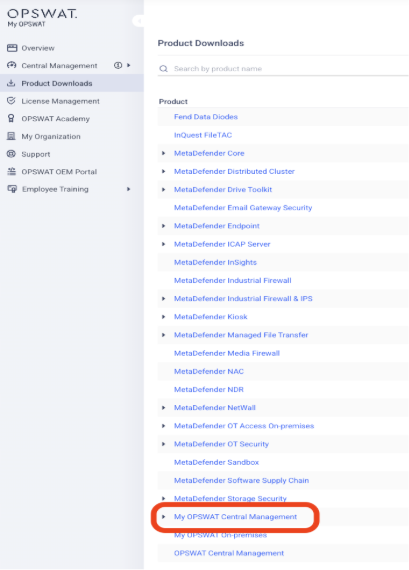
Login to My OPSWAT portal
Click on “My OPSWAT Central Management On-premises”
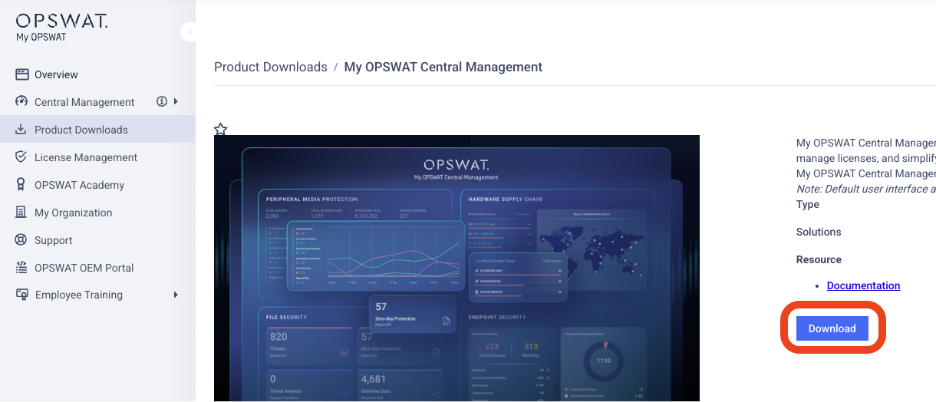
Click on “Download” button
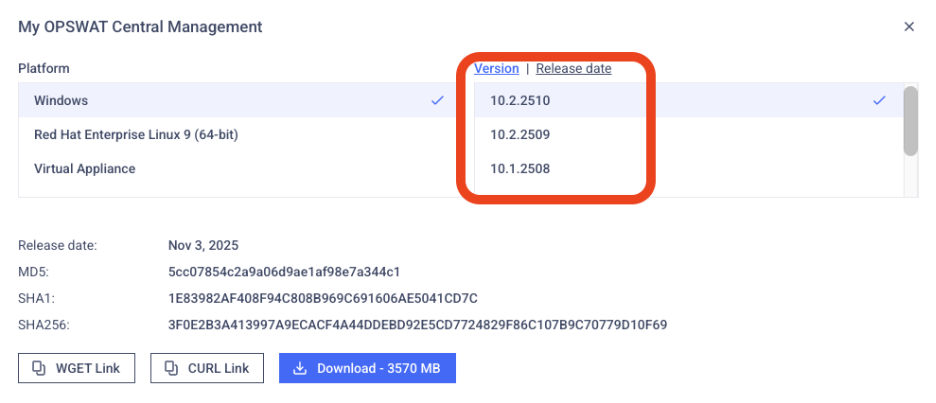
In the new window opened, always the version from the top is the latest version
Pro Tip:
OPSWAT highly recommends that users upgrade to the latest version of My OPSWAT Central Management. Current versions incorporate state-of-the-art features and necessary bug fixes, and are freely available for all license holders to download.
Support:
Feel free to contact OPSWAT support for further guidance through your Upgrade process. Please follow these instructions on How To Create a Support Package, before logging a Support Ticket with the OPSWAT team.