
Check your version:
This article applies to My OPSWAT Central Management version 10.7.26080 and later, deployed on premises on Windows or Linux systems.
Overview
Yes. Starting with My OPSWAT Central Management v10 (MOCM v10) version 10.7.26080, Active Directory users can sign in using the DOMAIN\Username format. This restores the login behavior familiar from Central Management v7. Users can also continue to sign in with their email address in User Principal Name (UPN) format.
Note: In versions prior to 10.7.26080, only the UPN format is accepted. If you are running an earlier release and require DOMAIN\Username logins, upgrade to 10.7.26080 or later.
How to Log In
In MOCM v10, the Active Directory login flow works as follows:
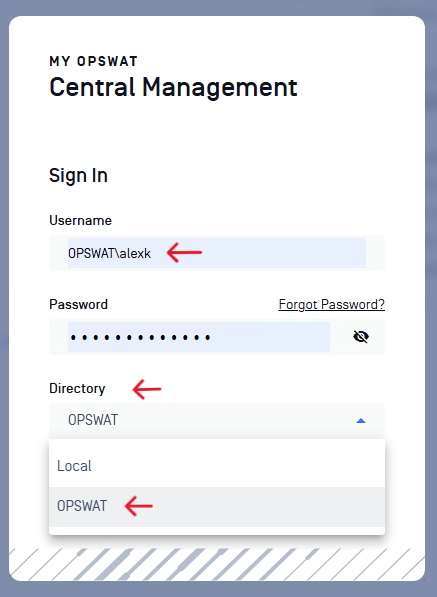
On the login page, select the appropriate directory from the Directory dropdown menu.
Enter your username in either the DOMAIN\Username format (for example OPSWAT\alexk) or UPN format (for example user@domain.com).
Enter your password to complete authentication.
Support: If you have questions, concerns or want to report issues regarding My OPSWAT Central Management v10, please open a Support Case with the OPSWAT team via phone, online chat or form, or feel free to ask the community on our OPSWAT Expert Forum.