
To enable Deep CDR, go to Workflow Managements > Workflows > [Workflow name] > Enable Deep CDR
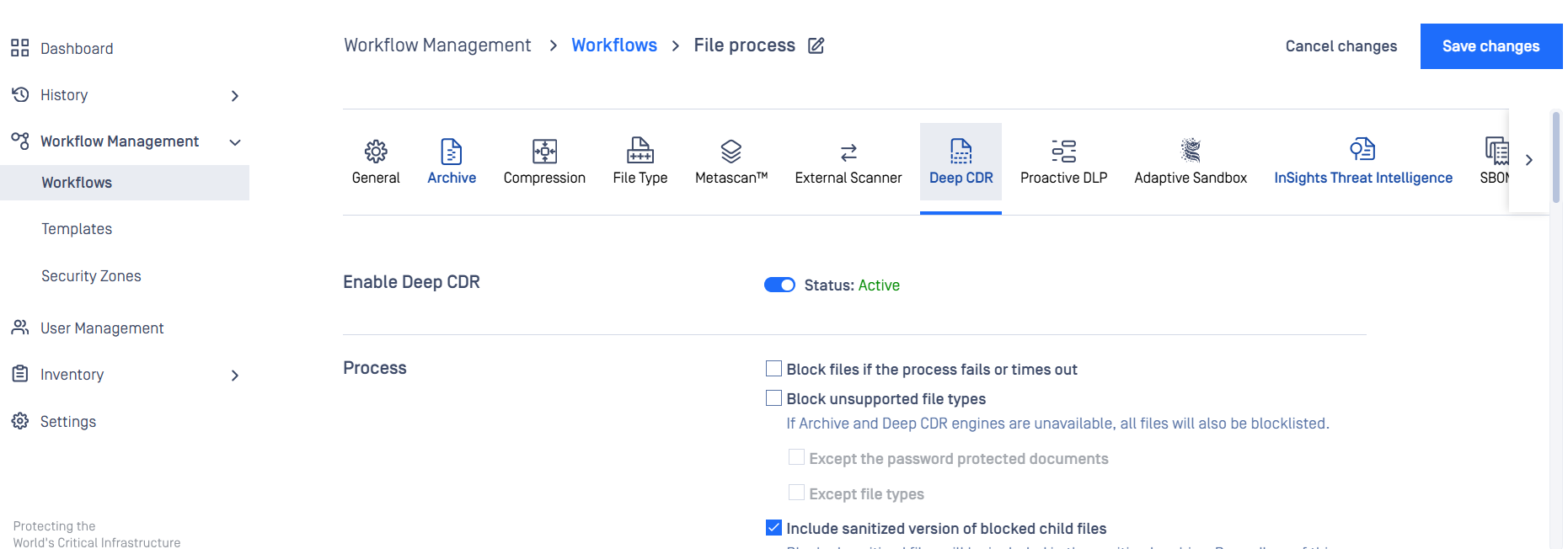
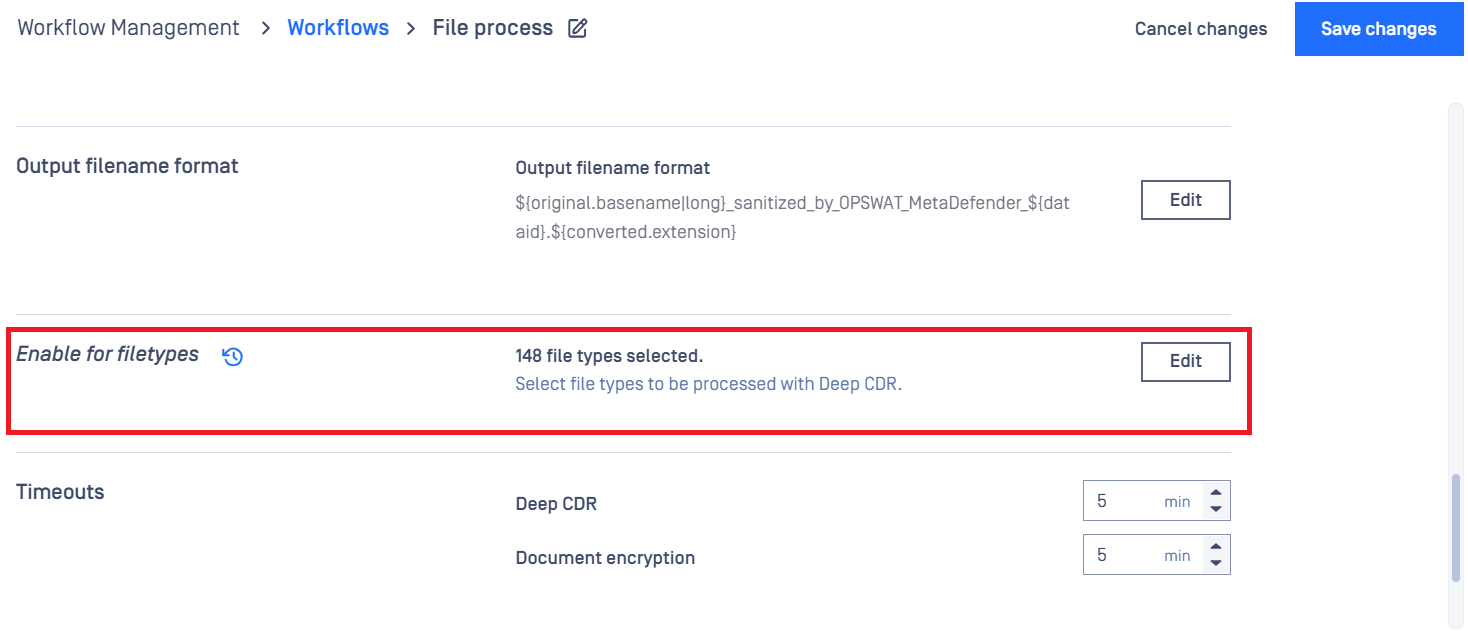
To enable file types to be processed
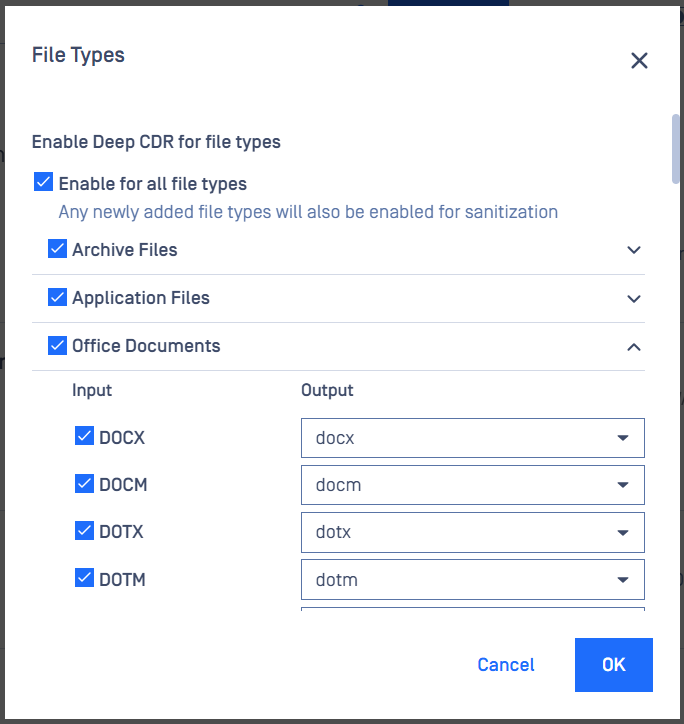
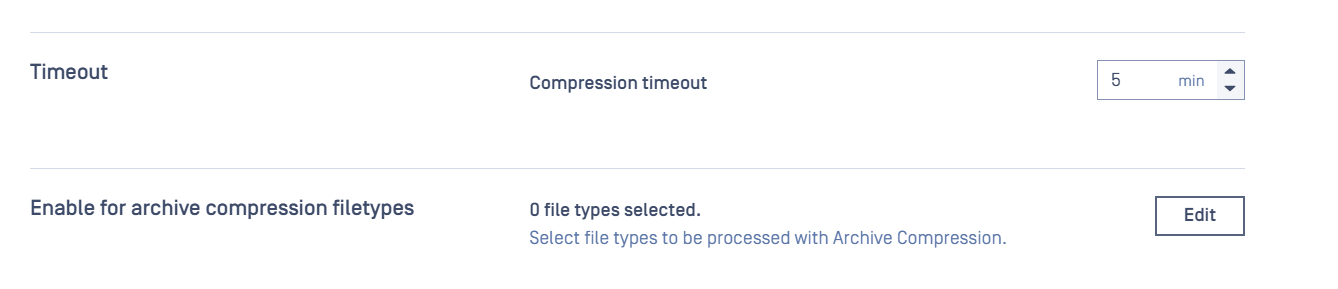
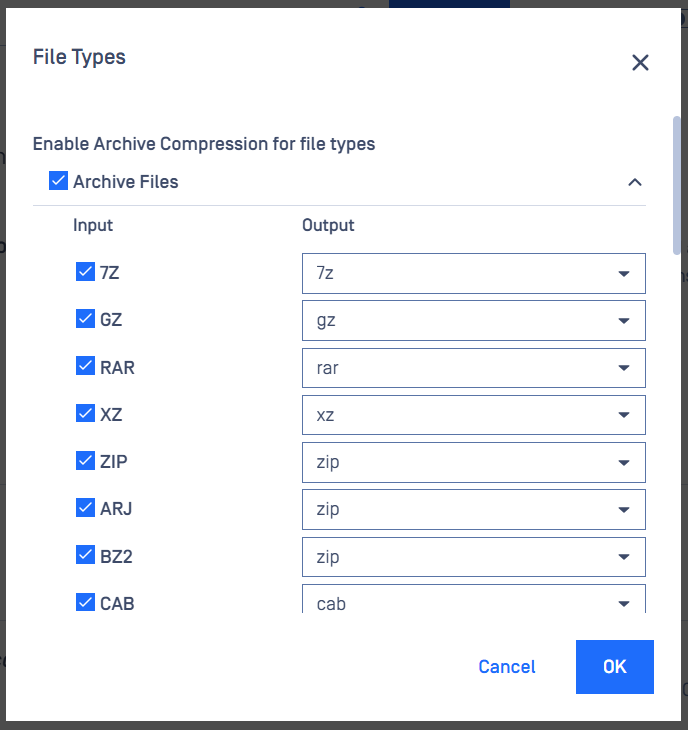
To enable Archive file types sanitization, go to the Compression tab
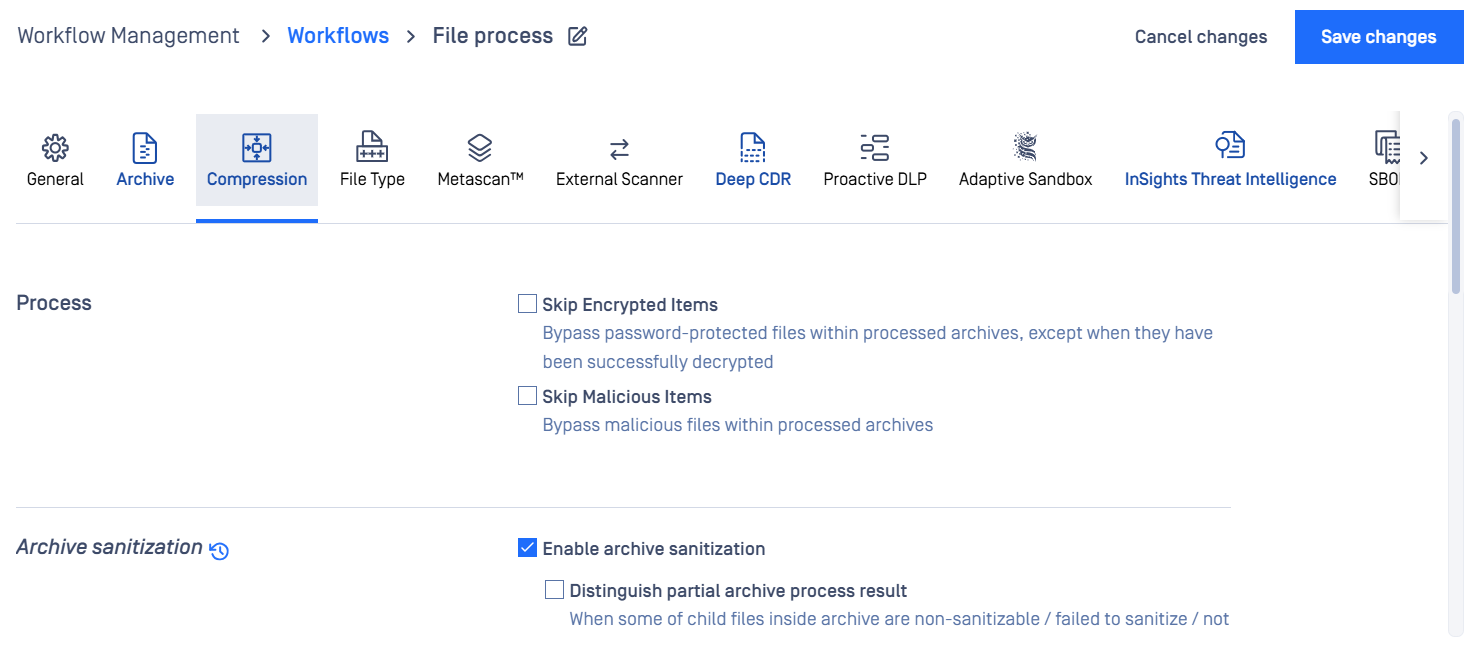
Update the "Enable for archive compression filetypes"
Advanced Configurations
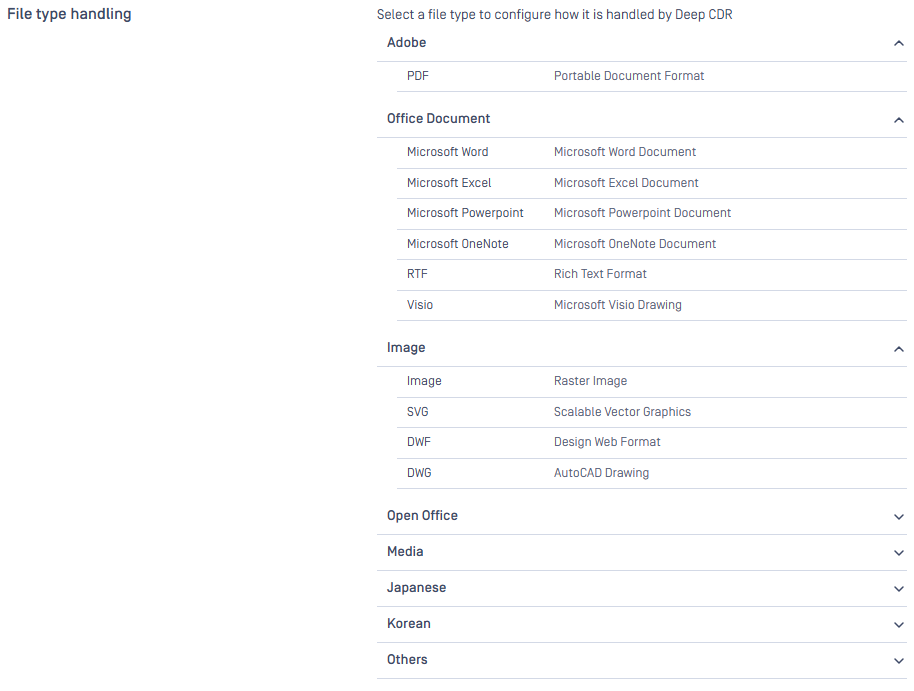
Deep CDR can be configured via workflow or rules within administrator management console. For each file type, it is customizable via module configuration, which objects to remove. For example, you can configure to remove macro while keeping hyperlinks.
The engine configuration is accessible under Workflow Management > Workflow > {Workflow name} > Deep CDR > Advanced configuration > File type handling > {File type}
Remove Macro: Remove JavaScript and document open action
Remove Embedded Object: Remove embedded objects including attachments, embedded files, etc. Applicable when recursive sanitization is not performed.
Excluded File Types: List of file types, separated by commas, of which files are skipped from the removal.
Recursive Level: Set to 0 to disable recursive sanitization
Process Hyperlink Behavior: Remove hyperlink annotations and change hyperlinks in text (plain text strings that PDF readers recognize as hyperlinks and highlight automatically)
Do nothing: Keep hyperlinks as-is
Remove hyperlink annotations only: Text links may still be highlighted by PDF readers
Remove hyperlink annotations and text links: Text links will not be clickable
Remove hyperlink annotations and prevent clickable links auto-turning: Prevent clickable links auto-turning feature of readers by changing "." to "[.]"
Remove hyperlink annotations and leave them in text form
Add hyperlink prefix
Return list of hyperlinks: Do nothing with hyperlink but list it in returned message
Hyperlink Prefix: Prefix text will be added to hyperlinks. Applicable when choosing 'Add hyperlink prefix'
Display Hyperlinks in Comments: Add comment annotations to show the original hyperlinks along with other actions on the hyperlinks. Not applicable to hyperlinks in XFA form
Process Image
Process Raw Image: Raw images are images that cannot be extracted to be standalone like normal images. They usually require large resources to process.
Process QR code: Hyperlink in QR code is detected and reported.
Image quality: Image quality is applied for jpg image
Optimized
As original
Balanced
Remove Metadata
Remove Embedded Font: Remove all embedded fonts; may break some non-English content (like Hebrew or Arabic)
Process Form: Process operational form fields
Remove Web Capture Content: Remove Web Capture content database objects (/IDS, /URLS) and related data (SpiderInfo and capture command)
Strict Validation: If false, ignore slight error in file structure, otherwise report standard compliance issues
Skip Signed File: Skip processing PDF file with digital signature
Skip Only if Signature is Valid: Only skip when PDF file is validated and valid against digital signature. Only applicable when Validate digital signature is enabled.
Validate digital signature: Check file integrity to ensure the content has not been modified.
Validate signer’s certificate: Confirm the signer is trusted by checking their certificate with known Certificate Authorities (CAs).
Trusted CAs directory: Path to directory containing only trusted root CAs.
Process 3D object: Process 3D object
Process PostScript Object: PostScript object data are set to empty and related streams are removed
Process XSS in text fields: Detect and sanitize XSS injection in text fields
Remove User-Defined Named Action: Remove the user-defined Named action
Allowed Named Actions: List of Named actions should be allowed
Process concatenated PDF: Detect concatenated PDF and sanitize the last PDF
Convert to rasterized PDF
Scale with custom ratio: Scale rasterized images with ratio to 4x page dimension rather than relying on Image quality
Custom image ratio
ISG-Compliant PDF
Remove Text Annotation (ISG PDF 5.39): Remove text annotations
Remove Popup Annotation (ISG PDF 5.43): Remove popup annotations
Remove Watermark Annotation (ISG PDF 5.47): Remove watermark annotations
PDF to Image
Image quality: Image quality is applied to converted image
Very low: Output image dimension is approximate A8 page size at 300dpi
Low: Output image dimension is approximate A5 page size at 300dpi
Medium: Output image dimension is approximate A3 page size at 300dpi
High: Output image dimension is approximate A2 page size at 300dpi
Office Document
Word
Process Macro: Process macro, DDE protocol and document open action in DOC/DOT/DOCM/DOTM
Do nothing
Remove all macro
Skip allowlisted macro: Skip macro listed in Macro Hashes setting
Macro Hashes: List of macro SHA256 hashes to allowlist. Add prefix "filepath:" to allow loading newline-separated hashes from file. Applicable when choosing 'Skip allowlisted macro'
Skip Signed Macro: Signed macro is detected and validated against its signature and excluded from removal if valid. Applicable to DOCM and DOTM
Remove Custom XML
Remove Chart: Only charts that are not recursively sanitized, due to Recursive Level set to 0 or recursive sanitization failure, are removed
Remove Embedded Object: Remove all embedded objects including attachments, embedded files,...
Process Hyperlink Behavior
Do nothing
Remove hyperlink
Add hyperlink prefix
Return list of hyperlinks: Do nothing with hyperlink but list it in returned message
Hyperlink Prefix: Prefix text will be added to hyperlinks. Applicable when choosing 'Add hyperlink prefix'
Process Image
Sanitize QR code: Hyperlink in QR code is detected and processed based on Image Configuration
Allowlist External Image: Skip external image listed in Allowlist Pattern setting
Allowlist Pattern: List of regular expressions for paths of external image to be allowlisted, e.g., "file:///D:/opswat/sample.*.jpg$". Add prefix "filepath:" to allow loading newline-separated patterns from file
Process ASCII-based QR code: QR code composed by ASCII characters is detected and reported. The detection is highly resource-consumed and may degrade performance.
Remove Comment: Remove Comment is applied to DOCX family (DOCX, DOTX, DOCM, etc.) only
Remove Revision: Remove Revision is applied to DOCX family (DOCX, DOTX, DOCM, etc.) only
Remove Metadata
Remove Embedded Font
Remove Hidden Text: Remove texts that were hidden in the document
Remove Smart Tag: Remove Smart Tags which is an Office feature that associates specific actions with text content matching a certain pattern. Applicable to DOCX family (DOCX, DOTX, DOCM, etc.) only
Cleanup Unused Resources: Remove unused styles and lists from DOC/DOT files
Recursive Level: Set to 0 to disable recursive sanitization
Excluded File Types for Recursion: List of file types that are not applied to recursive sanitization. Applicable when the 'Recursive Level' value is greater than 0
Skip Signed File: Skip processing Word file with digital signature
Validate Document Properties: Enable validation on Document Properties through syntactic checks. Applicable to DOCX family and XML-DOCX
Validation Effect on Sanitization Result: Choose how failure result of validation affects sanitization result
Success
Failure
Validate Template Name: Perform validation on Template Name including syntactic checks
Validation Effect on Sanitization Result: Choose how failure result of validation affects sanitization result
Success
Failure
Validate Header and Footer: Perform validation on Header and Footer including syntactic checks
Validation Effect on Sanitization Result: Choose how failure result of validation affects sanitization result
Success
Failure
Validate structural XML through syntactic checks: Enable validation on structural XML. Applicable to DOCX family and XML-DOCX
Validation Effect on Sanitization Result: Choose how failure result of validation affects sanitization result
Success
Failure
Validate Zip Structure: Perform validation on Zip Structure including syntactic checks
Validation Effect on Sanitization Result: Choose how failure result of validation affects sanitization result
Success
Failure
Convert to rasterized PDF
ISG-Compliant Word
Remove Field Code (ISG Office 2007 4.1 and 4.18): Only field codes DATABASE, LASTSAVEDBY, AUTHOR, USERINITIALS, USERNAME are supported
Remove Document-Specific Image Metadata (ISG Office 2007 4.17): Remove image metadata stored in document structure rather than the image itself
Remove Custom Properties (ISG Office 2007 4.9): Remove all custom properties in the document
Allowed Custom Properties: A list of custom properties to preserve. Any custom property whose name and value pair matches an entry in this list will be preserved in the document.
Property Name: Name of the custom property to be preserved
Property Value: Value of the custom property to be preserved
Remove Comment-Related Data (ISG Office 2007 4.3): Remove comment-related data. Applicable when Remove Comment is enabled
Remove Image (ISG Office 2007 4.4)
Remove embedded object completely (ISG Office 2007 4.4): Remove usage, definition, and everything related to embedded objects. Applicable when Remove Embedded Object is enabled
Remove Structured Document Tags (ISG Office 2007 4.21): Remove custom markup and content control elements (in-text comments, date pickers, drop-downs, etc.)
Excel
Process Macro: Process macro and document open action in XLS/XLT/XLSM/XLTM/XLSB/XLAM
Do nothing
Remove all macro
Skip allowlisted macro: Skip macro listed in Macro Hashes setting
Macro Hashes: List of macro SHA256 hashes to allowlist. Add prefix "filepath:" to allow loading newline-separated hashes from file. Applicable when choosing 'Skip allowlisted macro'
Skip Signed Macro: Signed macro is detected and validated against its signature and excluded from removal if valid. Applicable to XLSM, XLTM and XLAM
Remove Custom XML
Remove Embedded Object: Remove all embedded objects including attachments, embedded files,...
Process Hyperlink Behavior
Do nothing
Remove hyperlink
Add hyperlink prefix
Return list of hyperlinks: Do nothing with hyperlink but list it in returned message
Hyperlink Prefix: Prefix text will be added to hyperlinks. Applicable when choosing 'Add hyperlink prefix'
Process Image
Sanitize QR code: Hyperlink in QR code is detected and processed based on Image Configuration
Allowlist External Image: Skip external image listed in Allowlist Pattern setting. Applicable to Excel 2007 only
Allowlist Pattern: List of regular expressions for paths of external image to be allowlisted, e.g., "file:///D:/opswat/sample.*.jpg$". Add prefix "filepath:" to allow loading newline-separated patterns from file
Remove Comment: Remove Comment is applied to XLSX family (XLSX, XLSM, XLSB, etc.) only
Remove Revision
Remove Metadata
Remove Smart Tag: Remove Smart Tags which is an Office feature that associates specific actions with text content matching a certain pattern. Applicable to XLSX family (XLSX, XLSB, XLSM, etc.) only
Cleanup Unused Resources: Remove unused styles from XLS/XLT files
Recursive Level: Set to 0 to disable recursive sanitization
Remove External Content: Remove DDE (Dynamic Data Exchange) protocol, external sheet and external data connection
Skip Signed File: Skip processing Excel file with digital signature
Validate Document Properties: Enable validation on Document Properties through syntactic checks. Applicable to XLSX family
Validation Effect on Sanitization Result: Choose how failure result of validation affects sanitization result
Success
Failure
Validate Header and Footer: Perform validation on Header and Footer including syntactic checks. Applicable to XLSX family
Validation Effect on Sanitization Result: Choose how failure result of validation affects sanitization result
Success
Failure
Validate structural XML through syntactic checks: Enable validation on structural XML. Applicable to XLSX family
Validation Effect on Sanitization Result: Choose how failure result of validation affects sanitization result
Success
Failure
Validate Zip Structure: Perform validation on Zip Structure including syntactic checks
Validation Effect on Sanitization Result: Choose how failure result of validation affects sanitization result
Success
Failure
Convert to rasterized PDF
ISG-Compliant Excel
Remove Document-Specific Image Metadata (ISG Office 2007 4.17): Remove image metadata stored in document structure rather than the image itself
Remove Custom Properties (ISG Office 2007 4.9): Remove all custom properties in the document
Allowed Custom Properties: A list of custom properties to preserve. Any custom property whose name and value pair matches an entry in this list will be preserved in the document.
Property Name: Name of the custom property to be preserved
Property Value: Value of the custom property to be preserved
Remove Comment-Related Data (ISG Office 2007 4.3): Remove comment-related data. Applicable when Remove Comment is enabled
Remove embedded object completely (ISG Office 2007 4.4): Remove usage, definition, and everything related to embedded objects. Applicable when Remove Embedded Object is enabled
PowerPoint
Process Macro: Process macro, DDE protocol and document open action in PPT/PPS/POT/PPTM/PPSM/SLDX/SLDM
Do nothing
Remove all macro
Skip allowlisted macro: Skip macro listed in Macro Hashes setting
Macro Hashes: List of macro SHA256 hashes to allowlist. Add prefix "filepath:" to allow loading newline-separated hashes from file. Applicable when choosing 'Skip allowlisted macro'
Skip Signed Macro: Signed macro is detected and validated against its signature and excluded from removal if valid. Applicable to PPTM, PPSM, POTM, PPAM and SLDM
Remove Custom XML
Remove Chart: Only charts that are not recursively sanitized, due to Recursive Level set to 0 or recursive sanitization failure, are removed
Remove Embedded Object: Remove all embedded objects including attachments, embedded files,...
Process Hyperlink Behavior
Do nothing
Remove hyperlink
Add hyperlink prefix
Return list of hyperlinks: Do nothing with hyperlink but list it in returned message
Hyperlink Prefix: Prefix text will be added to hyperlinks (not internal links). Applicable when choosing 'Add hyperlink prefix'
Process Image
Sanitize QR code: Hyperlink in QR code is detected and processed based on Image Configuration
Allowlist External Image: Skip external image listed in Allowlist Pattern setting. Applicable to PowerPoint 2007 only
Allowlist Pattern: List of regular expressions for paths of external image to be allowlisted, e.g., "file:///D:/opswat/sample.*.jpg$". Add prefix "filepath:" to allow loading newline-separated patterns from file
Remove Comment: Remove Comment is applied to PPTX family (PPTX, PPTM, PPSX, etc.) only
Remove Metadata
Remove Embedded Font
Remove Smart Tag: Remove Smart Tags which is an Office feature that associates specific actions with text content matching a certain pattern. Applicable to PPTX family (PPTX, PPTM, etc.) only
Recursive Level: Set to 0 to disable recursive sanitization
Skip Signed File: Skip processing PowerPoint file with digital signature
Validate Document Properties: Enable validation on Document Properties through syntactic checks. Applicable to PPTX family and XML-PPTX
Validation Effect on Sanitization Result: Choose how failure result of validation affects sanitization result
Success
Failure
Validate structural XML through syntactic checks: Enable validation on structural XML. Applicable to PPTX family and XML-PPTX
Validation Effect on Sanitization Result: Choose how failure result of validation affects sanitization result
Success
Failure
Validate Zip Structure: Perform validation on Zip Structure including syntactic checks
Validation Effect on Sanitization Result: Choose how failure result of validation affects sanitization result
Success
Failure
ISG-Compliant PowerPoint
Remove Document-Specific Image Metadata (ISG Office 2007 4.17): Remove image metadata stored in document structure rather than the image itself
Remove Custom Properties (ISG Office 2007 4.9): Remove all custom properties in the document
Allowed Custom Properties: A list of custom properties to preserve. Any custom property whose name and value pair matches an entry in this list will be preserved in the document.
Property Name: Name of the custom property to be preserved
Property Value: Value of the custom property to be preserved
Remove Comment-Related Data (ISG Office 2007 4.3): Remove comment-related data. Applicable when Remove Comment is enabled
OneNote
Remove Embedded Object: Remove all embedded objects including attachments, embedded files, etc.
Process Image
Process Hyperlink Behavior
Do nothing: Keep hyperlinks as-is
Remove hyperlink
Add hyperlink prefix
Hyperlink Prefix: Prefix text will be added to hyperlinks. Applicable when choosing 'Add hyperlink prefix'
RTF
Remove Embedded Object: Remove all embedded objects including attachments, embedded files,...
Remove Metadata
Process Hyperlink Behavior
Do nothing
Remove hyperlink
Add hyperlink prefix
Hyperlink Prefix: Prefix text will be added to hyperlinks. Applicable when choosing 'Add hyperlink prefix'
Remove Embedded HTML: Remove HTML tags containing malicious HTML nodes
Do nothing
Remove HTML tags containing malicious nodes
Remove all HTML tags
Process Image
Recursive Level: Set to 0 to disable recursive sanitization
Process font table: Remove embedded font table
Limit of font count in font table: Font table exceeding this font count will be removed
Visio
Remove Macro
Remove Embedded Object
Process Hyperlink Behavior
Do nothing: Keep hyperlinks as-is
Remove hyperlink
Add hyperlink prefix
Hyperlink Prefix: Prefix text will be added to hyperlinks. Applicable when choosing 'Add hyperlink prefix'
Process Image
Remove Metadata: Remove Metadata is not applied to Visio XML
Recursive Level: Set to 0 to disable recursive sanitization (apply for Visio XML - vdx, vsx, vtx)
Project
Remove Embedded Object
Remove Macro
OpenDocument
OpenDocument Text
Remove Macro: Remove JavaScript and macro
Remove Embedded Object: Remove all embedded objects including attachments, embedded files, flash files,...
Process Hyperlink Behavior
Do nothing: Keep hyperlinks as-is
Remove hyperlink: Hyperlinks will not be clickable
Add hyperlink prefix
Hyperlink Prefix: Prefix text will be added to hyperlinks. Applicable when choosing 'Add hyperlink prefix'
Process Image
Remove Metadata
Remove Embedded Font
Remove Comment
Remove Hidden Text
Remove Revision
Recursive Level: Set to 0 to disable recursive sanitization
OpenDocument Sheet
Remove Macro
Process Image
Process Hyperlink Behavior
Do nothing: Keep hyperlinks as-is
Remove hyperlink: Hyperlinks will not be clickable
Add hyperlink prefix
Hyperlink Prefix: Prefix text will be added to hyperlinks. Applicable when choosing 'Add hyperlink prefix'
Remove Metadata
Remove Embedded Font
Remove Embedded Object: Remove all embedded objects including attachments, embedded files, flash files,...
Recursive Level: Set to 0 to disable recursive sanitization
OpenDocument Presentation
Process Image: Sanitize attached images
Remove Metadata
Remove Embedded Object: Remove all embedded objects including attachments, embedded files, flash files,...
Process Hyperlink Behavior
Do nothing: Keep hyperlinks as-is
Remove hyperlink: Hyperlinks will not be clickable
Add hyperlink prefix
Hyperlink Prefix: Prefix text will be added to hyperlinks. Applicable when choosing 'Add hyperlink prefix'
Remove Embedded Font
Remove Macro
Recursive Level: Set to 0 to disable recursive sanitization
OpenDocument Drawing
Remove Embedded Object: Remove all embedded objects including attachments, embedded files, flash files,...
Process Hyperlink Behavior
Do nothing: Keep hyperlinks as-is
Remove hyperlink: Hyperlinks will not be clickable
Add hyperlink prefix
Hyperlink Prefix: Prefix text will be added to hyperlinks. Applicable when choosing 'Add hyperlink prefix'
Process Image
Remove Metadata
Remove Embedded Font
Remove Comment
Remove Macro
Recursive Level: Set to 0 to disable recursive sanitization
JTD
Remove Macro
Remove Embedded Object
Remove Hyperlink: Make links unclickable
Process Image
Remove Embedded Font
Hangul Word
Remove Macro
Remove Embedded Object: Remove all embedded objects including attachments, embedded files, flash files,...
Process RTF Document: Sanitize embedded RTF files, remove if fail and Remove Embedded Object is enabled. Applicable to HWP only.
Process Hyperlink Behavior
Do nothing: Keep hyperlinks as-is
Remove hyperlink: Hyperlinks will not be clickable
Add hyperlink prefix
Hyperlink Prefix: Prefix text will be added to hyperlinks. Applicable when choosing 'Add hyperlink prefix'
Process Image
Process Chart Behavior
Do nothing
Remove chart
Remove Metadata: Remove Metadata is applicable to HWPX only
Recursive Level: Set to 0 to disable recursive sanitization. Applicable to HWPX only.
Process Embedded Font: May break some non-English content (like Hebrew or Arabic) if embedded fonts are removed. Applicable to HWPX only
Do nothing
Remove embedded font
Hancom Cell
Process Macro
Do nothing
Remove all macro
Skip allowlisted macro: Skip macro listed in Macro Hashes setting
Macro Hashes: List of macro SHA256 hashes to allowlist. Add prefix "filepath:" to allow loading newline-separated hashes from file. Applicable when choosing 'Skip allowlisted macro'
Remove Embedded Object
Process Hyperlink Behavior
Do nothing
Remove hyperlink
Add hyperlink prefix
Hyperlink Prefix: Prefix text will be added to hyperlinks. Applicable when choosing 'Add hyperlink prefix'
Process Image
Sanitize QR code: Hyperlink in QR code is detected and processed based on Image Configuration
Allowlist External Image: Skip external image listed in Allowlist Pattern setting
Allowlist Pattern: List of regular expressions for paths of external image to be allowlisted, e.g., "file:///D:/opswat/sample.*.jpg$". Add prefix "filepath:" to allow loading newline-separated patterns from file
Remove Comment
Remove Revision
Remove Metadata
Recursive Level: Set to 0 to disable recursive sanitization
Hancom Show
Remove Embedded Object
Remove Chart: Only charts that are not recursively sanitized, due to Recursive Level set to 0 or recursive sanitization failure, are removed
Process Hyperlink Behavior
Do nothing
Remove hyperlink
Add hyperlink prefix
Hyperlink Prefix: Prefix text will be added to hyperlinks. Applicable when choosing 'Add hyperlink prefix'
Process Image
Sanitize QR code: Hyperlink in QR code is detected and processed based on Image Configuration
Allowlist External Image: Skip external image listed in Allowlist Pattern setting
Allowlist Pattern: List of regular expressions for paths of external image to be allowlisted, e.g., "file:///D:/opswat/sample.*.jpg$". Add prefix "filepath:" to allow loading newline-separated patterns from file
Remove Comment
Remove Metadata
Recursive Level: Set to 0 to disable recursive sanitization
Image
Image
Sanitize QR code: Hyperlink in QR code is detected and processed
Applicable File Types
JPG
PNG
BMP
Process Hyperlink Behavior
Add hyperlink prefix
Return list of hyperlinks: Do nothing with hyperlink but list it in returned message
Hyperlink Prefix: Prefix text will be added to hyperlinks. Applicable when choosing 'Add hyperlink prefix'
Remove Metadata
Image Size Limit (MB): Maximum decompressed image size on memory (for JPG, PNG, BMP and TGA), set to 0 for unlimited size
Remove ICC Profile: Remove ICC profile in JPG files
Image quality: Image quality is applied for jpg image
As original
Balanced
GIF Layer Count Limit: Maximum normalized layer count of GIF, applicable to GIF only. GIF files with layer count exceeding this value will be skipped from processing.
TIFF Size Limit (MB): Maximum decompressed image size on memory for TIFF, set to 0 for unlimited size
Restrict processing of big TIFF files in single thread: TIFF files with decompressed image size greater than or equal to restricted size will be forced in single thread
Restricted size (MB)
Preserve GeoTIFF tags: Preserve private TIFF tags storing georeferencing information
Deep Sanitization: Deeply sanitize image pixel content to prevent stegomalware
Image Conversion
BMP Output Size: When width or height of an image exceeds a threshold, it will be resized by the specified percentage. Applicable when converting TIFF to BMP. Input the Dimension threshold (px) in the first box and Resize ratio (%) in the second box.
SVG
Remove JavaScript: Remove JavaScript code that may harm the system.
Remove CDATA: Remove character data that may embed harmful program.
Remove Injection: Remove SVG injection to prevent execution of harmful program.
Process Image: Process raster images included inside SVG file.
Process Embedded Image: Process raster images and vector graphiccs within the SVG files.
Process Foreign Object
Do nothing
Foreign object data is recursively sanitized: Foreign object data is recursively sanitized. If recursive sanitization fails, the object is removed
Remove foreign object
DWF
Remove Embedded Font: Remove all embedded fonts
Process Hyperlink Behavior
Do nothing
Remove hyperlink
Add hyperlink prefix
Hyperlink Prefix: Prefix text will be added to hyperlinks. Applicable when choosing 'Add hyperlink prefix'
Process Image
DWG
Remove Macro
JWW
Process Image: Process images in the JWW file
Text
TXT
Process Hyperlink Behavior
Do nothing
Add hyperlink prefix
Hyperlink Prefix: Prefix text will be added to hyperlinks. Applicable when choosing 'Add hyperlink prefix'
Preferred Encodings: Preferred encodings for auto encoding detection. Supported: UTF-8, UTF-16BE, UTF-16, ISO-8859-1 and Shift-JIS
UTF-8
UTF-16BE
UTF-16
ISO-8859-1: Hebrew language, ISO-8859-1
Shift-JIS: Japanese language, Shift-JIS
Remove Invisible Text: Remove invisible UTF-8 characters
Categories: Categories of characters to remove
Format Characters
Control Characters
Private Use Characters
Unassigned Characters
Variation Selectors Character
Exceptional Characters: Unicode of characters in hexadecimal to be excluded from removal. Characters which are necessary for visual content of text, e.g., line feed (000A) should be added.
Process ASCII-based QR code: QR code composed by ASCII characters is detected and reported. The detection is highly resource-consumed and may degrade performance.
CSV
Process Formula
Do nothing
Sanitize formulas with function
Sanitize all formulas
Markup
HTML
Remove Script
Remove Object
Remove Applet
Process Form: Remove actions in forms
Remove Comment
Remove Conditional Comment
Remove Iframe
Process Hyperlink Behavior
Do nothing
Display hyperlink in text form
Remove hyperlink
Display hyperlink with only domain
Return list of hyperlinks
Add hyperlink prefix
Replace hyperlink by text
Do nothing except remove JavaScript
Prevent hyperlinks from being clickable: Prevent clickable links by changing "." to "[.]"
Process Text Link: Process hyperlinks in text format. Only applicable when choosing 'Add hyperlink prefix' or 'Prevent hyperlinks from being clickable'
Hyperlink Prefix: Prefix text will be added to hyperlinks. Applicable when choosing 'Add hyperlink prefix'
Replaced Text: Hyperlinks will be replaced with this text (English characters only). Applicable when choosing 'Replace hyperlink by text'
Display Image Source: If enabled, copy image links ('http(s)://', 'ftp://', 'file://', 'www.', 'ms-its:') in 'src' attribute and place them outside
Process Embedded Image: Process images that are embedded directly in HTML files in Base64 format
Accept Multiple HTML Documents: Accept documents with multiple separate HTML documents
Include Documents without HTML Tag: Accept documents even if they do not have HTML tag
Process Zero Font Text: Process node with zero font text
Use Numeric Entity: HTML special characters are escaped with numeric entities
Prefer Pretty Print: Create HTML output with spacing in markup code where possible. Spacing visible to users when displayed will not be affected.
Process ASCII-based QR code: QR code composed by ASCII characters is detected and reported. The detection is highly resource-consumed and may degrade performance.
Remove Unapproved Tags: If enabled, only HTML tags specified in 'List of Approved Tags' are kept in output HTML files. The others are removed during the processing.
List of Approved Tags: A list of HTML tags that can be kept in output HTML files.
HTA
Process Script
Do nothing
Remove script with Windows shell commands only
Remove all script
Remove Object
Remove Applet
Process Form: Remove actions in forms
Remove Comment
Remove Iframe
Process Hyperlink Behavior
Do nothing
Display hyperlink in text form
Remove hyperlink
Display hyperlink with only domain
Return list of hyperlinks
Add hyperlink prefix
Replace hyperlink by text
Do nothing except remove JavaScript
Hyperlink Prefix: Prefix text will be added to hyperlinks. Applicable when choosing 'Add hyperlink prefix'
Replaced Text: Hyperlinks will be replaced with this text (English characters only). Applicable when choosing 'Replace hyperlink by text'
Display Image Source: If enabled, copy image links ('http(s)://', 'ftp://', 'file://', 'www.') in 'src' attribute and place them outside
Process Embedded Image: Process images that are embedded directly in the HTML file
Accept Multiple Html Tags: Accept documents with multiple separate html tags
Process zero font text: Process node with zero font text
MHT
Remove Embedded Object: Remove embedded objects including attachments, embedded files, etc. Applicable when recursive sanitization is not performed.
XML
Remove Macro: Remove JavaScript
Remove CDATA
Do nothing
Remove only if it contains script
Remove if it contains script or event
Remove all
Remove Injection
Process Base64 encoded data: Process XML values that are Base64 encoded data
Data following "data" URL scheme: Base64 encoded data that start with "data" URL scheme, e.g., data:image/png;base64,iVBORw0K
Data at certain XML path: Regular expressions of XML path to fields to be processed, e.g., user..*Picture$
Action on data when sanitization not applied: Choose what action should be applied to data when sanitization is not supported or fails
Do nothing
Remove data
Validate against Schema: Enable validation against XSD schema
Validation Effect on Sanitization Result: Choose how failure result of validation affects sanitization result
Success
Failure
XSD Schema Location: Path to directory containing XSD schema files
Schema File Name: Relative path to XSD schema file name against which XML files are validated
Enable character encoding fallback: When enabled, processing will be retried on failures related to encoding.
Fallback encoding: Encoding to use when retrying.
UTF-8
Shift-JIS
JSON
Preserve Format: Preserve formats like whitespaces, newlines, etc.
Support Newline Delimited: Support Newline Delimited JSON
Process Base64 encoded data: Process JSON values that are Base64 encoded data. Setting Preserve Format becomes invalid if there are processed data
Data following "data" URL scheme: Base64 encoded data that start with "data" URL scheme, e.g., data:image/png;base64,iVBORw0K
Data at certain JSON path: Regular expressions of JSON path to fields to be processed, e.g., user..*Picture$
Action on data when sanitization not applied: Choose what action should be applied to data when sanitization is not supported or fails
Do nothing
Remove data
ICS
Sanitize Inline Attachment
Do nothing
Sanitize, remove if not supported
Sanitize, keep if not supported
Remove External Attachment: Remove linked attachment
Process Hyperlink Behavior
Do nothing
Disable hyperlink
Add hyperlink prefix
Hyperlink Prefix: Prefix text will be added to hyperlinks. Applicable when choosing 'Add hyperlink prefix'
VCF
Process Hyperlink Behavior
Do nothing
Disable hyperlink
Add hyperlink prefix
Hyperlink Prefix: Prefix text will be added to hyperlinks. Applicable when choosing 'Add hyperlink prefix'
Process Hyperlink in Text Form: Apply selected hyperlink behavior to hyperlink in text form
Process Base64 encoded data: Process VCF values that are Base64 encoded data
Action on data when sanitization not applied: Choose what action should be applied to data when sanitization is not supported or fails
Do nothing
Remove data
Apply to all data fields: Apply Base64 processing to all data fields rather than just specified fields (KEY, LOGO, PHOTO, SOUND, and URL)
General Media
Preferred frame rate: Preferred frame rate for video processing. Applies to all conversions to WMV
Frame rate: Preferred frame rate for video processing. Applicable when choosing 'Preferred frame rate'
Number of Video Conversion Threads: Number of threads to be used for decoding and encoding in video conversion. Use 0 to let the number of threads selected automatically
MP3
Remove Metadata
Validate audio frame data: Perform anomaly detection on audio frame data to identify suspicious data like JavaScript
Invalid data occurrence threshold: Determine threshold for invalid data occurrence to avoid false positive. Invalid data are keywords related to JavaScript like <script, </script, exec(, etc.
AAC
Strict Validation: If false, ignore slight error in file structure, otherwise report standard compliance issues
AIFF
Remove Metadata
WAV
Remove Metadata
Remove Hidden Data
Signal-to-noise ratio (SNR) in dB: If remove hidden data is enabled, add random noise with the given SNR value to the audio stream
Strict Validation: If false, ignore slight error in file structure, otherwise report standard compliance issues
OGG
Strict Validation: If false, ignore slight error in file structure, otherwise report standard compliance issues
Remove Metadata: If true, remove all metadata
MPEG4
Strict Validation: If false, ignore slight error in file structure, otherwise report standard compliance issues
Remove Metadata: If true, remove all Metadata
WEBM
Strict Validation: If false, ignore slight error in file structure, otherwise report standard compliance issues
WMV
Remove Metadata: If true, remove all Metadata
WMA
Remove Metadata: If true, remove all Metadata
FLV
Remove Metadata: If true, remove all Metadata
MXF
Strict Validation: If false, ignore slight error in file structure, otherwise report standard compliance issues
LNK
Commands to remove (separated by |)
URL
Hyperlink Processing
Report hyperlink
Add hyperlink prefix
Hyperlink Prefix: Prefix text will be added to hyperlinks. Applicable when choosing 'Add hyperlink prefix'
PowerBI
Process Image
Cleanup Unused Resources: Remove unused resources from PBIX files
TWB
Remove Macro: Remove JavaScript
Remove Web Data Connection: Remove suspicious web data connections
Process Hyperlink Behavior
Do nothing
Remove hyperlink
Add hyperlink prefix
Hyperlink Prefix: Prefix text will be added to hyperlinks. Applicable when choosing 'Add hyperlink prefix'
XDW
Remove Image Annotation: Remove all image annotations in xdw file
Remove Embedded Object: Remove all embedded objects including OLE annotation
Process Hyperlink Behavior
Do nothing
Remove hyperlink
Add hyperlink prefix
Hyperlink Prefix: Prefix text will be added to hyperlinks. Applicable when choosing 'Add hyperlink prefix'
VSIX
Process Image
Validate structural files through syntactic checks: Enable validation on structural files like package.json, extension.vsixmanifest, [Content_Types].xml, *.imagemanifest, etc.
Validation Effect on Sanitization Result: Choose how failure result of validation affects sanitization result
Success
Failure
Process Tracked Files: Performs sanitization on tracked files contained within the package. This applies to files in JSON, XML, and RTF formats.
Process Untracked Files: Performs sanitization on untracked files contained within the package.
Supported File Types: List of file types that recursive sanitization is applied to.
SFC
Remove Comment
P21
Remove Comment